Skip to content
  • Categories
  • Recent
  • Popular
  • Support
  • MyRoute-app
Collapse
Brand Logo

MRA Community Forum

  1. Home
  2. General Discussion
  3. Import POIs

Import POIs

Scheduled Pinned Locked Moved General Discussion
6 Posts 3 Posters 1.0k Views 1 Watching
  • Oldest to Newest
  • Newest to Oldest
  • Most Votes
Reply
  • Reply as topic
Log in to reply
This topic has been deleted. Only users with topic management privileges can see it.
  • Gerd Heinzmann 0 Offline
    Gerd Heinzmann 0 Offline
    Gerd Heinzmann 0
    wrote on last edited by
    #1

    Is it possible to import POIs from Bascemp WITHOUT immediately calculating a route ?
    So as free-standing points?
    In Basecamp I have POIs
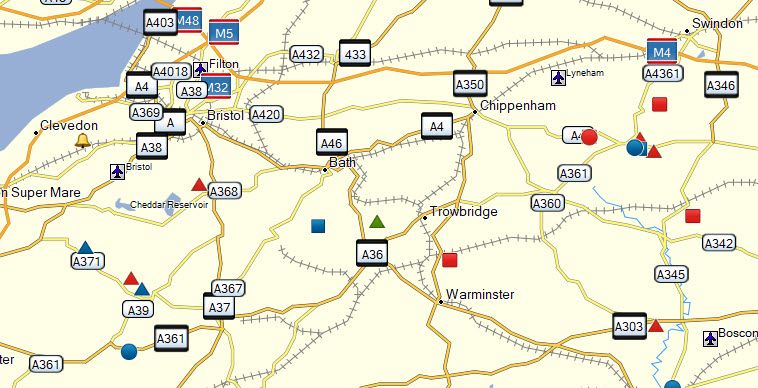
    POIs.jpg

    When I import this GPX file as as POI file, I get a 'successful' message. but can't see the POIs.
    When I import this GPX file as a route, the POIs are automatically calculated as a route
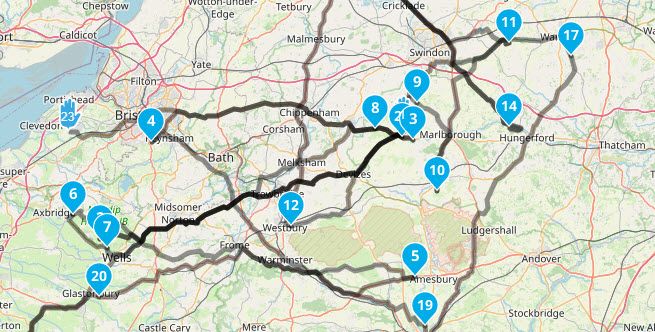
    POIS_2.jpg

    Thanks for any hints
    Kind regards
    gerry

    Jack van Tilburg Hans van de Ven MR.MRA 2 Replies Last reply
    0
    • Gerd Heinzmann 0 Gerd Heinzmann 0

      Is it possible to import POIs from Bascemp WITHOUT immediately calculating a route ?
      So as free-standing points?
      In Basecamp I have POIs
      POIs.jpg

      When I import this GPX file as as POI file, I get a 'successful' message. but can't see the POIs.
      When I import this GPX file as a route, the POIs are automatically calculated as a route
      POIS_2.jpg

      Thanks for any hints
      Kind regards
      gerry

      Jack van Tilburg Offline
      Jack van Tilburg Offline
      Jack van Tilburg
      wrote on last edited by Jack van Tilburg
      #2

      @Gerd-Heinzmann-0

      Use the upload option from the RouteLab and choose the <POI> tab in the next screen
      Then you will find your POIs in the left column when creating a route.

      Manual POI's Click

      1 Reply Last reply
      0
      • Gerd Heinzmann 0 Gerd Heinzmann 0

        Is it possible to import POIs from Bascemp WITHOUT immediately calculating a route ?
        So as free-standing points?
        In Basecamp I have POIs
        POIs.jpg

        When I import this GPX file as as POI file, I get a 'successful' message. but can't see the POIs.
        When I import this GPX file as a route, the POIs are automatically calculated as a route
        POIS_2.jpg

        Thanks for any hints
        Kind regards
        gerry

        Hans van de Ven MR.MRA Offline
        Hans van de Ven MR.MRA Offline
        Hans van de Ven MR.MRA
        Valued contributor
        wrote on last edited by
        #3

        @Gerd-Heinzmann-0

        Hello Gerry,
        Save this file as .csv (POI) or .ov2 (POI) and then upload is as POI file.
        Open a route, go to Points of Interest in the left menu and tick on the Library tab, then thick on the checkbox wich poi's you want to make visible on the map (zoom)
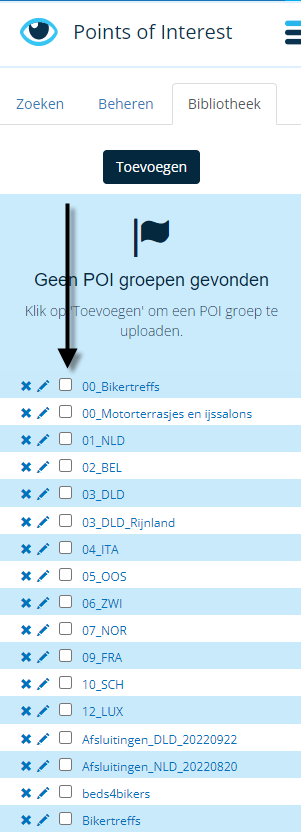
        eb159400-6f8a-45e7-9e2e-4f6b1458bb35-image.png

        Garmin Zumo XT3/XT2/XT/BMW Connected Ride Navigator/Tourstart/ MyRouteapp (The App)/...
        Een dag niet gelachen is een dag niet geleefd / Een route is net zo goed als deze uitgezet is.

        Gerd Heinzmann 0 1 Reply Last reply
        2
        • Hans van de Ven MR.MRA Hans van de Ven MR.MRA

          @Gerd-Heinzmann-0

          Hello Gerry,
          Save this file as .csv (POI) or .ov2 (POI) and then upload is as POI file.
          Open a route, go to Points of Interest in the left menu and tick on the Library tab, then thick on the checkbox wich poi's you want to make visible on the map (zoom)
          eb159400-6f8a-45e7-9e2e-4f6b1458bb35-image.png

          Gerd Heinzmann 0 Offline
          Gerd Heinzmann 0 Offline
          Gerd Heinzmann 0
          wrote on last edited by
          #4

          Thanks for you answers.
          Unfortunately it doesn't work up to now.

          @Hans-van-de-Ven-MRA-Master
          When I open your file, I can see all your POIs on the map and on the left side of the panel
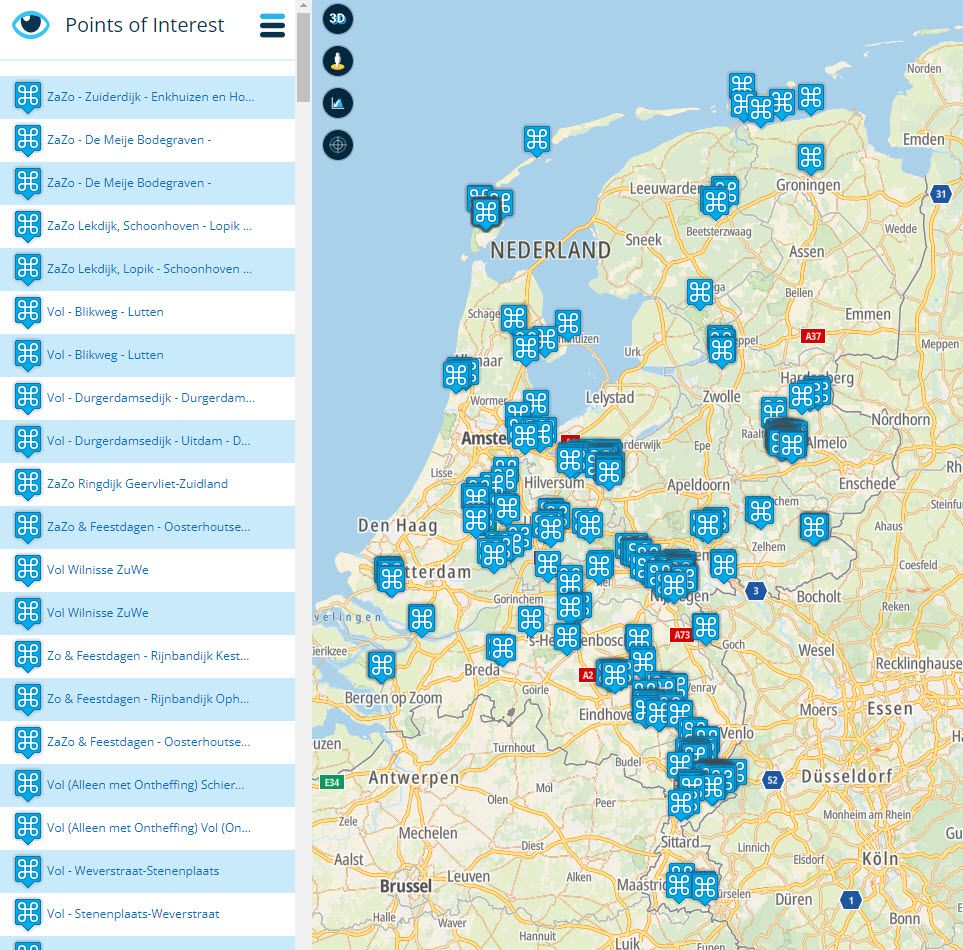
          POIs_3.jpg

          I saved this file and imported it to my route.
          Now it looks like this
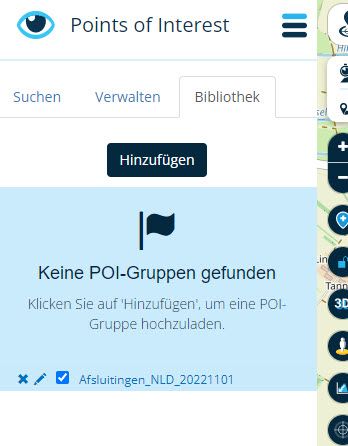
          04-11-2022 17-57-02.jpg
          The group of POs seem to be there, but I cannot see any of the Points

          What am I doing wrong ?

          Thanks, regards
          gerry

          Hans van de Ven MR.MRA 1 Reply Last reply
          0
          • Gerd Heinzmann 0 Gerd Heinzmann 0

            Thanks for you answers.
            Unfortunately it doesn't work up to now.

            @Hans-van-de-Ven-MRA-Master
            When I open your file, I can see all your POIs on the map and on the left side of the panel
            POIs_3.jpg

            I saved this file and imported it to my route.
            Now it looks like this
            04-11-2022 17-57-02.jpg
            The group of POs seem to be there, but I cannot see any of the Points

            What am I doing wrong ?

            Thanks, regards
            gerry

            Hans van de Ven MR.MRA Offline
            Hans van de Ven MR.MRA Offline
            Hans van de Ven MR.MRA
            Valued contributor
            wrote on last edited by
            #5

            @Gerd-Heinzmann-0

            Did you upload the file as poi?
            Open a route, tick on the checkbox in thee poi library and zoom in on the map

            Garmin Zumo XT3/XT2/XT/BMW Connected Ride Navigator/Tourstart/ MyRouteapp (The App)/...
            Een dag niet gelachen is een dag niet geleefd / Een route is net zo goed als deze uitgezet is.

            Gerd Heinzmann 0 1 Reply Last reply
            1
            • Hans van de Ven MR.MRA Hans van de Ven MR.MRA

              @Gerd-Heinzmann-0

              Did you upload the file as poi?
              Open a route, tick on the checkbox in thee poi library and zoom in on the map

              Gerd Heinzmann 0 Offline
              Gerd Heinzmann 0 Offline
              Gerd Heinzmann 0
              wrote on last edited by
              #6

              @Hans-van-de-Ven-MRA-Master
              Aah... I was to hasty.
              I didn't zoom in enough !

              Thanks a lot

              1 Reply Last reply
              0

              Hello! It looks like you're interested in this conversation, but you don't have an account yet.

              Getting fed up of having to scroll through the same posts each visit? When you register for an account, you'll always come back to exactly where you were before, and choose to be notified of new replies (either via email, or push notification). You'll also be able to save bookmarks and upvote posts to show your appreciation to other community members.

              With your input, this post could be even better 💗

              Register Login
              Reply
              • Reply as topic
              Log in to reply
              • Oldest to Newest
              • Newest to Oldest
              • Most Votes


              ACTIVE USERS
              Hans van de Ven MR.MRA
              Hans van de Ven MR.MRA
              Jack van Tilburg
              Jack van Tilburg
              Gerd Heinzmann 0
              Gerd Heinzmann 0
              POPULAR TOPICS
              • Interesting behaviour on a pre-planned route that uses the same road in both directions
                paul69
                paul69
                0
                10
                28

              • Er gaat hier iets mis melding
                Travellexxie
                Travellexxie
                0
                22
                430

              • Onbegrijpelijke afslagen
                Travellexxie
                Travellexxie
                0
                5
                102

              • Giving folders its own color
                Travellexxie
                Travellexxie
                0
                13
                346

              • Stemgeluid sterker bij afspelen muziek
                superg
                superg
                0
                4
                49

              • GPX1.2 & Garmin Tread
                MTC-Zeilberg
                MTC-Zeilberg
                0
                4
                120

              • Vormingspunt, viapunt en Eindpunt op Carplay
                Huibertus
                Huibertus
                0
                7
                121

              • Bij route naar bestemming, weg afgesloten die gewoon open is.
                Marinus van Deudekom
                Marinus van Deudekom
                0
                2
                27

              MY GROUPS
              • Login

              • Login or register to search.
              • First post
                Last post
              0
              • Categories
              • Recent
              • Popular
              • Support
              • MyRoute-app