Skip to content
  • Categories
  • Recent
  • Popular
  • Support
  • MyRoute-app
Collapse
Brand Logo

MRA Community Forum

  1. Home
  2. MRA Routeplanner Next Beta
  3. [Web-Beta] Problems, Bugs and other Issues
  4. Kaart niet zichtbaar

Kaart niet zichtbaar
Scheduled Pinned Locked Moved [Web-Beta] Problems, Bugs and other Issues
38 Posts 7 Posters 249 Views 3 Watching
  • Oldest to Newest
  • Newest to Oldest
  • Most Votes
Reply
  • Reply as topic
Log in to reply
This topic has been deleted. Only users with topic management privileges can see it.
  • a white mouse on the motorbike
    a white mouse on the motorbike
    a white mouse on the motorbike
    Valued contributor
    wrote last edited by
    #14

    En heeft wat er staat het probleem verholpen?

    met een R1250RT met TFT en BMW Connected Ride App (die dus nog steeds niet voldoet!) ; M.R.A. in combinatie met de Carpuride W702 (voor Android op de Motor!), de Garmin Zumo XT als backup en een Samsung Galaxy S24

    Nico Beerepoot 1 Reply Last reply
    0
    • a white mouse on the motorbike a white mouse on the motorbike

      En heeft wat er staat het probleem verholpen?

      Nico Beerepoot
      Nico Beerepoot
      Nico Beerepoot
      wrote last edited by
      #15

      @a-white-mouse-on-the-motorbike

      Helaas niet

      1 Reply Last reply
      0
      • Corjan Meijerink
        Corjan Meijerink
        Corjan Meijerink
        Developer
        wrote last edited by
        #16

        https://get.webgl.org/

        Zie je hier een cubus draaien? 🙂

        Guzzist Nico Beerepoot 2 Replies Last reply
        0
        • Corjan Meijerink Corjan Meijerink

          https://get.webgl.org/

          Zie je hier een cubus draaien? 🙂

          Guzzist
          Guzzist
          Guzzist
          Valued contributor
          wrote last edited by
          #17

          @Corjan-Meijerink said:

          https://get.webgl.org/

          Zie je hier een cubus draaien? 🙂

          Me too. On my Android Tablet, I see the linked cubus - but not the maps (only google map).
          On my PC everything is working well.

          Nothing is impossible ;-)
          In past: GARMIN Zumo 210->GARMIN Zumo 395->GARMIN XT=> now: DMD T865-X + MyRoute-App, LocusMaps, OsmAnd.
          In past: GARMIN MapSource ->GARMIN BaseCamp->Tyre->Kurviger->Calimoto=> now: MRA-Routplanner.

          Corjan Meijerink 1 Reply Last reply
          0
          • Corjan Meijerink
            Corjan Meijerink
            Corjan Meijerink
            Developer
            wrote last edited by Corjan Meijerink
            #18

            @nico-beerepoot

            1. Heb je een Intel of Apple chip? (Apple menu, About This Mac.)
            2. Als je de gehele computer opnieuw opstart, helpt dat?
            3. Kan je een screenshot van deze pagina delen? https://webglreport.com/?v=2
            4. Kan je het eens in Chrome proberen?
            Nico Beerepoot 1 Reply Last reply
            0
            • Corjan Meijerink Corjan Meijerink

              https://get.webgl.org/

              Zie je hier een cubus draaien? 🙂

              Nico Beerepoot
              Nico Beerepoot
              Nico Beerepoot
              wrote last edited by
              #19

              @Corjan-Meijerink

              Hi Corjan, ik zie geen cubus draaien

              1 Reply Last reply
              0
              • Corjan Meijerink Corjan Meijerink

                @nico-beerepoot

                1. Heb je een Intel of Apple chip? (Apple menu, About This Mac.)
                2. Als je de gehele computer opnieuw opstart, helpt dat?
                3. Kan je een screenshot van deze pagina delen? https://webglreport.com/?v=2
                4. Kan je het eens in Chrome proberen?
                Nico Beerepoot
                Nico Beerepoot
                Nico Beerepoot
                wrote last edited by
                #20

                @Corjan-Meijerink
                2,8 GHz Quad-Core Intel Core i7
                Computer opnieuw opstarten helpt niet
                Brows geschiedenis verwijderd en opnieuw opstarten helpt niet
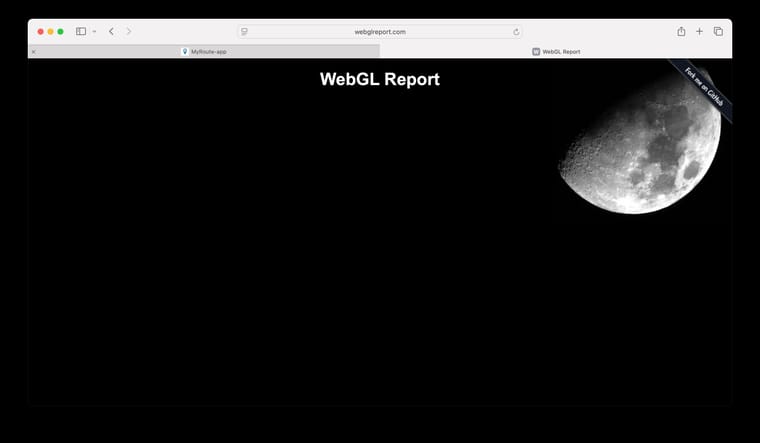
                image.jpeg
                Chrome moet ik eerst downloaden gebruik ik nooit

                Corjan Meijerink 1 Reply Last reply
                0
                • Nico Beerepoot Nico Beerepoot

                  @Corjan-Meijerink
                  2,8 GHz Quad-Core Intel Core i7
                  Computer opnieuw opstarten helpt niet
                  Brows geschiedenis verwijderd en opnieuw opstarten helpt niet
                  image.jpeg
                  Chrome moet ik eerst downloaden gebruik ik nooit

                  Corjan Meijerink
                  Corjan Meijerink
                  Corjan Meijerink
                  Developer
                  wrote last edited by
                  #21

                  @Nico-Beerepoot Bedankt, hier heb ik echt wat aan! Dat je geen kubus ziet betekent dat Safari op jouw Mac helemaal geen WebGL kan tekenen, en dat heeft onze kaart nodig. Het ligt dus niet aan je route of je instellingen, en andere sites die WebGL gebruiken doen het bij jou ook niet.

                  Kun je Firefox of Chrome eens proberen? Iemand met dezelfde klacht op een andere website had daar succes mee in Firefox.

                  Nog twee vragen, dan kan ik gericht verder zoeken:

                  1. Welk model staat er bij Apple-menu > Over deze Mac (bijvoorbeeld MacBook Pro 15-inch, 2017), en welke grafische kaart staat erbij?
                  2. Heb je macOS Sequoia gewoon via Software-update gekregen, of met OpenCore Legacy Patcher geïnstalleerd?
                  Nico Beerepoot 2 Replies Last reply
                  0
                  • Guzzist Guzzist

                    @Corjan-Meijerink said:

                    https://get.webgl.org/

                    Zie je hier een cubus draaien? 🙂

                    Me too. On my Android Tablet, I see the linked cubus - but not the maps (only google map).
                    On my PC everything is working well.

                    Corjan Meijerink
                    Corjan Meijerink
                    Corjan Meijerink
                    Developer
                    wrote last edited by
                    #22

                    @Guzzist Yours sounds different, because the cube works, so WebGL does run on your tablet. Which tablet and browser is it? And when you open a route, does a notice "The map isn't loading" appear after about 10 seconds?

                    Guzzist 1 Reply Last reply
                    0
                    • Corjan Meijerink Corjan Meijerink

                      @Guzzist Yours sounds different, because the cube works, so WebGL does run on your tablet. Which tablet and browser is it? And when you open a route, does a notice "The map isn't loading" appear after about 10 seconds?

                      Guzzist
                      Guzzist
                      Guzzist
                      Valued contributor
                      wrote last edited by
                      #23

                      @Corjan-Meijerink said:

                      @Guzzist Yours sounds different, because the cube works, so WebGL does run on your tablet. Which tablet and browser is it? And when you open a route, does a notice "The map isn't loading" appear after about 10 seconds?

                      Thank you @corjan-meijerink for investigation.
                      My Tablet is a:
                      SAMSUNG Galaxy Tab S8 5G (Model SM-X706B)
                      One UI-Version: 8.0
                      Android: 16
                      Browser: DuckDuckGo, Version 5.300.0

                      By this Browser no map style is beeing presented (only position on white ground) with excaptions: all Google maps are beeing presented. Test WebGL was ok.

                      By Browser Google Crome (Version: 156.0.8078.79) everything is working correkt, all map styles and all map layers are beeing presented.


                      To compare - my Smartphone is a:
                      ASUS ZenFone 8 (Model ASUS_Ioo6D)
                      Android: 13
                      Browser: DuckDuckGo, Version 5.300.0
                      By this Browser, everything is working correkt, all map styles and all map layers are beeing presented.

                      By Browser Google Crome (Version: 156.0.8078.79) everything is working correkt, all map styles and all map layers are beeing presented.

                      By Browser Firefox (Version 159.0) everything is working correkt, all map styles and all map layers are beeing presented.

                      A notice "The map isn't loading" doesn't appear at any device or any browser.

                      Nothing is impossible ;-)
                      In past: GARMIN Zumo 210->GARMIN Zumo 395->GARMIN XT=> now: DMD T865-X + MyRoute-App, LocusMaps, OsmAnd.
                      In past: GARMIN MapSource ->GARMIN BaseCamp->Tyre->Kurviger->Calimoto=> now: MRA-Routplanner.

                      Corjan Meijerink 1 Reply Last reply
                      0
                      • Leike Lodiers
                        Leike Lodiers
                        Leike Lodiers
                        wrote last edited by
                        #24

                        Heb het zelfde gehad met de Bibliotheek in Librewolf. Kaart niet zichtbaar. Even googlen en zoeken hoe je de webgl aanzet in je browser.

                        Om WebGL te activeren in Safari op je Mac, hoef je meestal niets te doen omdat het standaard ingeschakeld staat in moderne versies van macOS en Safari.
                        Mocht WebGL toch uitgeschakeld zijn of niet goed werken, dan kun je dit via de menu's controleren en aanzetten. Volg hiervoor deze stappen:

                        WebGL inschakelen in Safari (macOS)

                        1. Open Safari.
                        2. Klik linksboven in de menubalk op Safari en kies Instellingen... (of Voorkeuren... in oudere macOS-versies). Je kunt ook de sneltoets Cmd + , gebruiken.
                        3. Ga naar het tabblad Websites.
                        4. Scroll in de linker kolom naar beneden tot je WebGL ziet staan en klik erop. (Let op: als je deze optie niet ziet, ondersteunt jouw macOS-versie WebGL al volledig automatisch en ligt het probleem elders).
                        5. Aan de rechterkant zie je een lijst met geopende websites. Je kunt hier per website kiezen voor Sta toe of Vraag. Onderin kun je bij "Bij het bezoeken van andere websites" kiezen om het standaard voor alles in te schakelen.

                        Wat als het nog steeds niet werkt? (Ontwikkelaarsmenu)

                        Als bepaalde geavanceerde WebGL 2.0-functies niet werken, kun je ze forceren via het Ontwikkelaarsmenu:

                        1. Ga weer naar Safari > Instellingen... en kies het tabblad Geavanceerd.
                        2. Vink helemaal onderaan de optie 'Toon functies voor webontwikkelaars' (of 'Toon Ontwikkel-menu in menubalk') aan.
                        3. Er verschijnt nu een nieuw menu genaamd Ontwikkel bovenin de menubalk.
                        4. Klik op Ontwikkel > Functievlaggen (Feature Flags) en zorg ervoor dat WebGL 2 (of WebGL-gerelateerde instellingen) aangevinkt staat.

                        R1250GS. Started with a Zumo 550, BMW nav IV, Carpe-iter and now Chigee met MRA app.

                        1 Reply Last reply
                        0
                        • Corjan Meijerink Corjan Meijerink

                          @Nico-Beerepoot Bedankt, hier heb ik echt wat aan! Dat je geen kubus ziet betekent dat Safari op jouw Mac helemaal geen WebGL kan tekenen, en dat heeft onze kaart nodig. Het ligt dus niet aan je route of je instellingen, en andere sites die WebGL gebruiken doen het bij jou ook niet.

                          Kun je Firefox of Chrome eens proberen? Iemand met dezelfde klacht op een andere website had daar succes mee in Firefox.

                          Nog twee vragen, dan kan ik gericht verder zoeken:

                          1. Welk model staat er bij Apple-menu > Over deze Mac (bijvoorbeeld MacBook Pro 15-inch, 2017), en welke grafische kaart staat erbij?
                          2. Heb je macOS Sequoia gewoon via Software-update gekregen, of met OpenCore Legacy Patcher geïnstalleerd?
                          Nico Beerepoot
                          Nico Beerepoot
                          Nico Beerepoot
                          wrote last edited by
                          #25

                          @Corjan-Meijerink
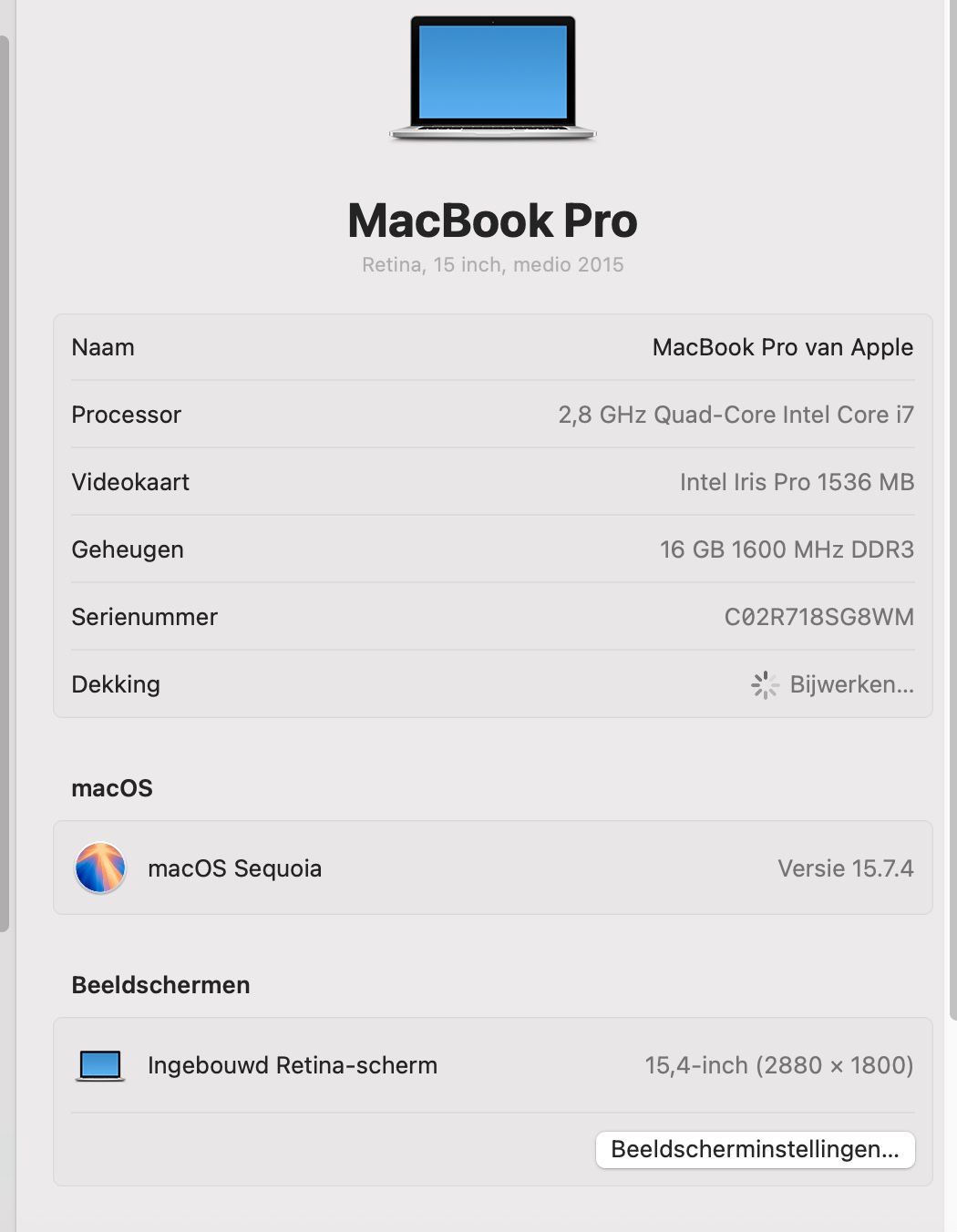
                          image.jpeg

                          Bouwjaar 2015 vlgs mij

                          macOS Sequoia is geïnstalleerd met OCLP maar dat heb ik niet zelf gedaan, dat is voor mij een beetje te spannend.

                          1 Reply Last reply
                          0
                          • Corjan Meijerink Corjan Meijerink

                            @Nico-Beerepoot Bedankt, hier heb ik echt wat aan! Dat je geen kubus ziet betekent dat Safari op jouw Mac helemaal geen WebGL kan tekenen, en dat heeft onze kaart nodig. Het ligt dus niet aan je route of je instellingen, en andere sites die WebGL gebruiken doen het bij jou ook niet.

                            Kun je Firefox of Chrome eens proberen? Iemand met dezelfde klacht op een andere website had daar succes mee in Firefox.

                            Nog twee vragen, dan kan ik gericht verder zoeken:

                            1. Welk model staat er bij Apple-menu > Over deze Mac (bijvoorbeeld MacBook Pro 15-inch, 2017), en welke grafische kaart staat erbij?
                            2. Heb je macOS Sequoia gewoon via Software-update gekregen, of met OpenCore Legacy Patcher geïnstalleerd?
                            Nico Beerepoot
                            Nico Beerepoot
                            Nico Beerepoot
                            wrote last edited by
                            #26

                            @Corjan-Meijerink

                            De volgende melding krijg ik in Chrome:
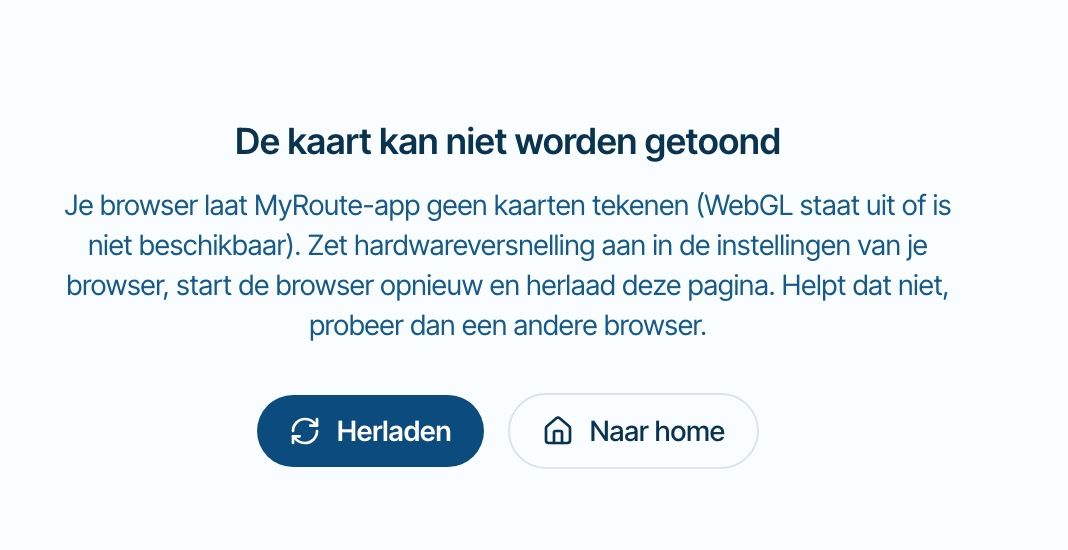
                            image.jpeg

                            Corjan Meijerink 1 Reply Last reply
                            0
                            • Nico Beerepoot Nico Beerepoot

                              @Corjan-Meijerink

                              De volgende melding krijg ik in Chrome:
                              image.jpeg

                              Corjan Meijerink
                              Corjan Meijerink
                              Corjan Meijerink
                              Developer
                              wrote last edited by
                              #27

                              @Nico-Beerepoot Bedankt, nu is het duidelijk. Jouw MacBook Pro uit 2015 krijgt van Apple officieel geen macOS meer na Monterey, en Sequoia draait erop via OpenCore Legacy Patcher. Meer mensen met zo'n Mac melden dat WebGL dan niet meer werkt in Safari en Chrome, ook op andere kaartsites. Het ligt dus niet aan je route of je account, en ik kan het vanaf onze kant niet oplossen. Hardwareversnelling aanzetten zal hier ook niet helpen.

                              Er is nog één browser om te proberen: Firefox (https://www.mozilla.org/nl/firefox/). Iemand met hetzelfde probleem op een andere website heeft het daarmee opgelost. Je hoeft verder niets aan je Mac te veranderen. Laat je weten of de kaart in Firefox wel werkt?

                              Helaas valt er voor mij dus niet heel veel te doen 😞

                              Nico Beerepoot 1 Reply Last reply
                              0
                              • Guzzist Guzzist

                                @Corjan-Meijerink said:

                                @Guzzist Yours sounds different, because the cube works, so WebGL does run on your tablet. Which tablet and browser is it? And when you open a route, does a notice "The map isn't loading" appear after about 10 seconds?

                                Thank you @corjan-meijerink for investigation.
                                My Tablet is a:
                                SAMSUNG Galaxy Tab S8 5G (Model SM-X706B)
                                One UI-Version: 8.0
                                Android: 16
                                Browser: DuckDuckGo, Version 5.300.0

                                By this Browser no map style is beeing presented (only position on white ground) with excaptions: all Google maps are beeing presented. Test WebGL was ok.

                                By Browser Google Crome (Version: 156.0.8078.79) everything is working correkt, all map styles and all map layers are beeing presented.


                                To compare - my Smartphone is a:
                                ASUS ZenFone 8 (Model ASUS_Ioo6D)
                                Android: 13
                                Browser: DuckDuckGo, Version 5.300.0
                                By this Browser, everything is working correkt, all map styles and all map layers are beeing presented.

                                By Browser Google Crome (Version: 156.0.8078.79) everything is working correkt, all map styles and all map layers are beeing presented.

                                By Browser Firefox (Version 159.0) everything is working correkt, all map styles and all map layers are beeing presented.

                                A notice "The map isn't loading" doesn't appear at any device or any browser.

                                Corjan Meijerink
                                Corjan Meijerink
                                Corjan Meijerink
                                Developer
                                wrote last edited by
                                #28

                                Thanks @Guzzist, that's very helpful. Chrome works on the same tablet, so the tablet can draw the map, and the problem is something in DuckDuckGo there.

                                I found one way to get a map like yours: the browser's storage for saved map tiles failing, which leaves the map empty without any message. I've fixed that for the next release. I can't test on your tablet, so I don't know yet if this is your problem. Could you check three things in DuckDuckGo on the tablet?

                                1. On the white map, do you see the blue line of your route, or only the waypoint pins?
                                2. Tap the layers button and choose Michelin or OpenTopoMap. Does that map appear?
                                3. Clear DuckDuckGo's data with the Fire button (the flame icon), sign in again and reopen the route. Does the map come back? This closes your tabs and signs you out of websites.

                                Until the next release, Chrome on the tablet is the safe choice.

                                Guzzist 1 Reply Last reply
                                0
                                • Captain Haddock
                                  Captain Haddock
                                  Captain Haddock
                                  wrote last edited by
                                  #29
                                  This post is deleted!
                                  1 Reply Last reply
                                  0
                                  • Corjan Meijerink Corjan Meijerink

                                    @Nico-Beerepoot Bedankt, nu is het duidelijk. Jouw MacBook Pro uit 2015 krijgt van Apple officieel geen macOS meer na Monterey, en Sequoia draait erop via OpenCore Legacy Patcher. Meer mensen met zo'n Mac melden dat WebGL dan niet meer werkt in Safari en Chrome, ook op andere kaartsites. Het ligt dus niet aan je route of je account, en ik kan het vanaf onze kant niet oplossen. Hardwareversnelling aanzetten zal hier ook niet helpen.

                                    Er is nog één browser om te proberen: Firefox (https://www.mozilla.org/nl/firefox/). Iemand met hetzelfde probleem op een andere website heeft het daarmee opgelost. Je hoeft verder niets aan je Mac te veranderen. Laat je weten of de kaart in Firefox wel werkt?

                                    Helaas valt er voor mij dus niet heel veel te doen 😞

                                    Nico Beerepoot
                                    Nico Beerepoot
                                    Nico Beerepoot
                                    wrote last edited by
                                    #30

                                    @Corjan-Meijerink
                                    afbeelding.jpeg
                                    Tis ff een omweg, maar in firefox doet ie het wel.

                                    Bedankt voor alle hulp!

                                    Groet,

                                    Nico Beerepoot

                                    1 Reply Last reply
                                    1
                                    • Corjan Meijerink
                                      Corjan Meijerink
                                      Corjan Meijerink
                                      Developer
                                      wrote last edited by
                                      #31

                                      Kijk dat is dan toch fijn! 🎉

                                      1 Reply Last reply
                                      0
                                      • Corjan Meijerink Corjan Meijerink

                                        Thanks @Guzzist, that's very helpful. Chrome works on the same tablet, so the tablet can draw the map, and the problem is something in DuckDuckGo there.

                                        I found one way to get a map like yours: the browser's storage for saved map tiles failing, which leaves the map empty without any message. I've fixed that for the next release. I can't test on your tablet, so I don't know yet if this is your problem. Could you check three things in DuckDuckGo on the tablet?

                                        1. On the white map, do you see the blue line of your route, or only the waypoint pins?
                                        2. Tap the layers button and choose Michelin or OpenTopoMap. Does that map appear?
                                        3. Clear DuckDuckGo's data with the Fire button (the flame icon), sign in again and reopen the route. Does the map come back? This closes your tabs and signs you out of websites.

                                        Until the next release, Chrome on the tablet is the safe choice.

                                        Guzzist
                                        Guzzist
                                        Guzzist
                                        Valued contributor
                                        wrote last edited by
                                        #32

                                        @Corjan-Meijerink said:

                                        Thanks @Guzzist, that's very helpful. Could you check three things in DuckDuckGo on the tablet?

                                        1. On the white map, do you see the blue line of your route, or only the waypoint pins?
                                        2. Tap the layers button and choose Michelin or OpenTopoMap. Does that map appear?
                                        3. Clear DuckDuckGo's data with the Fire button (the flame icon), sign in again and reopen the route. Does the map come back? This closes your tabs and signs you out of websites.
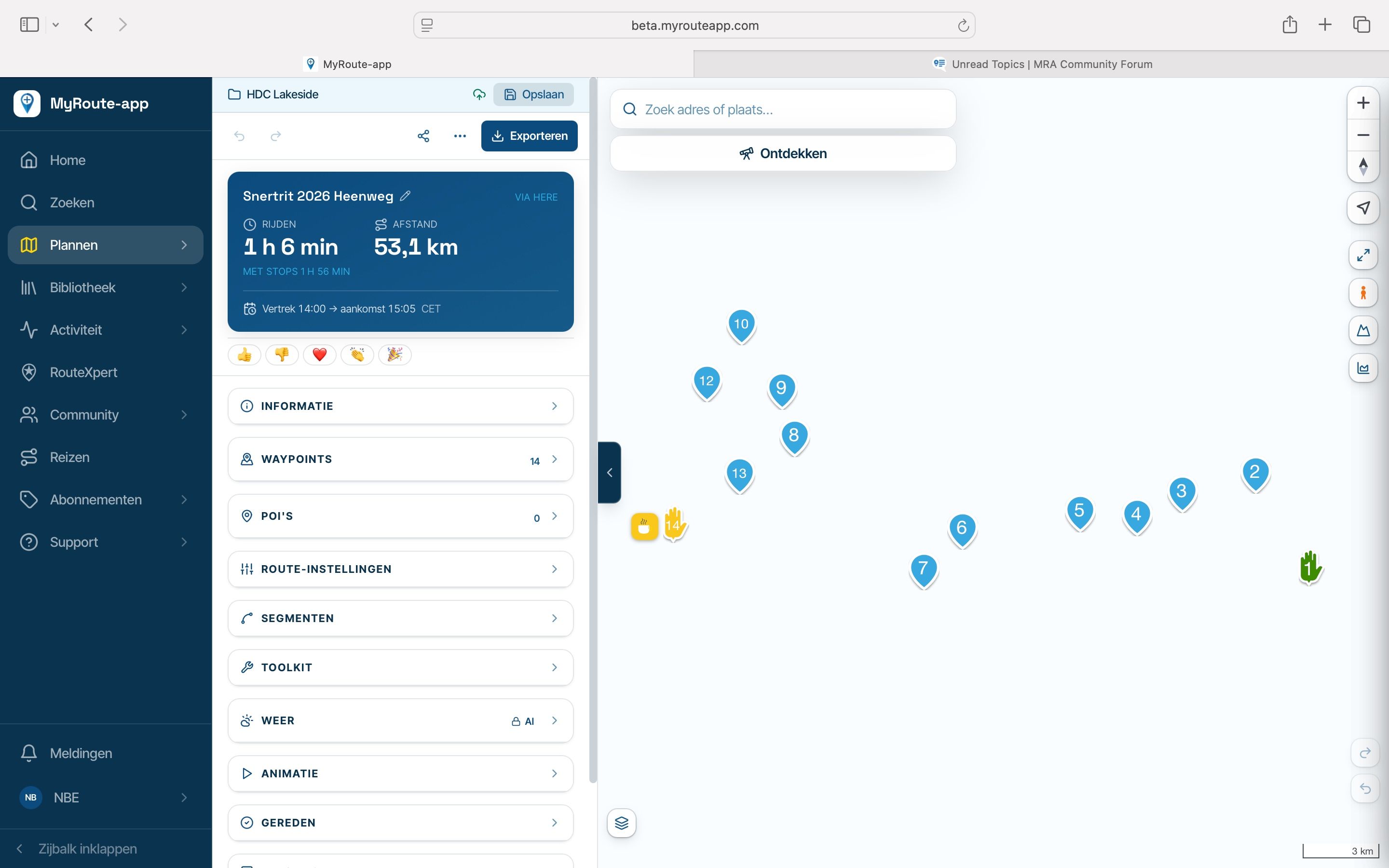
                                        • answer to #1: no, where the map and the route line should appear, there is only white background and a "race flag" which may indicate the start ord end point of the route. No route line.
                                          And after a while, a message pops up and informs: "The map can't be loaded".

                                        • answer to #2: no map layer is workin (not michelin, not OpenTopoMap not others) - only GoogleMaps

                                        • answer to #3: Clear DuckDuckGo's data by the Fire button, doesn't help.
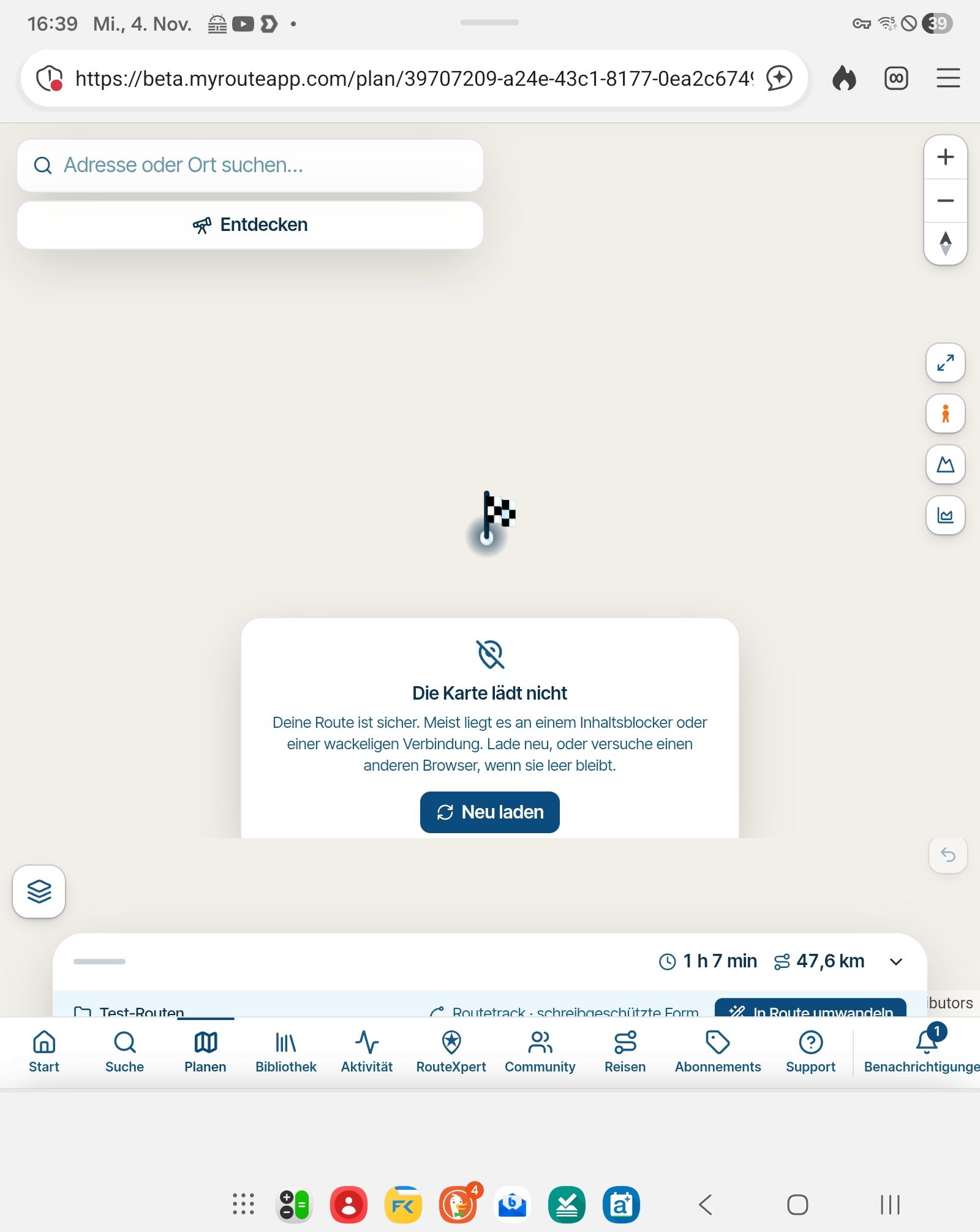
                                          Screenshot_20261104_163940_DuckDuckGo.jpg

                                        Nothing is impossible ;-)
                                        In past: GARMIN Zumo 210->GARMIN Zumo 395->GARMIN XT=> now: DMD T865-X + MyRoute-App, LocusMaps, OsmAnd.
                                        In past: GARMIN MapSource ->GARMIN BaseCamp->Tyre->Kurviger->Calimoto=> now: MRA-Routplanner.

                                        Corjan Meijerink 1 Reply Last reply
                                        0
                                        • Guzzist Guzzist

                                          @Corjan-Meijerink said:

                                          Thanks @Guzzist, that's very helpful. Could you check three things in DuckDuckGo on the tablet?

                                          1. On the white map, do you see the blue line of your route, or only the waypoint pins?
                                          2. Tap the layers button and choose Michelin or OpenTopoMap. Does that map appear?
                                          3. Clear DuckDuckGo's data with the Fire button (the flame icon), sign in again and reopen the route. Does the map come back? This closes your tabs and signs you out of websites.
                                          • answer to #1: no, where the map and the route line should appear, there is only white background and a "race flag" which may indicate the start ord end point of the route. No route line.
                                            And after a while, a message pops up and informs: "The map can't be loaded".

                                          • answer to #2: no map layer is workin (not michelin, not OpenTopoMap not others) - only GoogleMaps

                                          • answer to #3: Clear DuckDuckGo's data by the Fire button, doesn't help.
                                            Screenshot_20261104_163940_DuckDuckGo.jpg

                                          Corjan Meijerink
                                          Corjan Meijerink
                                          Corjan Meijerink
                                          Developer
                                          wrote last edited by
                                          #33

                                          @Guzzist Your answers and the screenshot help a lot. They rule out what I fixed: browser storage isn't the cause, since the Fire button didn't help. Your tablet's graphics seem fine too, because the map does draw its pale background. What's missing is everything that gets prepared in the background before it can be drawn, including the map tiles and your route line. That background work seems to stall in DuckDuckGo on your tablet, and the message you now see is a new check noticing it.

                                          I can't test DuckDuckGo on your tablet here, so the next release will report what fails there, without anything personal. Please now open a route in DuckDuckGo once. That should tell us whether I can fix this from our side.

                                          One check you could do now: tap the shield icon to the left of the address in DuckDuckGo, turn off the privacy protection for this site and reload. Does the map come back?

                                          Until then, Chrome on the tablet is the safe choice.
                                          1 Reply Last reply
                                          0

                                          Hello! It looks like you're interested in this conversation, but you don't have an account yet.

                                          Getting fed up of having to scroll through the same posts each visit? When you register for an account, you'll always come back to exactly where you were before, and choose to be notified of new replies (either via email, or push notification). You'll also be able to save bookmarks and upvote posts to show your appreciation to other community members.

                                          With your input, this post could be even better 💗

                                          Register Login

                                          Reply
                                          • Reply as topic
                                          Log in to reply
                                          • Oldest to Newest
                                          • Newest to Oldest
                                          • Most Votes


                                          • 1
                                          • 2
                                          ACTIVE USERS
                                          a white mouse on the motorbike
                                          a white mouse on the motorbike
                                          MotoCon
                                          MotoCon
                                          Corjan Meijerink
                                          Corjan Meijerink
                                          Guzzist
                                          Guzzist
                                          Captain Haddock
                                          Captain Haddock
                                          Nico Beerepoot
                                          Nico Beerepoot
                                          Leike Lodiers
                                          Leike Lodiers
                                          POPULAR TOPICS
                                          • How to export GPX files to Zumo XT without recalculation
                                            Andy Beviere
                                            Andy Beviere
                                            2
                                            24
                                            1.6k

                                          • ETA icon not displayed in Android Auto
                                            a white mouse on the motorbike
                                            a white mouse on the motorbike
                                            0
                                            22
                                            353

                                          • waar vind ik de bestaande POI'S
                                            Marinus van Deudekom
                                            Marinus van Deudekom
                                            0
                                            11
                                            57

                                          • Restriction on scenic length?
                                            Jeroen ekkel c
                                            Jeroen ekkel c
                                            0
                                            11
                                            190

                                          • Allow the last entered point to be set as a via point
                                            Corjan Meijerink
                                            Corjan Meijerink
                                            0
                                            8
                                            43

                                          • AI pricing is too high
                                            Parantapa
                                            Parantapa
                                            1
                                            12
                                            149

                                          • Avoiding roads with extreme gradients
                                            Corrado Miniati
                                            Corrado Miniati
                                            0
                                            7
                                            41

                                          • Statistieken
                                            Marinus van Deudekom
                                            Marinus van Deudekom
                                            0
                                            7
                                            50

                                          MY GROUPS
                                          • Login

                                          • Login or register to search.
                                          • First post
                                            Last post
                                          0
                                          • Categories
                                          • Recent
                                          • Popular
                                          • Support
                                          • MyRoute-app