Skip to content
  • Categories
  • Recent
  • Popular
  • Support
  • MyRoute-app
Collapse
Brand Logo

MRA Community Forum

  1. Home
  2. MRA Routeplanner Next Beta
  3. [Web-Beta] Suggestions and Discussions
  4. A04 Menu - Waypoints on the mobile phone

A04 Menu - Waypoints on the mobile phone

Scheduled Pinned Locked Moved [Web-Beta] Suggestions and Discussions
6 Posts 4 Posters 35 Views 4 Watching
  • Oldest to Newest
  • Newest to Oldest
  • Most Votes
Reply
  • Reply as topic
Log in to reply
This topic has been deleted. Only users with topic management privileges can see it.
  • Hubert Thori
    Hubert Thori
    Hubert Thori
    wrote last edited by
    #1

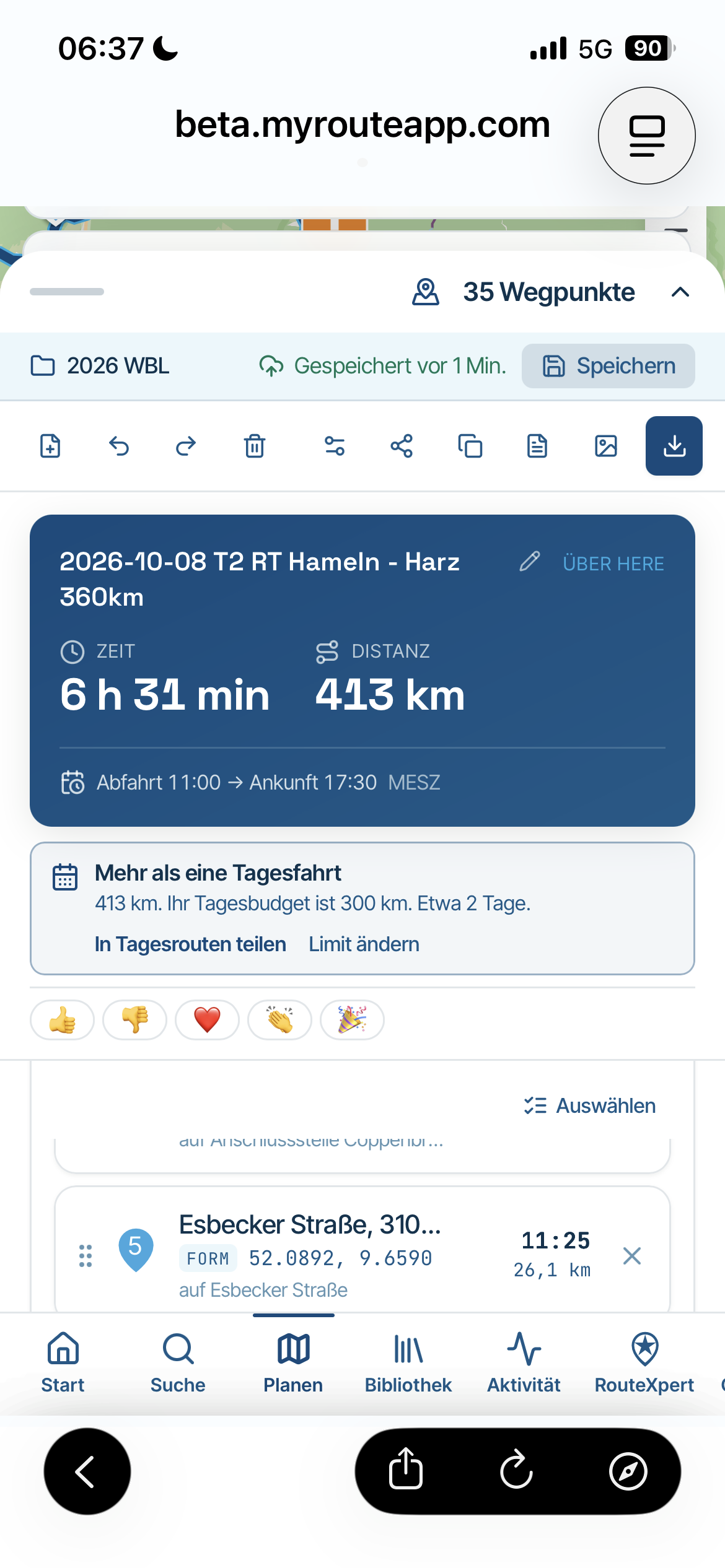
    Sorry, we are currently on tour in the Weserbergland - Harz and I only have my cell phones with me.

    Menus on the mobile:

    • I see the menu Waypoints on the mobile phone in vertical only very limited, because it has too little space at the bottom.

    Is that how it is?

    • Is the planner no longer intended for the mobile phone, that would be a pity because I have used it in the past?
    IMG_2210.png

    Rob Verhoeff 1 Reply Last reply
    0
    • Hubert Thori Hubert Thori

      Sorry, we are currently on tour in the Weserbergland - Harz and I only have my cell phones with me.

      Menus on the mobile:

      • I see the menu Waypoints on the mobile phone in vertical only very limited, because it has too little space at the bottom.

      Is that how it is?

      • Is the planner no longer intended for the mobile phone, that would be a pity because I have used it in the past?

      IMG_2210.png

      Rob Verhoeff
      Rob Verhoeff
      Rob Verhoeff
      Alpha tester
      wrote last edited by Rob Verhoeff
      #2

      @Hubert-Thori said:

      I see the menu Waypoints on the mobile phone in vertical only very limited, because it has too little space at the bottom.

      You can scroll through your complete list of route points in this screen. The limited space is of course because you are working on a mobile phone. There is no more space available, but in this view you can operate everything just as you can on the website.

      Is the planner no longer intended for the mobile phone, that would be a pity because I have used it in the past?

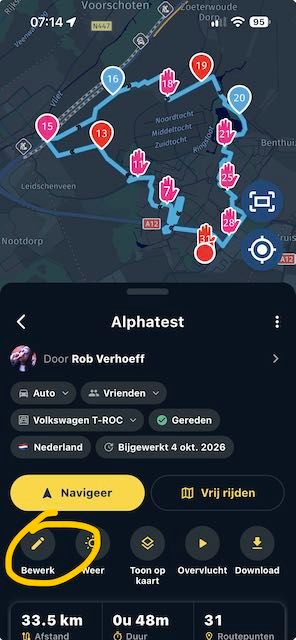
      Yes, the mobile planner is still there. Open a route and click on “Edit”. At the bottom of your screen, you can swipe and scroll again and perform all the same actions as in v5.

      Do you want to create a completely new route on your phone? That is also possible. Simply swipe down in the menu and select “MRA Routeplanner” (not Routelab!!) and you will be in the mobile planner.
      IMG_7584.jpeg

      🏍️ BMW K1600GT-P (2013) | Nolan N100-5 with Sena 30K
      📱 iOS on iPhone 13 & 16 (mounted on Quadlock or AliExpress extention on BMW-cradle)
      🚙 Apple CarPlay in VW T-Roc
      💻 Routelab on MacBook Air & iMac (Golden Gate & Ventura)

      1 Reply Last reply
      0
      • Hubert Thori
        Hubert Thori
        Hubert Thori
        wrote last edited by
        #3

        @rob-verhoeff

        I mean the real web planner..

        IMG_2216.jpeg

        Rob Verhoeff 1 Reply Last reply
        0
        • Hubert Thori Hubert Thori

          @rob-verhoeff

          I mean the real web planner..

          IMG_2216.jpeg

          Rob Verhoeff
          Rob Verhoeff
          Rob Verhoeff
          Alpha tester
          wrote last edited by Rob Verhoeff
          #4

          @Hubert-Thori Yes it is!! Swipe down te menu in the navigation-app and you'll find it!

          If you’re still seeing the old planner, go to the Settings menu in the app. Swipe down and tap “Switch to MRA Routeplanner Next” → tap the “Switch now” button → tap YES → enter your test account credentials → tap “Restart” → swipe down and tap “Routelab – Open the website.”

          Voilà...

          🏍️ BMW K1600GT-P (2013) | Nolan N100-5 with Sena 30K
          📱 iOS on iPhone 13 & 16 (mounted on Quadlock or AliExpress extention on BMW-cradle)
          🚙 Apple CarPlay in VW T-Roc
          💻 Routelab on MacBook Air & iMac (Golden Gate & Ventura)

          1 Reply Last reply
          1
          • Corjan Meijerink
            Corjan Meijerink
            Corjan Meijerink
            Developer
            wrote last edited by
            #5

            Fixed

            1 Reply Last reply
            2
            • Hubert Thoring
              Hubert Thoring
              Hubert Thoring
              Valued contributor
              wrote last edited by
              #6

              Thank you is now much better to deal 👍

              VG Hubert
              Beta Test "Next App" dazu die Hardware .
              iPad 9. Gen iOS 27.2.0/ iPhone 16e iOS 27.2.0/ Navi iPhone Xr iOS 18.7.11 / PC mit MS Win11 /❗️MyRoute-App im Cradel und Remotek-One❗️ Info zu MRA & Remotek One

              1 Reply Last reply
              0

              Hello! It looks like you're interested in this conversation, but you don't have an account yet.

              Getting fed up of having to scroll through the same posts each visit? When you register for an account, you'll always come back to exactly where you were before, and choose to be notified of new replies (either via email, or push notification). You'll also be able to save bookmarks and upvote posts to show your appreciation to other community members.

              With your input, this post could be even better 💗

              Register Login
              Reply
              • Reply as topic
              Log in to reply
              • Oldest to Newest
              • Newest to Oldest
              • Most Votes


              ACTIVE USERS
              Corjan Meijerink
              Corjan Meijerink
              Hubert Thoring
              Hubert Thoring
              Rob Verhoeff
              Rob Verhoeff
              Hubert Thori
              Hubert Thori
              POPULAR TOPICS
              • Updated beta! 6.0.0 (531) - Preparation for release
                Corjan Meijerink
                Corjan Meijerink
                5
                9
                55

              • A21 Tracklog colors say something?
                Hubert Thoring
                Hubert Thoring
                0
                8
                35

              • Reizen delen met NIET MRA gebruikers
                Albert van den Elsen
                Albert van den Elsen
                0
                7
                17

              • Verminkte route op TomTom.
                Jacob Waterweg
                Jacob Waterweg
                0
                7
                95

              • Probably a me thing
                Solo1138
                Solo1138
                0
                5
                57

              • Waypoints being skipped - not what I want to happen
                Nick Carthew
                Nick Carthew
                0
                14
                316

              • F018 Deleting photo from moment is not possible
                Hubert Thoring
                Hubert Thoring
                1
                5
                30

              • MRA V6.0.0 (531) Download offline maps ?
                Hubert Thoring
                Hubert Thoring
                0
                4
                34

              MY GROUPS
              • Login

              • Login or register to search.
              • First post
                Last post
              0
              • Categories
              • Recent
              • Popular
              • Support
              • MyRoute-app