Forum Discussions - Filter Languages
-
Is it possible to filter languages in any/all of the forums so that one only views the language they understand?
-
Is it possible to filter languages in any/all of the forums so that one only views the language they understand?

@GT-JWR No, not possible. But translation tools for websites and smartphones are easy to setup and use.
-
thanks Nick. Yes, I use those - however, it's not always clear what the topic is, and subsequently, if its of interest to me - so it is what it is.
-
thanks Nick. Yes, I use those - however, it's not always clear what the topic is, and subsequently, if its of interest to me - so it is what it is.
@GT-JWR Yes, I know what you mean. Auto translate would be a great addition.
-

I don’t know…..
I only speak English. But I understand that it’s mostly a European user base that speaks other languages. So it’s on me to do translations when needed. The web conversation tools are easy to use, so no big deal.
-
Good morning, Firefox (157.0) can do that with a single click on the icon.


-
I also second the ability to exclude non English posts from my view of the forums. No point as cannot read them, nor want to take the time to translate them all as there are a lot of them
-
I also second the ability to exclude non English posts from my view of the forums. No point as cannot read them, nor want to take the time to translate them all as there are a lot of them

@Clarke-Wardle, Do you realize that many non-native English speakers are relying on translation tools to be able to answer your questions? It would be respectful to return the favor once in a while.
-
Good morning, Firefox (157.0) can do that with a single click on the icon.

Good morning, Firefox (157.0) can do that with a single click on the icon.
@jörg-neudert What is the name of the extention!
met een R1250RT met TFT
en BMW Connected Ride App(die dus nog steeds niet voldoet!) ; M.R.A. in combinatie met de Carpuride W702 (voor Android op de Motor!), de Garmin Zumo XT als backup en een Samsung Galaxy S24 -
Good morning, Firefox (157.0) can do that with a single click on the icon.
@jörg-neudert What is the name of the extention!
@a-white-mouse-on-the-motorbike sagte:
Good morning, Firefox (157.0) can do that with a single click on the icon.
@jörg-neudert What is the name of the extention!

-
In the 'classic' I sometimes look at google maps to get a street view. If google is integrated here in BETA, how do I access it?
-
I don't know how to write a post in this forum and ask a simple question, so I'll go to my classic account and get a ticker
-
I don't know how to write a post in this forum and ask a simple question, so I'll go to my classic account and get a ticker

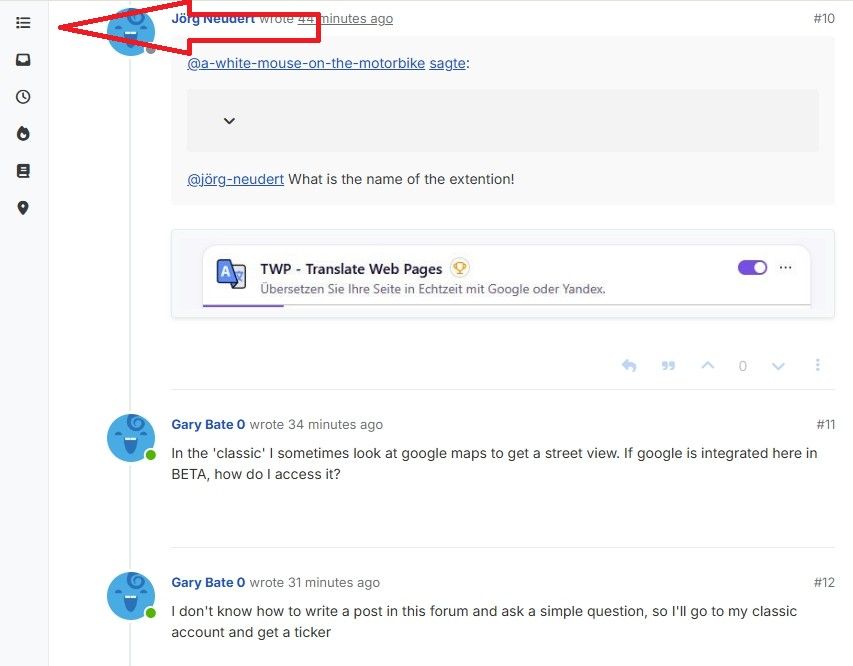
@Gary-Bate-0 At the top of the forum page click the hamburger menu to open categories, select the category and if you need to start a new topic, click the blue New topic button. Add a short title to your new topic, make it easily identifiable. Now type your question in the main dialogue box. When you are finished click the blue Submit button.
-
Early in your Introductory video it says google maps is integrated and shows a split page, but I can't see where I can do that? Please just answer my question!
-
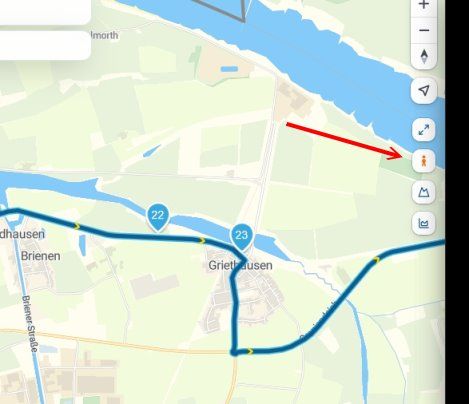
Klik in een route op het poppetje. Er verschijnen dan blauwe lijnen over de wegen die beschikbaar zijn voor Streetview.
klik daarna op kijken en klik met cursor op de plaats waar je wilt kijken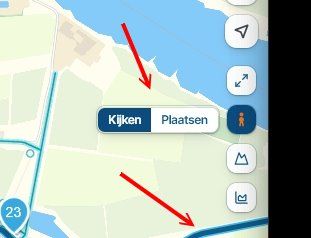
Kies vervolgens boven in het scherm welke view je wilt hebben. Hier kun je de streetview met het kruisje ook weer sluiten!
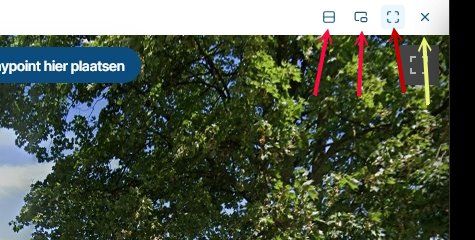
Is dit het antwoord op je vraag?
-
Yes it does answer my question thank you very much! I use a Carpuride 502 on my 1300GS
Hello! It looks like you're interested in this conversation, but you don't have an account yet.
Getting fed up of having to scroll through the same posts each visit? When you register for an account, you'll always come back to exactly where you were before, and choose to be notified of new replies (either via email, or push notification). You'll also be able to save bookmarks and upvote posts to show your appreciation to other community members.
With your input, this post could be even better 💗
Register Login-
 11293
-
01144
-
0834
-
 21161
-
0833
-
 0741
-
 0726
-
010100