Skip to content
  • Categories
  • Recent
  • Popular
  • Support
  • MyRoute-app
Collapse
Brand Logo

MRA Community Forum

  1. Home
  2. The MyRoute-app
  3. [App] Android Auto & CarPlay
  4. Why does route change when connecting to Android Auto?

Why does route change when connecting to Android Auto?

Scheduled Pinned Locked Moved [App] Android Auto & CarPlay
28 Posts 9 Posters 1.1k Views 4 Watching
  • Oldest to Newest
  • Newest to Oldest
  • Most Votes
Reply
  • Reply as topic
Log in to reply
This topic has been deleted. Only users with topic management privileges can see it.
  • white.mouseundefined Offline
    white.mouseundefined Offline
    white.mouse
    Valued contributor
    wrote last edited by white.mouse
    #9

    Ja. De navigatie werkt altijd met de Here map. Dus als je een route maakt met een andere kaart als laatste de route op de Here-kaart leggen en controleren.

    Yes. The navigation system always uses the Here map. So if you plan a route using a different map, make sure to finalize the route on the Here map and check it.

    met een R1250RT met TFT en BMW Connected Ride App (die dus nog steeds niet voldoet!) ;
    de Garmin Zumo XT en M.R.A. in combinatie met de Carpuride W702 (voor Android op de Motor!)

    1 Reply Last reply
    0
    • Brian Martinundefined Offline
      Brian Martinundefined Offline
      Brian Martin
      wrote last edited by
      #10

      Thanks for the replies. I do use the here maps and I use MRA in offline mode. I shall keep monitoring the situation to see if it keeps happening. I have an existing route planned for tomorrow, so I'll see if it behaves itself or not.

      1 Reply Last reply
      0
      • Atse Kroesundefined Offline
        Atse Kroesundefined Offline
        Atse Kroes
        wrote last edited by
        #11

        Als ik de knop start indruk van de route dan verschijnt er een popup schermpje met de tekst; 'TomTom route Track navigatie gebruiken'
        Wat betekend dit???

        Con Hennekensundefined 1 Reply Last reply
        0
        • Herman Veldhuizenundefined Offline
          Herman Veldhuizenundefined Offline
          Herman Veldhuizen
          wrote last edited by Herman Veldhuizen
          #12

          Using here maps only is no guarantee that the navigation comes with the same route as what you crafted in the planner. At least that is what I have observed. Dont know where the problem is. Could it be that planner and navigation are not using the same user settings? Differences between the routing engine in the app and on the server?

          Rob Verhoeffundefined Con Hennekensundefined 2 Replies Last reply
          0
          • Herman Veldhuizenundefined Herman Veldhuizen

            Using here maps only is no guarantee that the navigation comes with the same route as what you crafted in the planner. At least that is what I have observed. Dont know where the problem is. Could it be that planner and navigation are not using the same user settings? Differences between the routing engine in the app and on the server?

            Rob Verhoeffundefined Offline
            Rob Verhoeffundefined Offline
            Rob Verhoeff
            Alpha tester
            wrote last edited by Rob Verhoeff
            #13

            @Herman-Veldhuizen Or maybe you should use more route points at critical locations! I use as few as possible, but as many as necessary... 😉

            🏍️ BMW K1600GT-P (2013) | Nolan N100-5 with Sena 30K
            📱 iOS on iPhone 13 & 16 (mounted on Quadlock or AliExpress extention on BMW-cradle)
            🚙 Apple CarPlay in VW T-Roc
            💻 Routelab on MacBook Air & iMac (Tahoe & Ventura)

            1 Reply Last reply
            0
            • Herman Veldhuizenundefined Herman Veldhuizen

              Using here maps only is no guarantee that the navigation comes with the same route as what you crafted in the planner. At least that is what I have observed. Dont know where the problem is. Could it be that planner and navigation are not using the same user settings? Differences between the routing engine in the app and on the server?

              Con Hennekensundefined Offline
              Con Hennekensundefined Offline
              Con Hennekens
              Alpha tester
              wrote last edited by
              #14

              @Herman-Veldhuizen said:

              Could it be that planner and navigation are not using the same user settings?

              No, theoretically not, since the avoidance settings in the planner replicate to the app along with the route. There can be differences in map-versions though, and also of course in trafic information.

              I am just an enthusiastic MRA user, and hope you will be one too!

              Most motorcycle problems are caused by the nut that connects the handlebar to the saddle.

              Check out RideSleepRepeat.eu, a biker community for sharing stays across Europe

              Herman Veldhuizenundefined 1 Reply Last reply
              0
              • Atse Kroesundefined Atse Kroes

                Als ik de knop start indruk van de route dan verschijnt er een popup schermpje met de tekst; 'TomTom route Track navigatie gebruiken'
                Wat betekend dit???

                Con Hennekensundefined Offline
                Con Hennekensundefined Offline
                Con Hennekens
                Alpha tester
                wrote last edited by
                #15

                @Atse-Kroes said:

                Als ik de knop start indruk van de route dan verschijnt er een popup schermpje met de tekst; 'TomTom route Track navigatie gebruiken'
                Wat betekend dit???

                Please try to adhere to the language in the opening topic.
                The message indicates that the route was planned on the TomTom map, and therefore will be navigated as a track instead of a route.

                I am just an enthusiastic MRA user, and hope you will be one too!

                Most motorcycle problems are caused by the nut that connects the handlebar to the saddle.

                Check out RideSleepRepeat.eu, a biker community for sharing stays across Europe

                1 Reply Last reply
                2
                • Con Hennekensundefined Con Hennekens

                  @Herman-Veldhuizen said:

                  Could it be that planner and navigation are not using the same user settings?

                  No, theoretically not, since the avoidance settings in the planner replicate to the app along with the route. There can be differences in map-versions though, and also of course in trafic information.

                  Herman Veldhuizenundefined Offline
                  Herman Veldhuizenundefined Offline
                  Herman Veldhuizen
                  wrote last edited by Herman Veldhuizen
                  #16

                  @Con-Hennekens There are more settings. The functional navigation settings in the profile.
                  What I observe is that when I navigate a route as track, a closure can be ignored, but only when I navigate from the opening page of the route. When I navigate from the in-app route editor the closure is not ignored.
                  In areas with few roads, like here in Norway, a closure of a road can have a big impact. So what the app navigation comes up with can be very different to what you crafted in the in app editor, all with the same type of maps.

                  Con Hennekensundefined 1 Reply Last reply
                  0
                  • Herman Veldhuizenundefined Herman Veldhuizen

                    @Con-Hennekens There are more settings. The functional navigation settings in the profile.
                    What I observe is that when I navigate a route as track, a closure can be ignored, but only when I navigate from the opening page of the route. When I navigate from the in-app route editor the closure is not ignored.
                    In areas with few roads, like here in Norway, a closure of a road can have a big impact. So what the app navigation comes up with can be very different to what you crafted in the in app editor, all with the same type of maps.

                    Con Hennekensundefined Offline
                    Con Hennekensundefined Offline
                    Con Hennekens
                    Alpha tester
                    wrote last edited by
                    #17

                    @Herman-Veldhuizen, I was merely referring to @atse-kroes addition.
                    To answer your comment, I think when you open a route in the app-planner, and the detour is already shown there, that becomes the new "original calculation" of the route.

                    I am just an enthusiastic MRA user, and hope you will be one too!

                    Most motorcycle problems are caused by the nut that connects the handlebar to the saddle.

                    Check out RideSleepRepeat.eu, a biker community for sharing stays across Europe

                    Herman Veldhuizenundefined 1 Reply Last reply
                    0
                    • Con Hennekensundefined Con Hennekens

                      @Herman-Veldhuizen, I was merely referring to @atse-kroes addition.
                      To answer your comment, I think when you open a route in the app-planner, and the detour is already shown there, that becomes the new "original calculation" of the route.

                      Herman Veldhuizenundefined Offline
                      Herman Veldhuizenundefined Offline
                      Herman Veldhuizen
                      wrote last edited by Herman Veldhuizen
                      #18

                      @Con-Hennekens not sure what you mean, but all what I am after is consistency. Ignoring closures might be the right thing to do but then i would like to see the same in the in-app route editor, without having to sprinkle my route with waypoints which don't represent anything and without having to change some settings between editing and navigating. The in-app editor is the only editor I ever use.

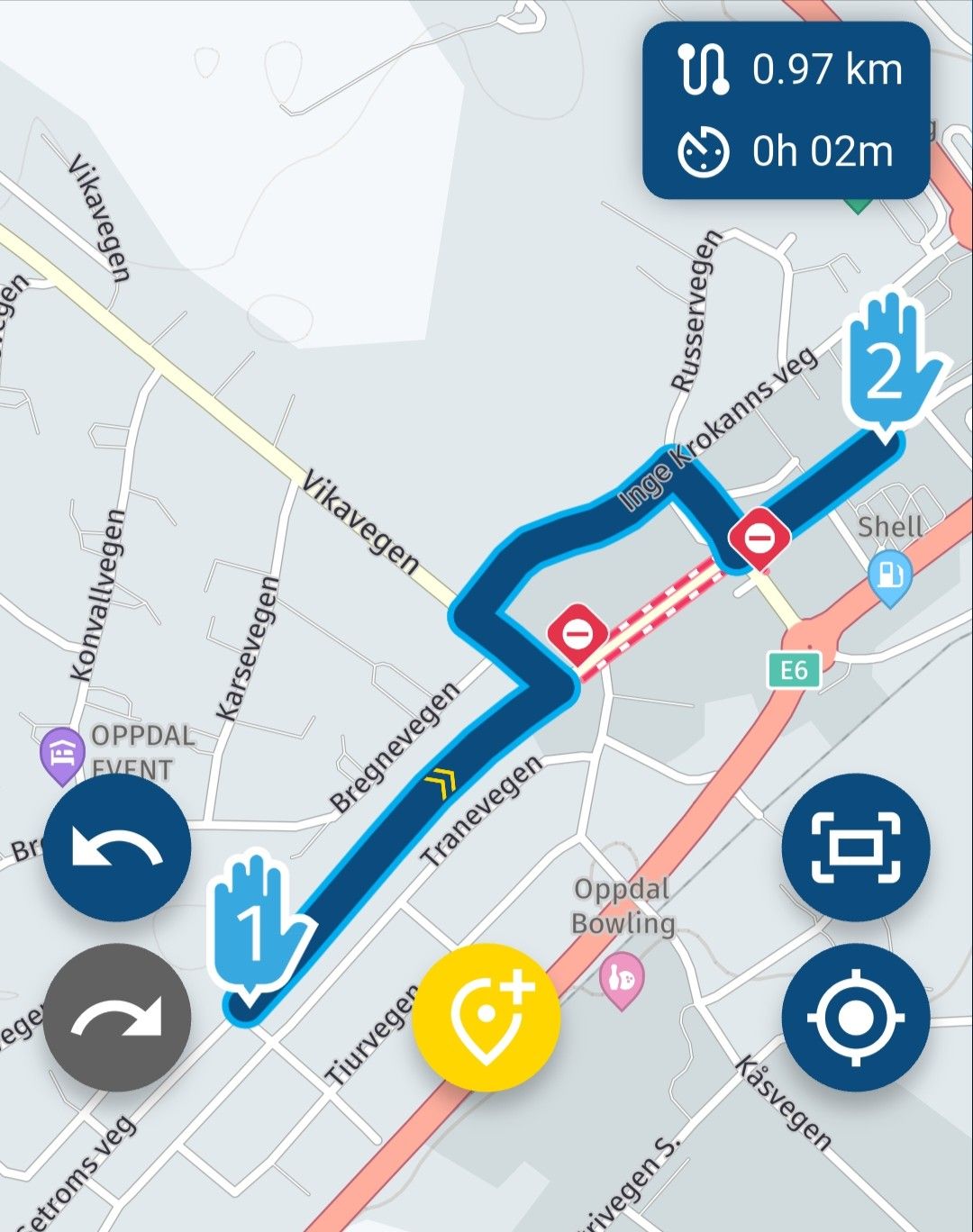
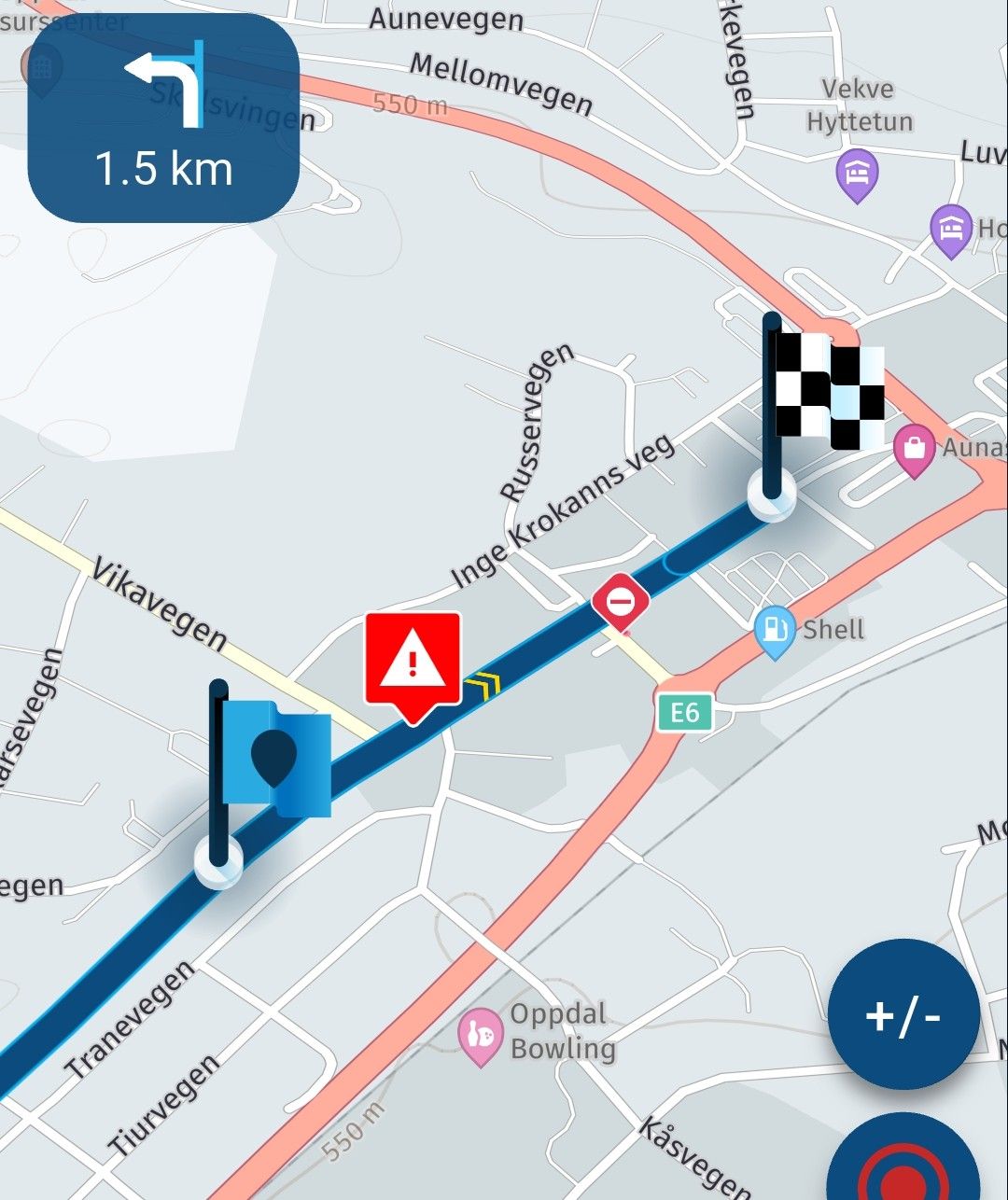
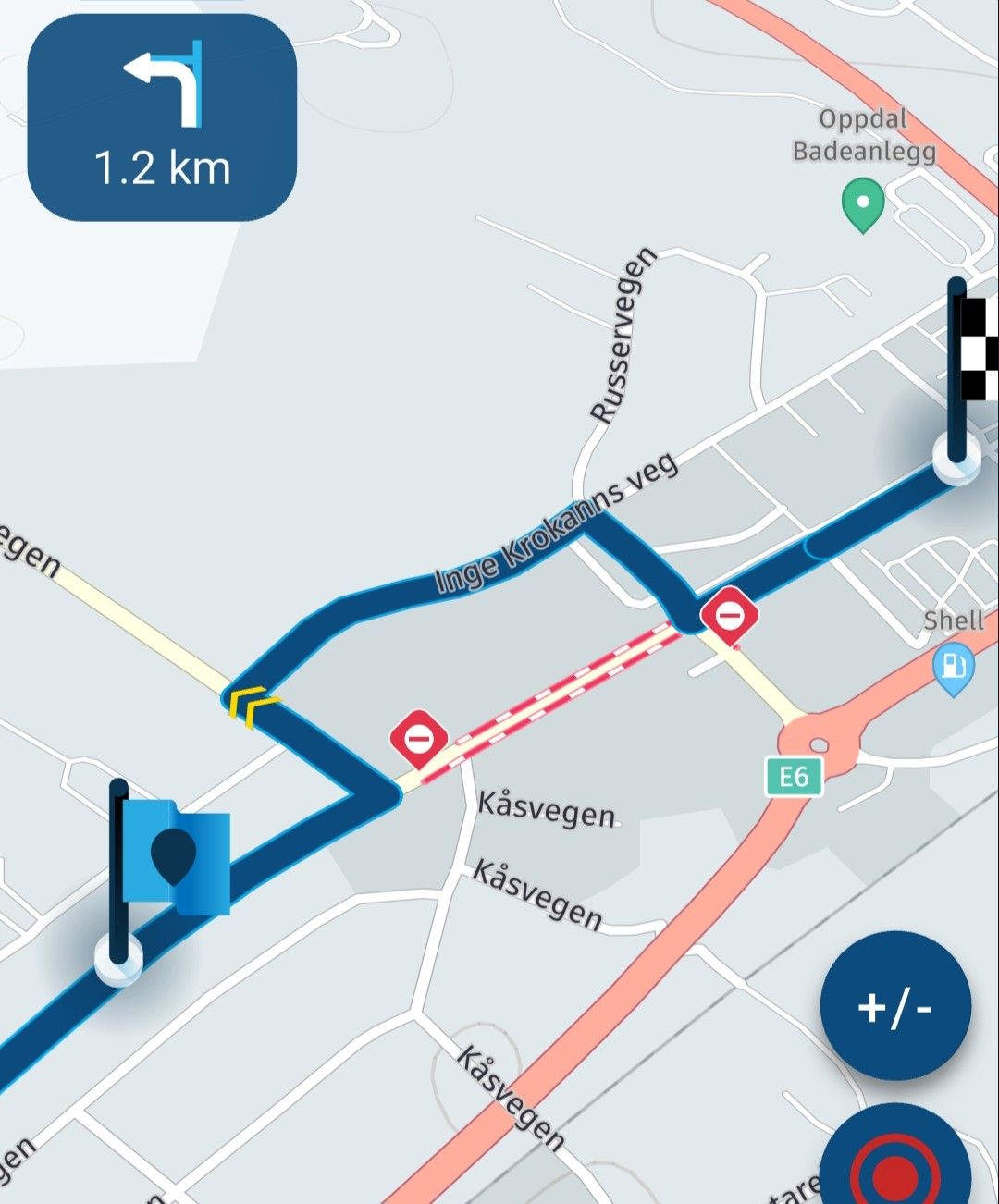
                      The images below illustrate the issue.

                      The first one shows my mini test route in the editor.
                      The 2nd and 3rd show what I can see during navigation (route as track). Sometimes the 2nd, sometimes the 3rd.
                      1000011831.jpg

                      1000011832.jpg

                      1000011833.jpg

                      Con Hennekensundefined 1 Reply Last reply
                      0
                      • Herman Veldhuizenundefined Herman Veldhuizen

                        @Con-Hennekens not sure what you mean, but all what I am after is consistency. Ignoring closures might be the right thing to do but then i would like to see the same in the in-app route editor, without having to sprinkle my route with waypoints which don't represent anything and without having to change some settings between editing and navigating. The in-app editor is the only editor I ever use.

                        The images below illustrate the issue.

                        The first one shows my mini test route in the editor.
                        The 2nd and 3rd show what I can see during navigation (route as track). Sometimes the 2nd, sometimes the 3rd.

                        1000011831.jpg

                        1000011832.jpg

                        1000011833.jpg

                        Con Hennekensundefined Offline
                        Con Hennekensundefined Offline
                        Con Hennekens
                        Alpha tester
                        wrote last edited by
                        #19

                        @Herman-Veldhuizen, Thanks for clarification. Do I understand correctly that one is opened direfrom the route menu, and the other from the in-app planner? Interesting...

                        I am just an enthusiastic MRA user, and hope you will be one too!

                        Most motorcycle problems are caused by the nut that connects the handlebar to the saddle.

                        Check out RideSleepRepeat.eu, a biker community for sharing stays across Europe

                        Herman Veldhuizenundefined 1 Reply Last reply
                        0
                        • Con Hennekensundefined Con Hennekens

                          @Herman-Veldhuizen, Thanks for clarification. Do I understand correctly that one is opened direfrom the route menu, and the other from the in-app planner? Interesting...

                          Herman Veldhuizenundefined Offline
                          Herman Veldhuizenundefined Offline
                          Herman Veldhuizen
                          wrote last edited by Herman Veldhuizen
                          #20

                          @Con-Hennekens correct.
                          The first one (2nd picture) from the opening page of the route (select route, navigate).
                          The second one (3rd picture) from the in-app editor (select route, edit, navigate).
                          Corjan had a look at it but I am not sure what the conclusion was.
                          I dont often start the navigation from the editor but in this case it would actually best match what I see during planning.

                          Con Hennekensundefined 1 Reply Last reply
                          0
                          • Herman Veldhuizenundefined Herman Veldhuizen

                            @Con-Hennekens correct.
                            The first one (2nd picture) from the opening page of the route (select route, navigate).
                            The second one (3rd picture) from the in-app editor (select route, edit, navigate).
                            Corjan had a look at it but I am not sure what the conclusion was.
                            I dont often start the navigation from the editor but in this case it would actually best match what I see during planning.

                            Con Hennekensundefined Offline
                            Con Hennekensundefined Offline
                            Con Hennekens
                            Alpha tester
                            wrote last edited by
                            #21

                            @Herman-Veldhuizen, I must say I do not use the in-app planner a lot, so I never noticed this difference. I am afraid I cannot add much to this if Corjan is already looking at it... 😉

                            I am just an enthusiastic MRA user, and hope you will be one too!

                            Most motorcycle problems are caused by the nut that connects the handlebar to the saddle.

                            Check out RideSleepRepeat.eu, a biker community for sharing stays across Europe

                            Herman Veldhuizenundefined 1 Reply Last reply
                            0
                            • Con Hennekensundefined Con Hennekens

                              @Herman-Veldhuizen, I must say I do not use the in-app planner a lot, so I never noticed this difference. I am afraid I cannot add much to this if Corjan is already looking at it... 😉

                              Herman Veldhuizenundefined Offline
                              Herman Veldhuizenundefined Offline
                              Herman Veldhuizen
                              wrote last edited by
                              #22

                              @Con-Hennekens if you want to try it :

                              View 'maasland' in MyRoute-app! https://www.myrouteapp.com/route/open/13720793

                              Con Hennekensundefined 1 Reply Last reply
                              0
                              • Herman Veldhuizenundefined Herman Veldhuizen

                                @Con-Hennekens if you want to try it :

                                View 'maasland' in MyRoute-app! https://www.myrouteapp.com/route/open/13720793

                                Con Hennekensundefined Offline
                                Con Hennekensundefined Offline
                                Con Hennekens
                                Alpha tester
                                wrote last edited by
                                #23

                                @Herman-Veldhuizen, actually I am getting the same detour in both cases... 😉

                                I am just an enthusiastic MRA user, and hope you will be one too!

                                Most motorcycle problems are caused by the nut that connects the handlebar to the saddle.

                                Check out RideSleepRepeat.eu, a biker community for sharing stays across Europe

                                Herman Veldhuizenundefined 1 Reply Last reply
                                0
                                • Con Hennekensundefined Con Hennekens

                                  @Herman-Veldhuizen, actually I am getting the same detour in both cases... 😉

                                  Herman Veldhuizenundefined Offline
                                  Herman Veldhuizenundefined Offline
                                  Herman Veldhuizen
                                  wrote last edited by Herman Veldhuizen
                                  #24

                                  @Con-Hennekens so do i if i navigate as route. if i navigate as track i get 2 versions

                                  Con Hennekensundefined 1 Reply Last reply
                                  0
                                  • Herman Veldhuizenundefined Herman Veldhuizen

                                    @Con-Hennekens so do i if i navigate as route. if i navigate as track i get 2 versions

                                    Con Hennekensundefined Offline
                                    Con Hennekensundefined Offline
                                    Con Hennekens
                                    Alpha tester
                                    wrote last edited by
                                    #25

                                    @Herman-Veldhuizen, ah yes, I see what you mean. But actually I find that rather logical. "Navigate route as track" only kicks in when you start navigating. By opening the route (it's not a track!) in the planner, the route already changes to create the detour. Then you start navigating that changed route as track, so it includes the detour. When you do NOT open it in the planner first, you navigate the unchanged route as a track, and you know a track won't change due to traffic. So I can imagine that Corjan's conclusion was: "it's by design" 😉

                                    I am just an enthusiastic MRA user, and hope you will be one too!

                                    Most motorcycle problems are caused by the nut that connects the handlebar to the saddle.

                                    Check out RideSleepRepeat.eu, a biker community for sharing stays across Europe

                                    1 Reply Last reply
                                    0
                                    • Herman Veldhuizenundefined Offline
                                      Herman Veldhuizenundefined Offline
                                      Herman Veldhuizen
                                      wrote last edited by Herman Veldhuizen
                                      #26

                                      I guess it makes sense for those who know the internals of the app. I struggle to see that it makes sense for an average user. The fact that the user brings up an editor (or not) before riding should make no difference in what the navigation comes up with.
                                      In other words : the sequence open-edit-navigate is now very different to
                                      open-edit-save-open-navigate ! This even without making one change.

                                      You must agree with me that when I spent an hour or so in the inapp editor to make or check the route that I expect the route to look the same when I press navigate directly after (from the opening page of the route). Currently this isn't the case when navigating a route (with closures) as track.

                                      I believe that people choose route-as-track because they like the stability of the track. In one way this is now the opposite. The stability is there during navigation but not in the time period between planning the route and riding.

                                      In the end it boils down to this: when should the track be created? I sort of feel that it should be created when the route is created/edited and saved. Of coarse when roads change or close/reopen this track becomes out of date. This I understand and I would accept that I would have to revisit the route with a newer map to get an up to date track.

                                      If I had a way to see the track in the in-app editor I would be happy too (i think) because then at least I can see where the app will take me when riding. As far as I know this isnt possible now.

                                      Con Hennekensundefined 1 Reply Last reply
                                      0
                                      • Herman Veldhuizenundefined Herman Veldhuizen

                                        I guess it makes sense for those who know the internals of the app. I struggle to see that it makes sense for an average user. The fact that the user brings up an editor (or not) before riding should make no difference in what the navigation comes up with.
                                        In other words : the sequence open-edit-navigate is now very different to
                                        open-edit-save-open-navigate ! This even without making one change.

                                        You must agree with me that when I spent an hour or so in the inapp editor to make or check the route that I expect the route to look the same when I press navigate directly after (from the opening page of the route). Currently this isn't the case when navigating a route (with closures) as track.

                                        I believe that people choose route-as-track because they like the stability of the track. In one way this is now the opposite. The stability is there during navigation but not in the time period between planning the route and riding.

                                        In the end it boils down to this: when should the track be created? I sort of feel that it should be created when the route is created/edited and saved. Of coarse when roads change or close/reopen this track becomes out of date. This I understand and I would accept that I would have to revisit the route with a newer map to get an up to date track.

                                        If I had a way to see the track in the in-app editor I would be happy too (i think) because then at least I can see where the app will take me when riding. As far as I know this isnt possible now.

                                        Con Hennekensundefined Offline
                                        Con Hennekensundefined Offline
                                        Con Hennekens
                                        Alpha tester
                                        wrote last edited by
                                        #27

                                        @Herman-Veldhuizen, I agree with all you say, but I fail to see that it is any other way as it is 😉

                                        When you edit a track in the in-app planner, the traffic info is already there, and what I see when I start navigating is exactly as it was in the editor. The only change is there when you did NOT load it in the editor, and in that case you will not notice a change because you did not open it in the editor.

                                        You say that you don't change anything, but actually by opening a route it get's recalculated. That has always been that way and will always be. That's in this case where the change happens, and a new track is calculated. In the end it is still a route, not a track.

                                        I very much agree that tracks are chosen for stability. For that reason I am all for a feature that converts a route to a track (without export/re-import), so people actually navigate a track instead of a "route as track".

                                        I guess it makes sense for those who know the internals of the app. I struggle to see that it makes sense for an average user.

                                        Yes I can imagine that, but that's why we are trying to help out 😉

                                        I am just an enthusiastic MRA user, and hope you will be one too!

                                        Most motorcycle problems are caused by the nut that connects the handlebar to the saddle.

                                        Check out RideSleepRepeat.eu, a biker community for sharing stays across Europe

                                        1 Reply Last reply
                                        0
                                        • Herman Veldhuizenundefined Offline
                                          Herman Veldhuizenundefined Offline
                                          Herman Veldhuizen
                                          wrote last edited by Herman Veldhuizen
                                          #28

                                          Most of the time I start the navigation from the opening page. I dont edit my routes often. So if there were closures during editing i will be surprised where the app sends me too (assuming the closure are still there). Again when there are few roads, one closure can have a big impact.

                                          But what about my suggestion to display both the route and the track in the in-app editor when I have have route as track enabled? We see both when navigating so I assume it is technically possible.

                                          pure track navigation is no option for me. the ETA info to waypoints is the most important feature for me.

                                          1 Reply Last reply
                                          0

                                          Hello! It looks like you're interested in this conversation, but you don't have an account yet.

                                          Getting fed up of having to scroll through the same posts each visit? When you register for an account, you'll always come back to exactly where you were before, and choose to be notified of new replies (either via email, or push notification). You'll also be able to save bookmarks and upvote posts to show your appreciation to other community members.

                                          With your input, this post could be even better 💗

                                          Register Login
                                          Reply
                                          • Reply as topic
                                          Log in to reply
                                          • Oldest to Newest
                                          • Newest to Oldest
                                          • Most Votes


                                          • 1
                                          • 2
                                          ACTIVE USERS
                                          Marinus van Deudekomundefined
                                          Marinus van Deudekom
                                          M. Schrijverundefined
                                          M. Schrijver
                                          Con Hennekensundefined
                                          Con Hennekens
                                          Rob Verhoeffundefined
                                          Rob Verhoeff
                                          nomkoundefined
                                          nomko
                                          white.mouseundefined
                                          white.mouse
                                          Herman Veldhuizenundefined
                                          Herman Veldhuizen
                                          Atse Kroesundefined
                                          Atse Kroes
                                          Brian Martinundefined
                                          Brian Martin
                                          POPULAR TOPICS
                                          • Expand
                                            Brian McGundefined
                                            Brian McG
                                            0
                                            24
                                            419

                                          • Routepunten
                                            M. Schrijverundefined
                                            M. Schrijver
                                            0
                                            12
                                            263

                                          • New update 5.2 - Avoid roadblocks, persistent map items, POI management and share
                                            Jörgenundefined
                                            Jörgen
                                            27
                                            37
                                            1.9k

                                          • Sealevel
                                            Christian Feursteinundefined
                                            Christian Feurstein
                                            0
                                            6
                                            134

                                          • MyRoute-App - worst navigation experience ever
                                            Marinus van Deudekomundefined
                                            Marinus van Deudekom
                                            0
                                            59
                                            35.1k

                                          • Karte dreht im Stand bei der Navigation dauernd
                                            Jörgenundefined
                                            Jörgen
                                            0
                                            3
                                            52

                                          • New enlarge fuelstation icon gone to soon or not?
                                            M. Schrijverundefined
                                            M. Schrijver
                                            1
                                            11
                                            656

                                          • Default Map Layer in Animate
                                            Brian McGundefined
                                            Brian McG
                                            1
                                            9
                                            242

                                          MY GROUPS
                                          • Login

                                          • Login or register to search.
                                          • First post
                                            Last post
                                          0
                                          • Categories
                                          • Recent
                                          • Popular
                                          • Support
                                          • MyRoute-app