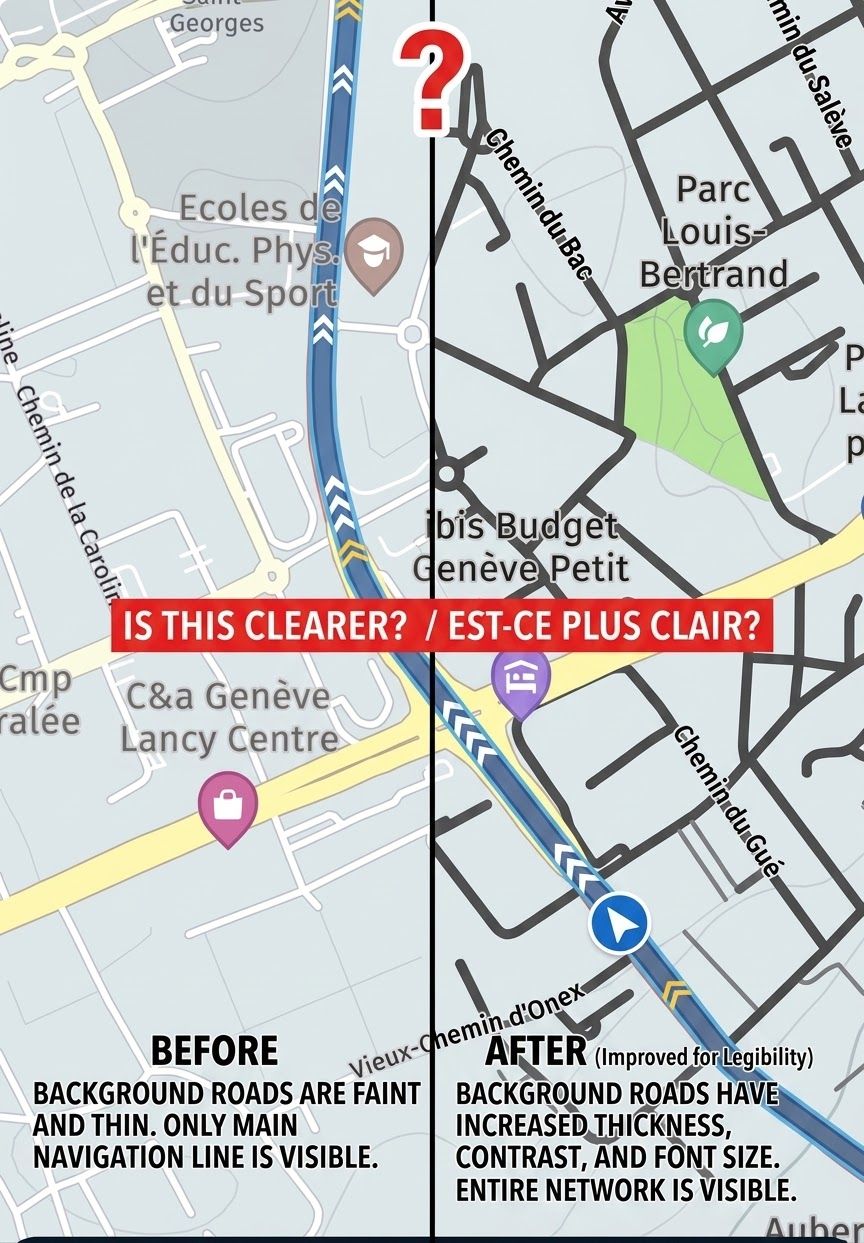
Coloured Routes options
-
Searched but only found something from 2024, but wondering if there are options to change the Route colours?
What I struggle with, when using a fairly comprehensive route, is overlapping the route. When this happens and during the ride, I see the overlap and often forget which direction to take on the route. This then forces the App to go into a spiral of reverting back to the last stop, or myself being aware and clicking Skip current stop.
These issues always happen because I create several rides for groups and often revisit and forget the complex routes I enjoy creating. If colours were an option, when an overlap occurs - it would be great to insert a different colour from one stop to the next.I also suffer from needing glasses when reading, and as it isn't possible to wear them on bike rides easily (or safe to), this would help those of us not wanting to put reading glasses on when riding.
Anyone found a way around this?
-
Searched but only found something from 2024, but wondering if there are options to change the Route colours?
What I struggle with, when using a fairly comprehensive route, is overlapping the route. When this happens and during the ride, I see the overlap and often forget which direction to take on the route. This then forces the App to go into a spiral of reverting back to the last stop, or myself being aware and clicking Skip current stop.
These issues always happen because I create several rides for groups and often revisit and forget the complex routes I enjoy creating. If colours were an option, when an overlap occurs - it would be great to insert a different colour from one stop to the next.I also suffer from needing glasses when reading, and as it isn't possible to wear them on bike rides easily (or safe to), this would help those of us not wanting to put reading glasses on when riding.
Anyone found a way around this?
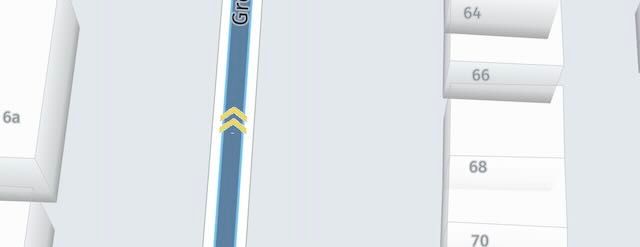
@Hanso7o From version 5.1 (available soon), you’ll see a double yellow arrow on the route you’re following (see image below), shown in yellow on top of the blue route line. You’ll still need glasses, though. Unfortunately, the font size in the app is not (yet) scalable.
-
That's definitely an improvement, but wonder if they can simply make one large arrow instead of the two smaller shown?
It's more useability than requiring the detail shown, as lets face it, we are mostly viewing through a phone display until such time we all get the huge screens many are seeing now.
It's still good to see steps forward though, thanks.
-
That's definitely an improvement, but wonder if they can simply make one large arrow instead of the two smaller shown?
It's more useability than requiring the detail shown, as lets face it, we are mostly viewing through a phone display until such time we all get the huge screens many are seeing now.
It's still good to see steps forward though, thanks.
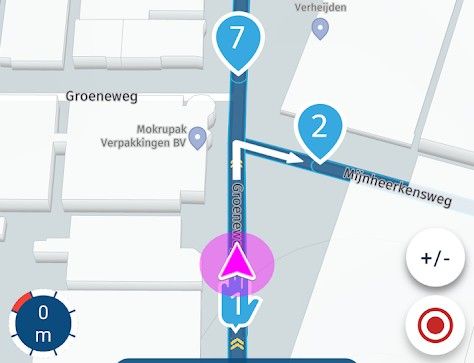
@Hanso7o, I don't understand the problem... Even when parts of your route overlap, navigation is still guiding you in the right direction. Instructions are still good, and the white arrows show you the way.
I am just an enthusiastic MRA user, and hope you will be one too!
Most motorcycle problems are caused by the nut that connects the handlebar to the saddle.
Check out RideSleepRepeat.eu, a biker community for sharing stays across Europe
-
@Hanso7o, I don't understand the problem... Even when parts of your route overlap, navigation is still guiding you in the right direction. Instructions are still good, and the white arrows show you the way.
@Con-Hennekens Well, that's something new to me. I do NOT have the white arrows at overlapping points detailing which direction. Also, the referenced example within the image isn't something that may be setup where it displays the step numbers. Rarely are mine so close, as yours displays - which is something I can try and use - however, my eyesight doesn't always allow me to distinguish those numbers accurately or confirm I knew the previous step number either.
Aye, I'm fighting age and technology... but there are ways as I've suggested to overcome these issues if they were additions.
As for the arrows not being there, I'll reinvestigate.. thankyou.
-
@Con-Hennekens Well, that's something new to me. I do NOT have the white arrows at overlapping points detailing which direction. Also, the referenced example within the image isn't something that may be setup where it displays the step numbers. Rarely are mine so close, as yours displays - which is something I can try and use - however, my eyesight doesn't always allow me to distinguish those numbers accurately or confirm I knew the previous step number either.
Aye, I'm fighting age and technology... but there are ways as I've suggested to overcome these issues if they were additions.
As for the arrows not being there, I'll reinvestigate.. thankyou.
@Hanso7o, These arrows are shown whenever an instruction is given. If no arrow, continue straight.
The route points that close to the crossing is of course only to show you, but certainly NOT best practise



Hello! It looks like you're interested in this conversation, but you don't have an account yet.
Getting fed up of having to scroll through the same posts each visit? When you register for an account, you'll always come back to exactly where you were before, and choose to be notified of new replies (either via email, or push notification). You'll also be able to save bookmarks and upvote posts to show your appreciation to other community members.
With your input, this post could be even better 💗
Register Login-
 15142
15142
-
 1325
1325
-
 47398
47398
-
-
08308
-
 06193
06193
-
03121
-
015640