App behaviour when in offline mode at a construction site
-
I have a question about road closures shown on Here Maps in relation to offline navigation.
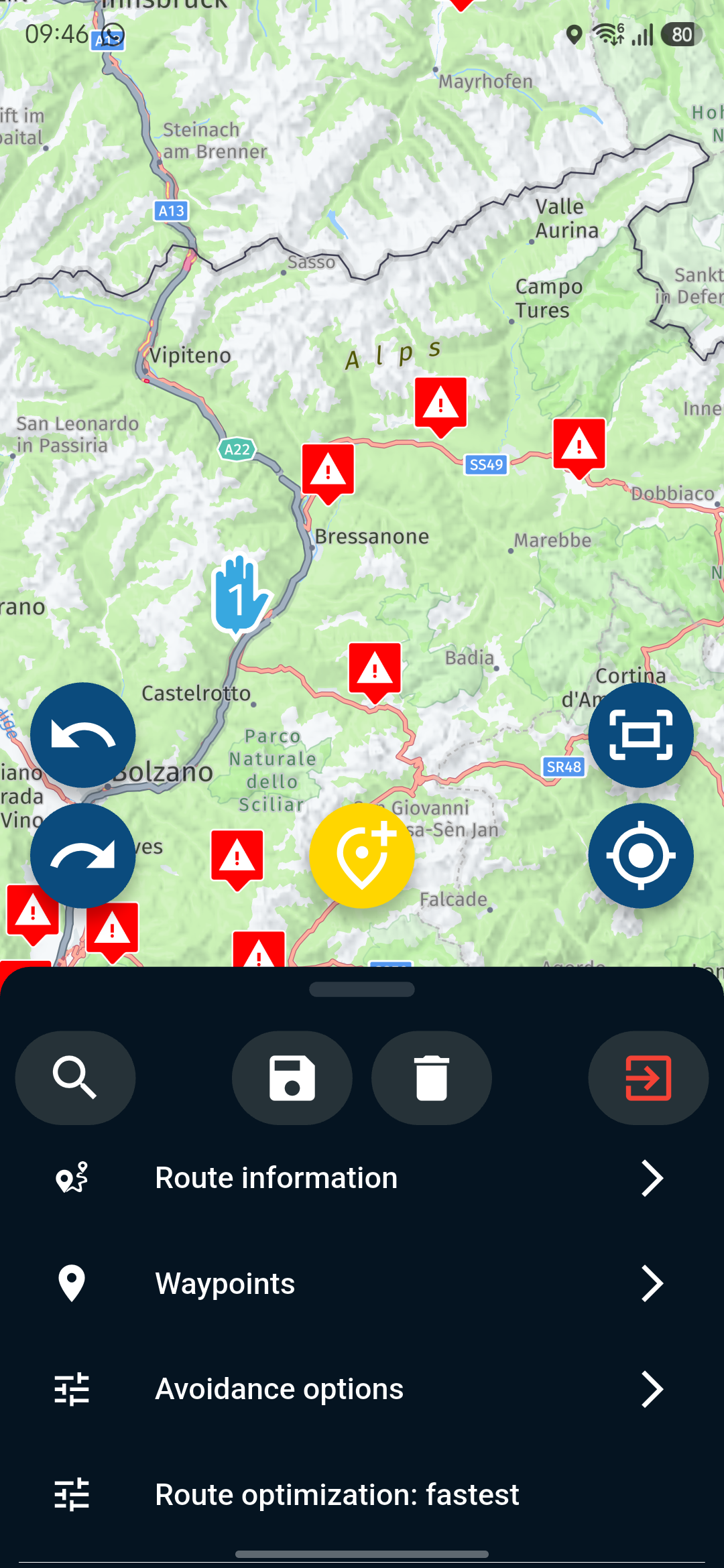
Last Sunday, I was driving ‘online’ from Italy to Germany via Cortina d’Ampezzo.
According to the Here map, the road was closed, but in reality the roadworks had already finished; however, the app prevented me from taking the planned route.....What happens if I navigate ‘offline’? Will the app still try to reroute me, or can I follow the planned route without any notifications from the app?
Does anyone have any experience with this? I’ve always navigated online up to now, so I don’t have any experience with this.
BMW R 1250 GS
MRA Navigation & SilverFox C1 Controller
DMD-NOR7E 7"
SPC Universal mount
Motorola Edge 40 "offline"
Sena SLR 3
Sena 50 R -
I have a question about road closures shown on Here Maps in relation to offline navigation.
Last Sunday, I was driving ‘online’ from Italy to Germany via Cortina d’Ampezzo.
According to the Here map, the road was closed, but in reality the roadworks had already finished; however, the app prevented me from taking the planned route.....What happens if I navigate ‘offline’? Will the app still try to reroute me, or can I follow the planned route without any notifications from the app?
Does anyone have any experience with this? I’ve always navigated online up to now, so I don’t have any experience with this.
Already figured out that there is no big difference....
The only thing which helps, is to deactivate route violation and switch to navigate route as a track.
Have a nice sunny weekend
-
Or just follow the road and do nothing

Met andere apps maak je een route, met MRA componeer je een route!
Ducati Monster 1200 met Garmin Zümo XT
Fiat 124 Spider/Camper Dethleffs met Navigation-App op Samsung Tab Active4 Pro
MRA Lifetime Gold -
Or just follow the road and do nothing
@Lex.Kloet.RX Yeah, sure, that’s an option, of course, but the constant reminders that I should take a different route because I’m supposedly not allowed to drive through the roadworks are incredibly annoying......
-
Already figured out that there is no big difference....
The only thing which helps, is to deactivate route violation and switch to navigate route as a track.
Have a nice sunny weekend
@Peter-Zehentreiter you worked out a solution,
it is similar to the way I use MRA so that I get to ride the route I planned, I use offline mode & route as track,
this way there are no disturbances to the route unless I go off route & the app then tries to get me back on the trackyes I know this has the disadvantage of not getting the latest up to date road closure/traffic information but I am on a bike & traffic is not really such an issue & even a lot of "road closures" can be got through on a bike
I do mitigate the issue of road closures, normally at breakfast in the hotel, by going onlline & checking if the app does try to add any route changes before I set off,
but when I set off the route is reloaded with navigation is offline & as a trackBlackView BV7100, Android 12
Navigate "Routes as Tracks" in Offline mode with Offline Maps
No Wifi, no internet, no interruptions, works well -
@Peter-Zehentreiter you worked out a solution,
it is similar to the way I use MRA so that I get to ride the route I planned, I use offline mode & route as track,
this way there are no disturbances to the route unless I go off route & the app then tries to get me back on the trackyes I know this has the disadvantage of not getting the latest up to date road closure/traffic information but I am on a bike & traffic is not really such an issue & even a lot of "road closures" can be got through on a bike
I do mitigate the issue of road closures, normally at breakfast in the hotel, by going onlline & checking if the app does try to add any route changes before I set off,
but when I set off the route is reloaded with navigation is offline & as a track@Brian-McG said in App behaviour when in offline mode at a construction site:
I use offline mode & route as track,
this way there are no disturbancesWhen doing the same just online there shouldn't be disturbances as well...... ( I `ll try)
Concerning getting the latest information about traffic or construction areas.....I`ll see when trying the Route as a track.what will happen online.
Sometimes there are up to 10 other riders following me, so I like to know in advance where the road leads or at least be sure that the road I choose is suitable for the others.
So far, though, I’ve always managed to reach my destination
-
MRA and traffic info is not the best combination. From my TomTom app i know it can be a good thing the traffic info corrects the route. It "saves" me more often than it annoyed me.
But not always the traffic info and roadclosures are proper alligned.(I use MRA Next only on Android Auto. Every comment, suggestion, etc will be based on my usage with Android Auto)
-
MRA and traffic info is not the best combination. From my TomTom app i know it can be a good thing the traffic info corrects the route. It "saves" me more often than it annoyed me.
But not always the traffic info and roadclosures are proper alligned.@M.-Schrijver Yes, sometimes it’s a curse and sometimes it’s a blessing.
For the ‘Route as Track’ feature, the settings explicitly state that it works best online.
I’ll give it a go and let you know the results here.....
-
Our experience: in 98% of the cases, when a road is closed, you can go further with a bike.
@AWDC-LAO Thanks for pointing that out
 but that’s not the issue....
It annoys me when the Here map shows a roadworks site... even though it’s actually already finished, and the app keeps nagging me to turn around.
-
@Brian-McG said in App behaviour when in offline mode at a construction site:
I use offline mode & route as track,
this way there are no disturbancesWhen doing the same just online there shouldn't be disturbances as well...... ( I `ll try)
Concerning getting the latest information about traffic or construction areas.....I`ll see when trying the Route as a track.what will happen online.
Sometimes there are up to 10 other riders following me, so I like to know in advance where the road leads or at least be sure that the road I choose is suitable for the others.
So far, though, I’ve always managed to reach my destination
@Peter-Zehentreiter sorry my previous post was maybe not 100% clear,
when I navigate "offline" I truly mean "offline" as in airplane mode,
yes MRA is in "offline" mode but also my phone has no input connections except for GPS & bluetooth to my headset,
hence the only disturbance I can get to the path of my route is a bad GPS position or if I deviate from the pathre: "For the ‘Route as Track’ feature, the settings explicitly state that it works best online."
This may be due to this track display issue https://forum.myrouteapp.com/post/66551BlackView BV7100, Android 12
Navigate "Routes as Tracks" in Offline mode with Offline Maps
No Wifi, no internet, no interruptions, works well -
@Peter-Zehentreiter sorry my previous post was maybe not 100% clear,
when I navigate "offline" I truly mean "offline" as in airplane mode,
yes MRA is in "offline" mode but also my phone has no input connections except for GPS & bluetooth to my headset,
hence the only disturbance I can get to the path of my route is a bad GPS position or if I deviate from the pathre: "For the ‘Route as Track’ feature, the settings explicitly state that it works best online."
This may be due to this track display issue https://forum.myrouteapp.com/post/66551@Brian-McG No problem, I’ve already understood what you meant about offline use.
I get on really well with MRA and am really happy with it; it’s just the occasionally outdated road closures in the Here map that are a bit of a nuisance (though that’s not MRA’s fault).
In any case, I’m testing the ‘Route as Track’ feature both online and offline… and forming my own opinion.
Everyone has different needs, and the app definitely tries to cover everything as best it can.
The icing on the cake would be if MRA used Google maps, including their up-to-date information.....
‘We’re allowed to dream’
BMW R 1250 GS
MRA Navigation & SilverFox C1 Controller
DMD-NOR7E 7"
SPC Universal mount
Motorola Edge 40 "offline"
Sena SLR 3
Sena 50 R -
@Brian-McG No problem, I’ve already understood what you meant about offline use.
I get on really well with MRA and am really happy with it; it’s just the occasionally outdated road closures in the Here map that are a bit of a nuisance (though that’s not MRA’s fault).
In any case, I’m testing the ‘Route as Track’ feature both online and offline… and forming my own opinion.
Everyone has different needs, and the app definitely tries to cover everything as best it can.
The icing on the cake would be if MRA used Google maps, including their up-to-date information.....
‘We’re allowed to dream’
@Peter-Zehentreiter Very valid question.
In the app it seems to depends on:
- where you are in the app : In-app route editor, opening page of a route or during navigating.
- The global setting 'Navigate route as tracks'.
- a:The global setting 'Offline navigation'.
b: The route level toggle 'Use offline/online maps'.
I have observed the following issues/behaviours but it is unclear to me wether these are caused by map issues, app issues or wether they are supposed to be like that.
A) 3a and 3b seem to be related: changing one also changes the other. The fact that the app changes the global setting is a bit confusing. I suggest to make the route level toggle a temporary one.
B) The in-app route editor assumes that you navigate a route as route. It doesn't use 2). So when you navigate a route as track you don't get the same route as in the editor.
C) Closures are sometimes ignored in offline mode (even if they are available in the offline map). Is it an error in the map or in the app? Don't know.
D) Closures are always ignored in the opening page of a route. So what you see in the opening page might not correspond to what you see in the route editor or while navigating.
E) Closures CAN be ignored when navigating a route as track. It has surprised me that the way you navigate a route controls how closures are handled. It also depends on Where you press Navigate : from the opening page of a route or from the in-app route editor. That there is a difference here must be a bug.
-
@Peter-Zehentreiter Very valid question.
In the app it seems to depends on:
- where you are in the app : In-app route editor, opening page of a route or during navigating.
- The global setting 'Navigate route as tracks'.
- a:The global setting 'Offline navigation'.
b: The route level toggle 'Use offline/online maps'.
I have observed the following issues/behaviours but it is unclear to me wether these are caused by map issues, app issues or wether they are supposed to be like that.
A) 3a and 3b seem to be related: changing one also changes the other. The fact that the app changes the global setting is a bit confusing. I suggest to make the route level toggle a temporary one.
B) The in-app route editor assumes that you navigate a route as route. It doesn't use 2). So when you navigate a route as track you don't get the same route as in the editor.
C) Closures are sometimes ignored in offline mode (even if they are available in the offline map). Is it an error in the map or in the app? Don't know.
D) Closures are always ignored in the opening page of a route. So what you see in the opening page might not correspond to what you see in the route editor or while navigating.
E) Closures CAN be ignored when navigating a route as track. It has surprised me that the way you navigate a route controls how closures are handled. It also depends on Where you press Navigate : from the opening page of a route or from the in-app route editor. That there is a difference here must be a bug.
@Herman-Veldhuizen said in App behaviour when in offline mode at a construction site:
a:The global setting 'Offline navigation'.
In my view, the “offline” global setting means that there is absolutely no internet connection, that there is no SIM card in the device, and that in the morning at the hotel, neither Wi-Fi nor a hotspot is used for updates.
b: The route level toggle 'Use offline/online maps'.
I haven’t been able to figure out exactly what’s going on yet, but it seems odd to me that when I tap the ‘offline navigation’ option in orange, it switches back to ‘online navigation’ in the main settings.
@Herman-Veldhuizen said in App behaviour when in offline mode at a construction site:
The in-app route editor assumes that you navigate a route as route. It doesn't use 2). So when you navigate a route as track you don't get the same route as in the editor.
I can’t currently confirm this for myself: when I place two devices side by side (both are online), with one device is set to ‘Route as Track’ and the other device is set to ‘Route as Route’, I see the same route when I open it (even before I press ‘Navigate).
@Herman-Veldhuizen said in App behaviour when in offline mode at a construction site:
Closures are always ignored in the opening page of a route. So what you see in the opening page might not correspond to what you see in the route editor or while navigating.
‘That seems logical to me, though, as only the planned route is displayed when you open the app, and it’s only when you start navigation that the road closures (according to Here) are taken into account, and the route is then naturally adjusted to avoid them.’ ‘That’s exactly how it should be.’
What strikes me about offline navigation, however, is that when I call up the route (with the settings set to ‘Route as Route’) and press Start, I can’t see any change to the route; it navigates as if I were using ‘Route as Track’.
That’s why I’d like to better understand the difference between an ‘offline’ route (set to ‘Route as Route’) and an ‘online’ route (set to ‘Route as Track’).
What is also noticeable when calling up ‘Route as Track’ online is that the route is navigated as planned, but warning messages appear on the map indicating that the route might be closed, for example.
With offline navigation using ‘Route as Route’, these warnings do not appear.
Perhaps someone is able to define the difference precisely.
-
In your last few lines you write exact the difference between offline and online.
When riding offline there is no possibilty to adjust the route by i.e traffic problems, etc. The route stays as it was at the start.
When online, the route can be more flexible because there is online info which can cause adjustments or warnings for problems along the way.(I use MRA Next only on Android Auto. Every comment, suggestion, etc will be based on my usage with Android Auto)
-
In your last few lines you write exact the difference between offline and online.
When riding offline there is no possibilty to adjust the route by i.e traffic problems, etc. The route stays as it was at the start.
When online, the route can be more flexible because there is online info which can cause adjustments or warnings for problems along the way.@M.-Schrijver OK, thanks for pointing that out; I’ve been thinking along similar lines...
But I’ll definitely try both to see what happens when I leave the route.
-
With route as route you will see no difference. MRA should handle this offline just as good as online.
With route as track there can be difference but i don't know this feature good enough. I use it almost never.(I use MRA Next only on Android Auto. Every comment, suggestion, etc will be based on my usage with Android Auto)
-
With route as route you will see no difference. MRA should handle this offline just as good as online.
With route as track there can be difference but i don't know this feature good enough. I use it almost never.@M.-Schrijver said in App behaviour when in offline mode at a construction site:
I use it almost never.
Me neither... that's why I'm asking
BMW R 1250 GS
MRA Navigation & SilverFox C1 Controller
DMD-NOR7E 7"
SPC Universal mount
Motorola Edge 40 "offline"
Sena SLR 3
Sena 50 R -
@M.-Schrijver said in App behaviour when in offline mode at a construction site:
I use it almost never.
Me neither... that's why I'm asking
@Peter-Zehentreiter you have probably already seen this MRA tutorial video "Route Navigation Versus Track Navigation" but just in case you missed it

BlackView BV7100, Android 12
Navigate "Routes as Tracks" in Offline mode with Offline Maps
No Wifi, no internet, no interruptions, works well -
@Peter-Zehentreiter you have probably already seen this MRA tutorial video "Route Navigation Versus Track Navigation" but just in case you missed it
@Brian-McG Yes, I’m familiar with this video, and I also understand how it works – it’s simply brilliant.
The reason I’m considering using this option more often is, that due to some outdated traffic updates from Here, I’m sometimes receiving information I don’t actually want.
Thanks for the tips from the community

I’ll just give it a go.
A Bavarian would say:
"Schau ma moi, dann segn mas scha"

BMW R 1250 GS
MRA Navigation & SilverFox C1 Controller
DMD-NOR7E 7"
SPC Universal mount
Motorola Edge 40 "offline"
Sena SLR 3
Sena 50 R





Hello! It looks like you're interested in this conversation, but you don't have an account yet.
Getting fed up of having to scroll through the same posts each visit? When you register for an account, you'll always come back to exactly where you were before, and choose to be notified of new replies (either via email, or push notification). You'll also be able to save bookmarks and upvote posts to show your appreciation to other community members.
With your input, this post could be even better 💗
Register Login-
 312217
-
 112340
-
 09320
09320
-
0362
-
0383
-
 04128
04128
-
 09190
09190