Skip to content
  • Categories
  • Recent
  • Popular
  • Support
  • MyRoute-app
Collapse
Brand Logo

MRA Community Forum

  1. Home
  2. The MyRoute-app
  3. [App] Problems, Bugs and other Issues
  4. Default for Avoidance Options

Default for Avoidance Options

Scheduled Pinned Locked Moved [App] Problems, Bugs and other Issues
8 Posts 4 Posters 89 Views 3 Watching
  • Oldest to Newest
  • Newest to Oldest
  • Most Votes
Reply
  • Reply as topic
Log in to reply
This topic has been deleted. Only users with topic management privileges can see it.
  • MartinW
    MartinW
    MartinW
    wrote last edited by
    #1

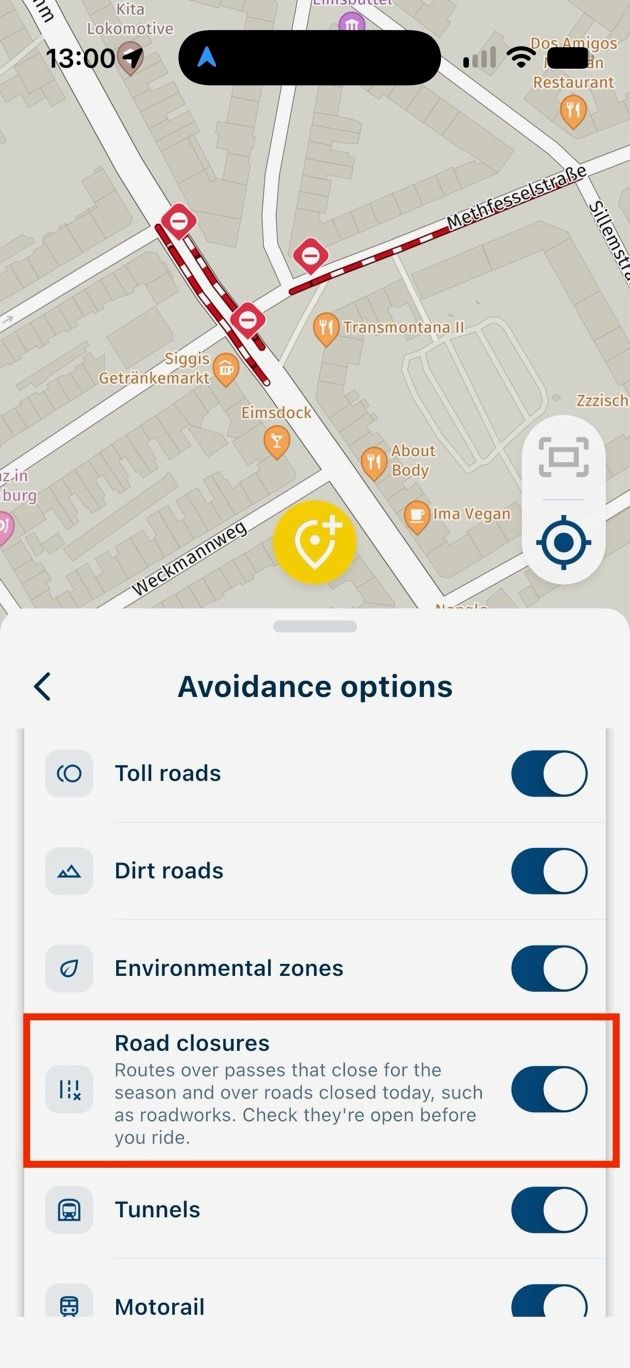
    Most of the time, I use the app for ad hoc planning and navigation rather than pre-planning routes I’ll ride later: I set a destination, maybe add some intermediate WPs, and start navigation immediately.

    Since “Allow Road closures” also affects closures due to road construction, I always have to remember to turn this off to avoid the app leading me into roadblocks, which is a bit annoying.

    Is there a way to change the default setting to OFF for “Allow Road closures”?
    IMG_3379.jpeg

    Marinus van Deudekom 1 Reply Last reply
    0
    • MartinW MartinW

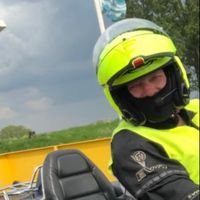
      Most of the time, I use the app for ad hoc planning and navigation rather than pre-planning routes I’ll ride later: I set a destination, maybe add some intermediate WPs, and start navigation immediately.

      Since “Allow Road closures” also affects closures due to road construction, I always have to remember to turn this off to avoid the app leading me into roadblocks, which is a bit annoying.

      Is there a way to change the default setting to OFF for “Allow Road closures”?
      IMG_3379.jpeg

      Marinus van Deudekom
      Marinus van Deudekom
      Marinus van Deudekom
      RouteXpert
      wrote last edited by
      #2

      @MartinW yes, just switch it off

      Honda Goldwing GL1500,
      Honda Silverwing GL 650
      DMD2 T865X 8 inch Android tablet using MRA next for navigation
      Garmin XT sold
      Samsung S24FE mounted on a Quadlock and using Android Auto in my car

      MartinW 1 Reply Last reply
      0
      • Marinus van Deudekom Marinus van Deudekom

        @MartinW yes, just switch it off

        MartinW
        MartinW
        MartinW
        wrote last edited by
        #3

        @Marinus-van-Deudekom sagte:

        just switch it off

        If I switch it off, it affects only the route I’m currently planning, but for the next route, it’s on again.

        I’m asking for a way to change the default.

        Marinus van Deudekom 1 Reply Last reply
        0
        • MartinW MartinW

          @Marinus-van-Deudekom sagte:

          just switch it off

          If I switch it off, it affects only the route I’m currently planning, but for the next route, it’s on again.

          I’m asking for a way to change the default.

          Marinus van Deudekom
          Marinus van Deudekom
          Marinus van Deudekom
          RouteXpert
          wrote last edited by
          #4

          @MartinW if I’m correct there’s a possiblity in the general settings of Beta
          Honda Goldwing GL1500,
          Honda Silverwing GL 650
          DMD2 T865X 8 inch Android tablet using MRA next for navigation
          Garmin XT sold
          Samsung S24FE mounted on a Quadlock and using Android Auto in my car

          a white mouse on the motorbike 1 Reply Last reply
          0
          • Marinus van Deudekom Marinus van Deudekom

            @MartinW if I’m correct there’s a possiblity in the general settings of Beta

            a white mouse on the motorbike
            a white mouse on the motorbike
            a white mouse on the motorbike
            Valued contributor
            wrote last edited by
            #5

            @Marinus-van-Deudekom said:

            @MartinW if I’m correct there’s a possiblity in the general settings of Beta

            @marinus-van-deudekom Can you tell us where to find it, because I can't find it in the General Settings!

            met een R1250RT met TFT en BMW Connected Ride App (die dus nog steeds niet voldoet!) ; M.R.A. in combinatie met de Carpuride W702 (voor Android op de Motor!), de Garmin Zumo XT als backup en een Samsung Galaxy S24

            Marinus van Deudekom 1 Reply Last reply
            0
            • a white mouse on the motorbike a white mouse on the motorbike

              @Marinus-van-Deudekom said:

              @MartinW if I’m correct there’s a possiblity in the general settings of Beta

              @marinus-van-deudekom Can you tell us where to find it, because I can't find it in the General Settings!

              Marinus van Deudekom
              Marinus van Deudekom
              Marinus van Deudekom
              RouteXpert
              wrote last edited by
              #6

              @a-white-mouse-on-the-motorbike
              New route then uncheck the box
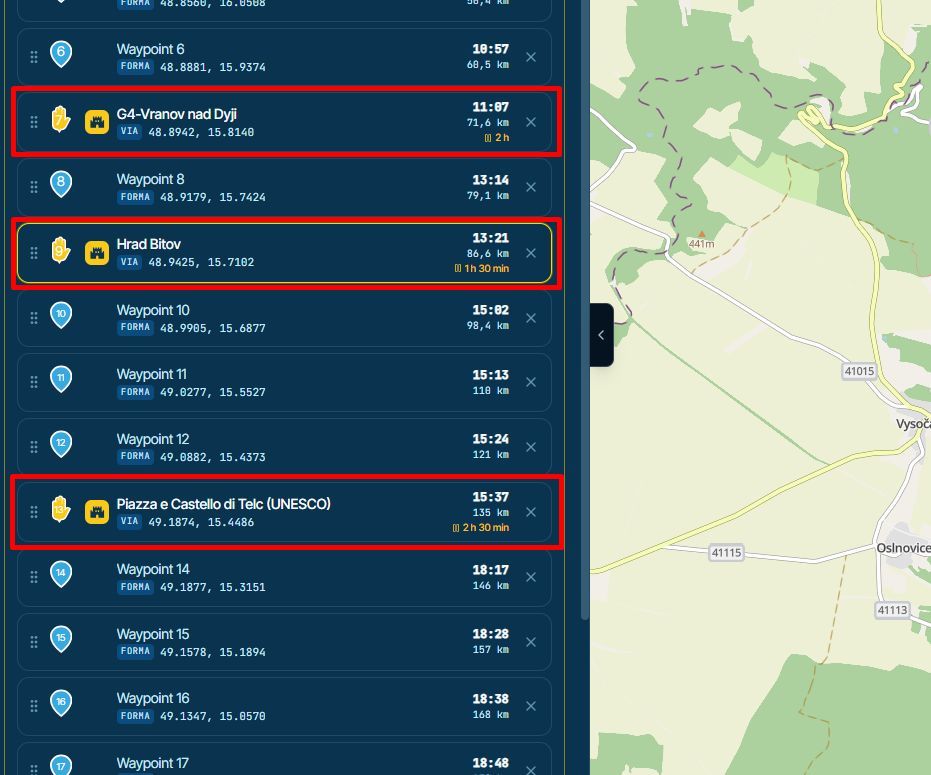
              Scroll down a bit and click on the save boxIMG_0270.png
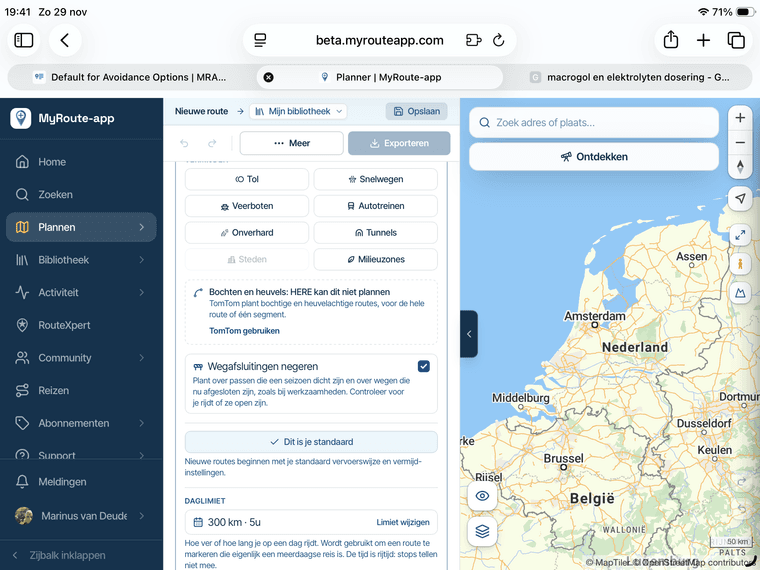
              Dit is je standaard or This is your standard

              Honda Goldwing GL1500,
              Honda Silverwing GL 650
              DMD2 T865X 8 inch Android tablet using MRA next for navigation
              Garmin XT sold
              Samsung S24FE mounted on a Quadlock and using Android Auto in my car

              MartinW 1 Reply Last reply
              0
              • Marinus van Deudekom Marinus van Deudekom

                @a-white-mouse-on-the-motorbike
                New route then uncheck the box
                Scroll down a bit and click on the save boxIMG_0270.png

                Dit is je standaard or This is your standard

                MartinW
                MartinW
                MartinW
                wrote last edited by
                #7

                @Marinus-van-Deudekom

                And this setting (in the new beta web planner) also influences the corresponding setting in the navigation app?
                That's cool!

                1 Reply Last reply
                0
                • Corjan Meijerink
                  Corjan Meijerink
                  Corjan Meijerink
                  Developer
                  wrote last edited by
                  #8

                  Thanks for raising this, and sorry, the advice above isn't right. The "This is your default" button in the web planner doesn't save the road closures setting and the app doesn't read the website's default avoidances at all. So unticking it on the web won't change what the app does. Only a route you plan and save on the website keeps its own road closures setting when you open it in the app. For ad hoc routes planned in the app there's no way yet to make "Road closures" start off. We're looking at adding that, so the app remembers your choice the way it already remembers motorways, tolls and ferries. Until then, unticking it per route is the only option, sorry.

                  1 Reply Last reply
                  0

                  Hello! It looks like you're interested in this conversation, but you don't have an account yet.

                  Getting fed up of having to scroll through the same posts each visit? When you register for an account, you'll always come back to exactly where you were before, and choose to be notified of new replies (either via email, or push notification). You'll also be able to save bookmarks and upvote posts to show your appreciation to other community members.

                  With your input, this post could be even better 💗

                  Register Login
                  Reply
                  • Reply as topic
                  Log in to reply
                  • Oldest to Newest
                  • Newest to Oldest
                  • Most Votes


                  ACTIVE USERS
                  Corjan Meijerink
                  Corjan Meijerink
                  MartinW
                  MartinW
                  Marinus van Deudekom
                  Marinus van Deudekom
                  a white mouse on the motorbike
                  a white mouse on the motorbike
                  POPULAR TOPICS
                  • Default for Avoidance Options
                    Corjan Meijerink
                    Corjan Meijerink
                    0
                    8
                    89

                  • Small blemish in the number of unread forum posts
                    Tegel Werner
                    Tegel Werner
                    0
                    8
                    61

                  • Stopping For Coffee - While Navigating a Route in the APP - Android Auto
                    M. Schrijver
                    M. Schrijver
                    0
                    9
                    210

                  • Beta Planner - What "Exactly" Happens to My Existing Routes
                    Marinus van Deudekom
                    Marinus van Deudekom
                    0
                    4
                    102

                  • eCharger and Range
                    Marinus van Deudekom
                    Marinus van Deudekom
                    0
                    3
                    38

                  • Stopover expiration time notification
                    Corjan Meijerink
                    Corjan Meijerink
                    0
                    3
                    32

                  • Béta to no-béta
                    Corjan Meijerink
                    Corjan Meijerink
                    0
                    2
                    5

                  • MyRouteApp on the Tracer 9 GT+ Display. Works! :)
                    a white mouse on the motorbike
                    a white mouse on the motorbike
                    0
                    4
                    162

                  MY GROUPS
                  • Login

                  • Login or register to search.
                  • First post
                    Last post
                  0
                  • Categories
                  • Recent
                  • Popular
                  • Support
                  • MyRoute-app