Move a GPS point on the map
-

Hi,
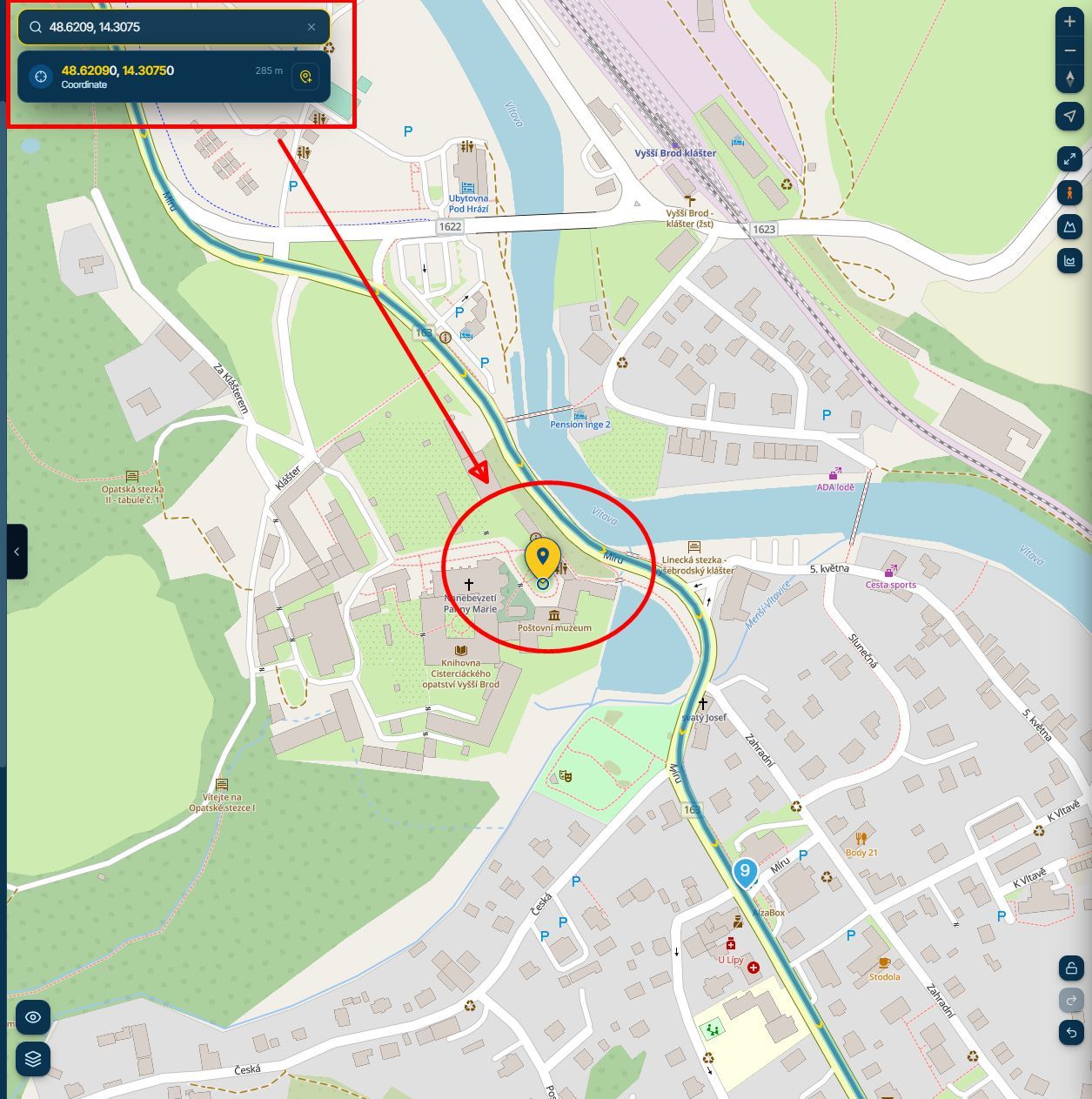
When searching for a location on the map using GPS coordinates, the result is often not 100% accurate.
The corresponding yellow marker cannot be moved, but it would be very useful to be able to drag it and place it at the exact location after verifying the correct position on the map, and then convert it into a waypoint.Thanks
-
Hi,
When searching for a location on the map using GPS coordinates, the result is often not 100% accurate.
The corresponding yellow marker cannot be moved, but it would be very useful to be able to drag it and place it at the exact location after verifying the correct position on the map, and then convert it into a waypoint.Thanks

@Corrado-Miniati
The yellow marker represents the exact center point of the coordinates you provided. The surface area covered by your coordinates may vary, as different types of coordinate systems have different levels of precision.
The yellow marker appears at that location, but it is not yet a waypoint. Did a screen appear asking if you wanted to set that location as a waypoint on the map? If you accepted that, you will see the familiar blue marker, which you can then move around as you please. -
@Corrado-Miniati
The yellow marker represents the exact center point of the coordinates you provided. The surface area covered by your coordinates may vary, as different types of coordinate systems have different levels of precision.
The yellow marker appears at that location, but it is not yet a waypoint. Did a screen appear asking if you wanted to set that location as a waypoint on the map? If you accepted that, you will see the familiar blue marker, which you can then move around as you please.
@TorqueRider
Thanks for the feedback.
Yes, I did that, but what I was asking for is simpler with fewer steps: first move the yellow icon and then convert it into a via waypoint. -
@TorqueRider
Thanks for the feedback.
Yes, I did that, but what I was asking for is simpler with fewer steps: first move the yellow icon and then convert it into a via waypoint.
@Corrado-Miniati
I understood what you meant.
And in many cases, it would certainly work—provided, of course, that you are absolutely certain about the correctness and accuracy of your coordinates.
However, there will inevitably be awkward situations where the location turns out to be in the wrong place, or in a spot to which no route can be generated. Personally, I often find that coordinates from Google don’t actually correspond to the specific point I’m looking for.
For that reason, if I were asked, I would not be in favor of your proposal. -
@Corrado-Miniati
I understood what you meant.
And in many cases, it would certainly work—provided, of course, that you are absolutely certain about the correctness and accuracy of your coordinates.
However, there will inevitably be awkward situations where the location turns out to be in the wrong place, or in a spot to which no route can be generated. Personally, I often find that coordinates from Google don’t actually correspond to the specific point I’m looking for.
For that reason, if I were asked, I would not be in favor of your proposal.
@TorqueRider
In fact, that is what happens regularly.
Hello! It looks like you're interested in this conversation, but you don't have an account yet.
Getting fed up of having to scroll through the same posts each visit? When you register for an account, you'll always come back to exactly where you were before, and choose to be notified of new replies (either via email, or push notification). You'll also be able to save bookmarks and upvote posts to show your appreciation to other community members.
With your input, this post could be even better 💗
Register Login-
 011239
-
 0645
-
0526
-
 07220
-
 0323
-
01379
-
0237
-
 0241