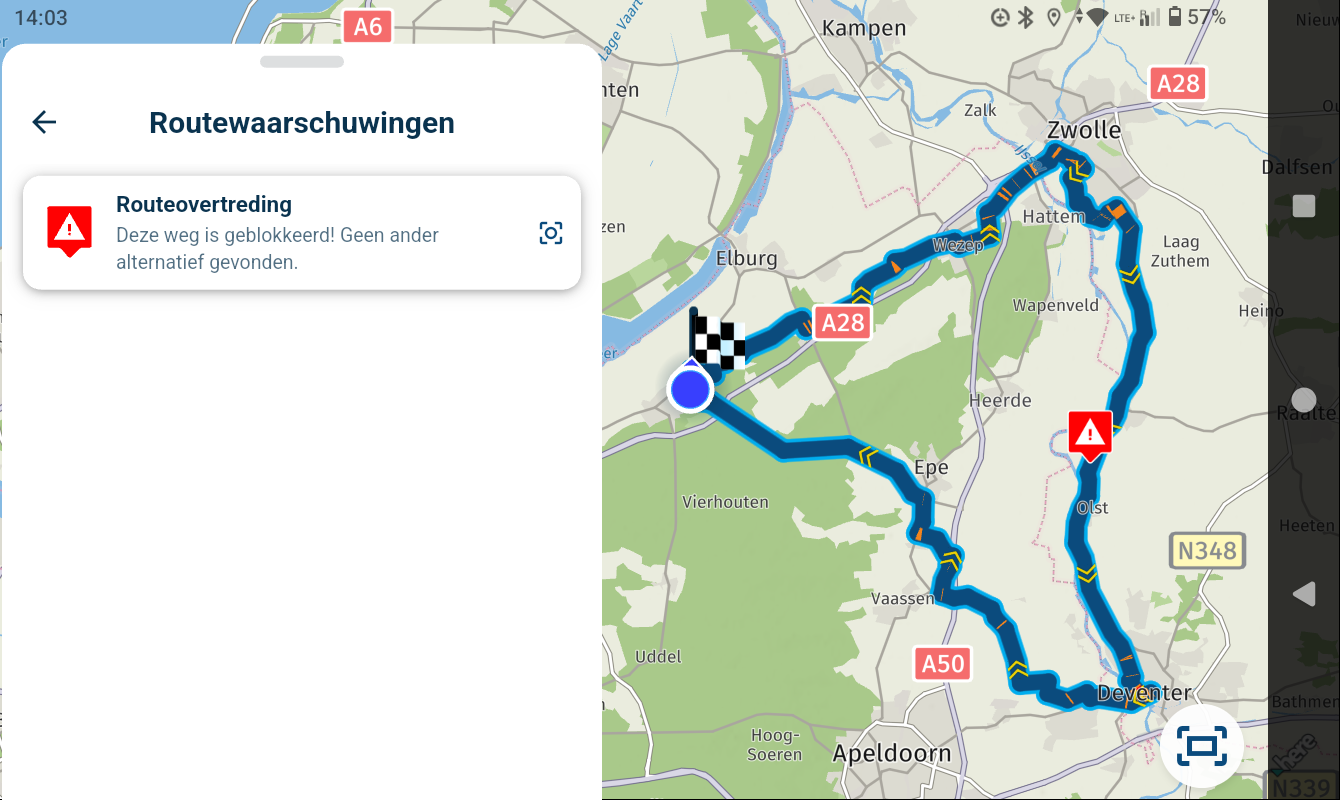
I’ve just tried V6. A few suggestions.
-
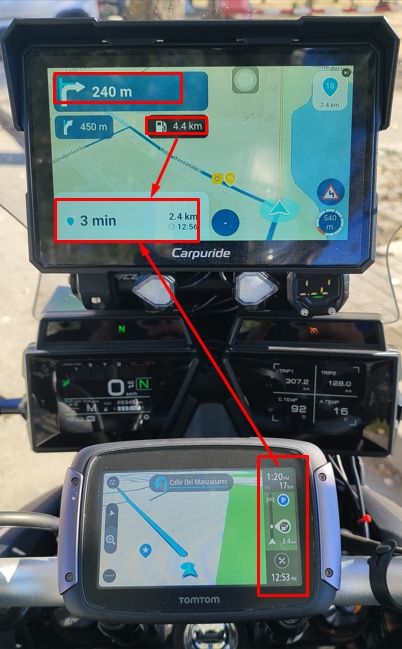
I have just tried V6, and I must say that an excellent job has been done with this new version; it represents a significant leap in quality. I have nothing but praise for the developer(s). That said, I would like to offer a few suggestions. I own a TomTom Rider 550, and I recently purchased a Carpuride 702 Plus—which runs on Android 14—on which I have installed the MyRoute-app (I do not use Android Auto). I have included an image of my setup to illustrate my suggestions. I must acknowledge that TomTom has managed to fit all the necessary information onto a 5-inch screen, and one of its greatest strengths is the side progress bar, which I find very useful. I believe there is ample room in the white space at the bottom left to place such a progress bar; that area currently feels underutilized. In any case, it could be implemented just as TomTom does—by making the progress bar optional. If you look closely, TomTom’s bar also displays upcoming gas stations along the route. This approach could be adopted, potentially replacing the black box that currently shows the distance to the next gas station, thereby freeing up more space for the map. The Carpuride 702 is sufficiently large (7 inches), and it works well for me as it is; I would simply add the progress bar in that space, where it would fit perfectly. Additionally, the blue box in the top-left corner seems excessively large and could be reduced. I offer these suggestions primarily with smaller devices in mind.

I have just tried V6, and I must say that an excellent job has been done with this new version; it represents a significant leap in quality. I have nothing but praise for the developer(s). That said, I would like to offer a few suggestions. I own a TomTom Rider 550, and I recently purchased a Carpuride 702 Plus—which runs on Android 14—on which I have installed the MyRoute-app (I do not use Android Auto). I have included an image of my setup to illustrate my suggestions. I must acknowledge that TomTom has managed to fit all the necessary information onto a 5-inch screen, and one of its greatest strengths is the side progress bar, which I find very useful. I believe there is ample room in the white space at the bottom left to place such a progress bar; that area currently feels underutilized. In any case, it could be implemented just as TomTom does—by making the progress bar optional. If you look closely, TomTom’s bar also displays upcoming gas stations along the route. This approach could be adopted, potentially replacing the black box that currently shows the distance to the next gas station, thereby freeing up more space for the map. The Carpuride 702 is sufficiently large (7 inches), and it works well for me as it is; I would simply add the progress bar in that space, where it would fit perfectly. Additionally, the blue box in the top-left corner seems excessively large and could be reduced. I offer these suggestions primarily with smaller devices in mind.
Hello,
I’m curious whether the next turn instruction—specifically the text below the arrow—is displayed in a larger font in the new Android app. In the previous version, the font size in that area was simply too small for a mobile phone, making it difficult to read while riding a motorcycle in bright sunlight. During a 1,000 km trip, I found that even my TomTom Rider 400 offered better visibility regarding the distance to the next turn. I would really appreciate a larger font size for this information. It seems to be well-implemented on your Carpuride unit. I agree with you that the info bar on the TomTom is well-designed.See here:
https://forum.myrouteapp.com/topic/11044/font-for-the-distance-to-the-next-turn-to-smal -

En la Carpuride 702 plus, todo se ve perfectamente, incluso diría que demasiado grande. No tengo ninguna queja de como se ve. Pero si creo que se puede optimizar de manera de que quede mas espacio para el mapa. Yo creo que con una barra de progreso bien planificada se puede quitar cosas de la pantalla (por ejemplo la de la gasolinera proxima). Entiendo que complacer a todos es imposible Cada uno tiene unas necesidades y gustos diferentes. Pero la barra de progreso puede ser opcional como en TomTom. Incluso en TomTom se puede establecer el tamaño. Hay 2 tamaños. Y tb está la opción de quitarla. La Barra de progreso en muy util y bien diseñada, seguro sería un gran aporte a esta excelente aplicacion.
-
I also love the TomTom progress bar. I use its wide version, which offers even more info: distance to the next gas station and the time loss at the next delay on the route.
-
La verdad es que nunca he probado la barra ancha. Ya me parece mas que suficiente la angosta, pero voy a probarla a ver que tal. Esta posibilidad de tener o no tener una barra de progreso, mas ancha o mas delgada es lo que sugiero a los desarrolladores de MRA incluyan.
-
I also miss a progression bar as used in the TomTom Rider and even in the Garmin XT (in that case for approaching traffic jam or road worksy The distance to the next Gas station is in deed very convenient.
-
I have just tried V6, and I must say that an excellent job has been done with this new version; it represents a significant leap in quality. I have nothing but praise for the developer(s). That said, I would like to offer a few suggestions. I own a TomTom Rider 550, and I recently purchased a Carpuride 702 Plus—which runs on Android 14—on which I have installed the MyRoute-app (I do not use Android Auto). I have included an image of my setup to illustrate my suggestions. I must acknowledge that TomTom has managed to fit all the necessary information onto a 5-inch screen, and one of its greatest strengths is the side progress bar, which I find very useful. I believe there is ample room in the white space at the bottom left to place such a progress bar; that area currently feels underutilized. In any case, it could be implemented just as TomTom does—by making the progress bar optional. If you look closely, TomTom’s bar also displays upcoming gas stations along the route. This approach could be adopted, potentially replacing the black box that currently shows the distance to the next gas station, thereby freeing up more space for the map. The Carpuride 702 is sufficiently large (7 inches), and it works well for me as it is; I would simply add the progress bar in that space, where it would fit perfectly. Additionally, the blue box in the top-left corner seems excessively large and could be reduced. I offer these suggestions primarily with smaller devices in mind.
Hello,
I’m curious whether the next turn instruction—specifically the text below the arrow—is displayed in a larger font in the new Android app. In the previous version, the font size in that area was simply too small for a mobile phone, making it difficult to read while riding a motorcycle in bright sunlight. During a 1,000 km trip, I found that even my TomTom Rider 400 offered better visibility regarding the distance to the next turn. I would really appreciate a larger font size for this information. It seems to be well-implemented on your Carpuride unit. I agree with you that the info bar on the TomTom is well-designed.See here:
https://forum.myrouteapp.com/topic/11044/font-for-the-distance-to-the-next-turn-to-smal -
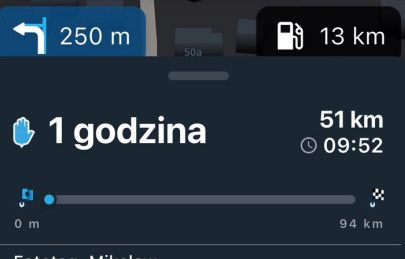
As we already have a progress bar at the bottom that can easily be shown if needed, I suggested placing some information there, such as the two nearest petrol stations. This information could be useful. I also miss the old TT bar.

-

Thanks for all the feedback!
Already working on improvements for the next update -
whateve we add , I hope the user can select wether its shown or not (like we can for some already).
For my use cases I am e.g. not interested in the fuel stations or progress bar.
But what I do miss is to have the name of the next point visible all the time (and not only just before arriving there). I know my points by name (and not by number) and I would like to know where I am driving to... -
Si, lo ideal es que cada usuario pueda activar o desactivar lo que desea. Y sobre lo del nombre visible del próximo punto, me parece una excelente idea.. tb esto podria ser activable o no ..
Hello! It looks like you're interested in this conversation, but you don't have an account yet.
Getting fed up of having to scroll through the same posts each visit? When you register for an account, you'll always come back to exactly where you were before, and choose to be notified of new replies (either via email, or push notification). You'll also be able to save bookmarks and upvote posts to show your appreciation to other community members.
With your input, this post could be even better 💗
Register Login-
0764
-
 06183
-
05100
-
018127
-
1416157
-
0479
-
 0490
-
 0428