Allow the last entered point to be set as a via point
-

When I’m working my way through creating a route, I often build up the route from point to point, rather than entering the destination point first.
So I click on a spot for my next waypoint and it is correctly added to the end of the route.
However If I now change that final waypoint to a via point (6 in this example):
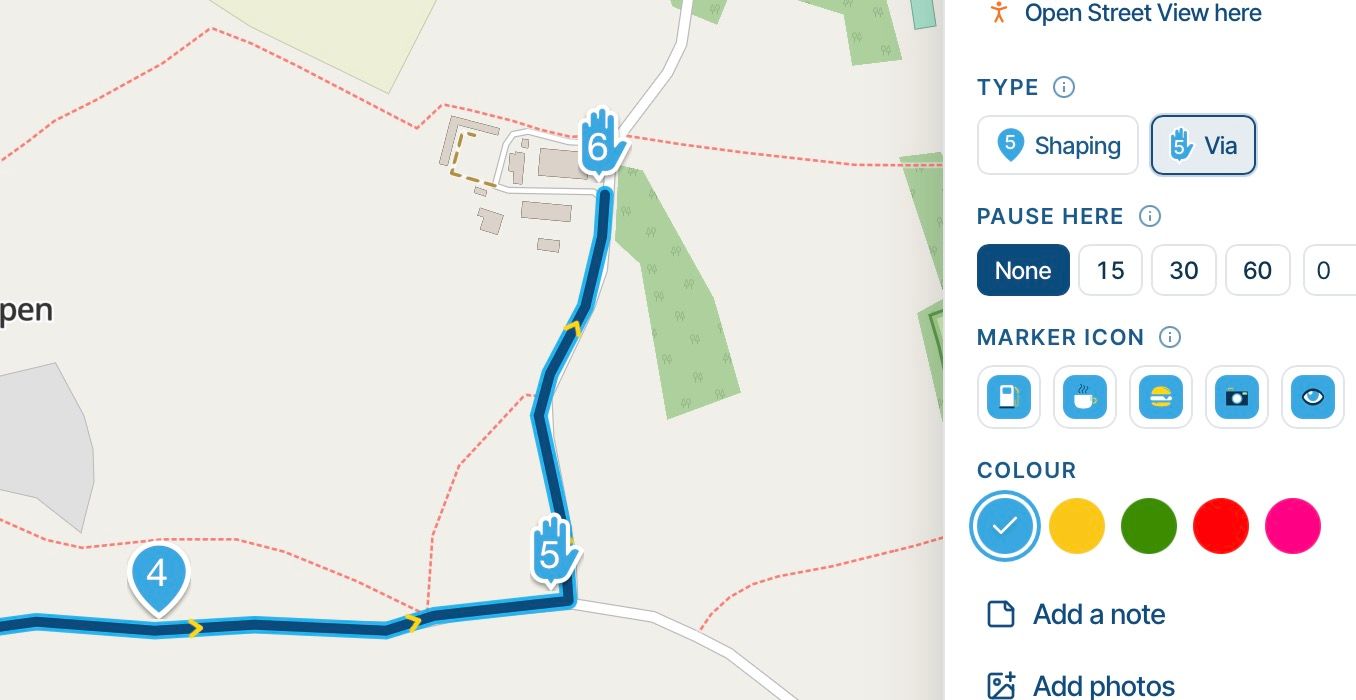
Then add another waypoint (7), it silently turns my via point (6) back into a shaping point:
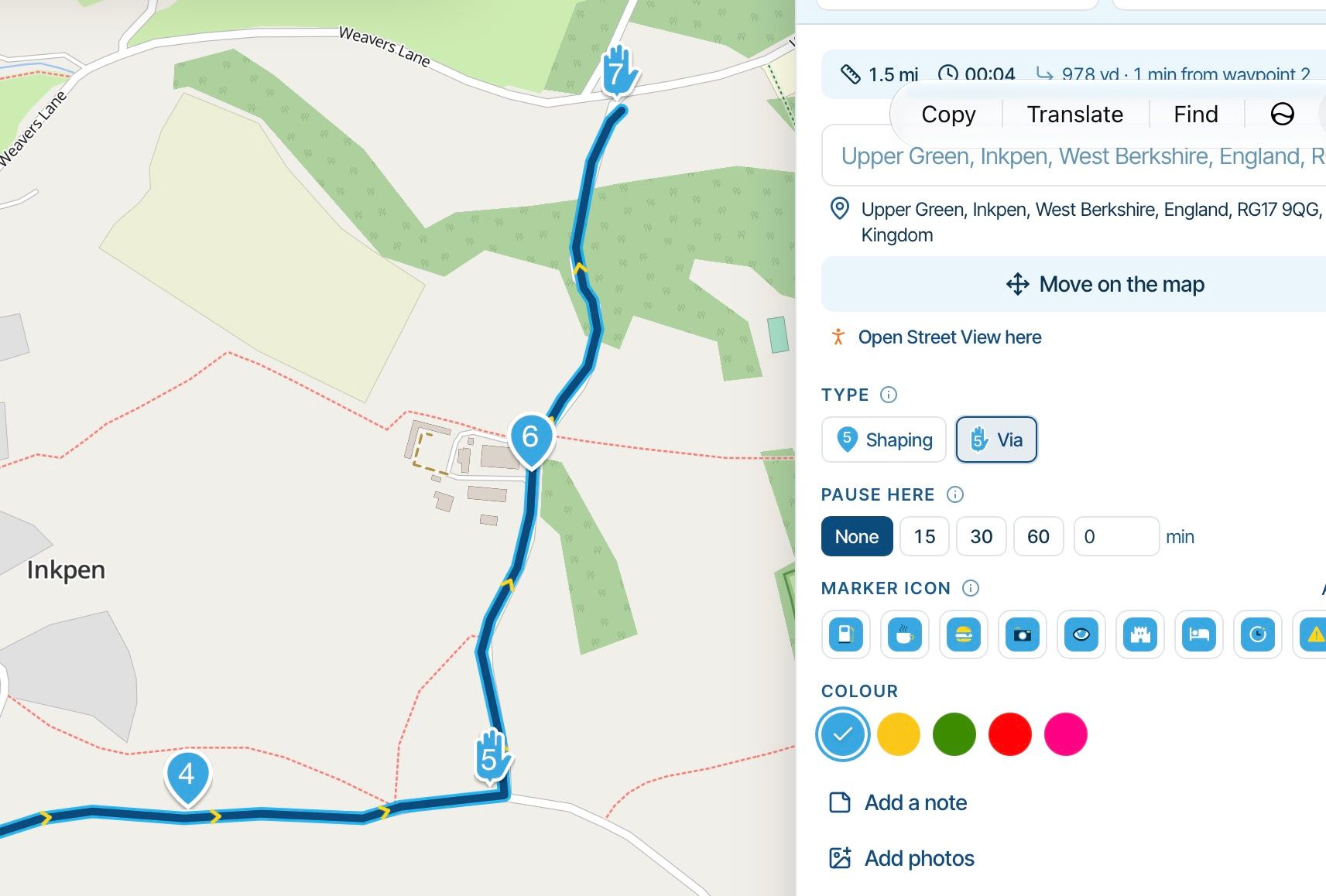
This is a slight variant of a behaviour in the previous planner which I found annoying. It treats the last point you have entered as some kind of special case. Actually, if I’m entering a route point by point, I want to be able to mark that as a waypoint or via point as I would do for any point in the middle of the route, and then move on with the next point in my map, expecting it to remain what I’ve set it as.
(If for internal reasons you need the endpoint to be different from a viapoint, why not just do that conversion at the point of saving?)
-
When I’m working my way through creating a route, I often build up the route from point to point, rather than entering the destination point first.
So I click on a spot for my next waypoint and it is correctly added to the end of the route.
However If I now change that final waypoint to a via point (6 in this example):
Then add another waypoint (7), it silently turns my via point (6) back into a shaping point:
This is a slight variant of a behaviour in the previous planner which I found annoying. It treats the last point you have entered as some kind of special case. Actually, if I’m entering a route point by point, I want to be able to mark that as a waypoint or via point as I would do for any point in the middle of the route, and then move on with the next point in my map, expecting it to remain what I’ve set it as.
(If for internal reasons you need the endpoint to be different from a viapoint, why not just do that conversion at the point of saving?)

I don't see why this must be changed, It works fine asi it is now.
You can mark "last point" wile you are creating your route line with a color to identify later to add pause, text, or other indications.
This behavior is from first days of planner, not new.
Regards,
-
I don’t want to go back and add things later, I want to build my route up point by point. So I click on a village, and I want to make that a via point. The new app (unlike the old one) appears to let me do that. I just want that to do what it says, not to automatically and silentlyturn it back into a shaping point when I add the next point on my route.
That seems to me to be the intuitive behaviour. Of course many people will have already entered the start and end point and be building a route from the middle, but not everyone works that way.
-
I don’t want to go back and add things later, I want to build my route up point by point. So I click on a village, and I want to make that a via point. The new app (unlike the old one) appears to let me do that. I just want that to do what it says, not to automatically and silentlyturn it back into a shaping point when I add the next point on my route.
That seems to me to be the intuitive behaviour. Of course many people will have already entered the start and end point and be building a route from the middle, but not everyone works that way.

@Anonymouse ...the entered last point is always a Via Point (because you wnat definitively reach it).
If you enter a new last point, this wil become a Via Point and the former last point turns to Shaping Point... -
Yes I know. My point is that when I am creating a route step by step I dont want this counterintuitive logic:
1 create point which is automatically a via point; enter notes, set up icon, etc
2 add next point
3 go back and edit 1 to make it a via point because it has changed itself.That constant backtracking is what I have always had to do but in the beta there is a nice easy button to explicitly make it a via point as I go along. So all I’m asking for is that it sticks.
-
Yes I know. My point is that when I am creating a route step by step I dont want this counterintuitive logic:
1 create point which is automatically a via point; enter notes, set up icon, etc
2 add next point
3 go back and edit 1 to make it a via point because it has changed itself.That constant backtracking is what I have always had to do but in the beta there is a nice easy button to explicitly make it a via point as I go along. So all I’m asking for is that it sticks.
@Anonymouse ...ah got it. By default, each new entered Waypoint becomes a Shaping Point - except the first and last point; they are always Via Points.
Would be helpful in your case, in the moment, you are entering a point, a question asks: as Via- or as Shaping Point.
I'm working a bit different: I know where to start, setting the first Waypoint. Then I know roughly my target/destination an enter the second Waypoint (which is the last Waypoint). Immediatelly I see the distance and can decide it's ok, or to far away for a day trip.
If distance is roughly ok, I search for lovely route and force the rout line to a dedicated street. This gives me Shaping Points (in the rigth Order).
Then - depending on distance and time - I enter additional Way Points for Restaurant, or Fuel stop. Because that are only a couple of, it's not a big work to change them to Via Points, because I'm changing the colour, so it's not an extra effort to change in this moment also the type. -
Yes you have got it. Sometimes we set up a route by picking start, end, then aending interesting stopping points. But sometimes we say let’s go that that village, then that castle, etc; then come back and refine the route by entering shaping points so it’s fun to drive. I think both ways of working are necessary and valid in MRA.
-

I indeed won’t make changes to this
Hello! It looks like you're interested in this conversation, but you don't have an account yet.
Getting fed up of having to scroll through the same posts each visit? When you register for an account, you'll always come back to exactly where you were before, and choose to be notified of new replies (either via email, or push notification). You'll also be able to save bookmarks and upvote posts to show your appreciation to other community members.
With your input, this post could be even better 💗
Register Login-
 020283
-
01349
-
 01144
-
 2201.4k
-
0831
-
08111
-
0742
-
0722