Skip to content
  • Categories
  • Recent
  • Popular
  • Support
  • MyRoute-app
Collapse
Brand Logo

MRA Community Forum

  1. Home
  2. MyRoute-app Routeplanner
  3. [Web] Problems, Bugs and other Issues
  4. Can't get MRA to use a ection of N20 road near Merens-les-Vals, France to Andorra

Can't get MRA to use a ection of N20 road near Merens-les-Vals, France to Andorra

Scheduled Pinned Locked Moved [Web] Problems, Bugs and other Issues
10 Posts 5 Posters 428 Views 2 Watching
  • Oldest to Newest
  • Newest to Oldest
  • Most Votes
Reply
  • Reply as topic
Log in to reply
This topic has been deleted. Only users with topic management privileges can see it.
  • Steve Kelly 0 Offline
    Steve Kelly 0 Offline
    Steve Kelly 0
    wrote last edited by
    #1

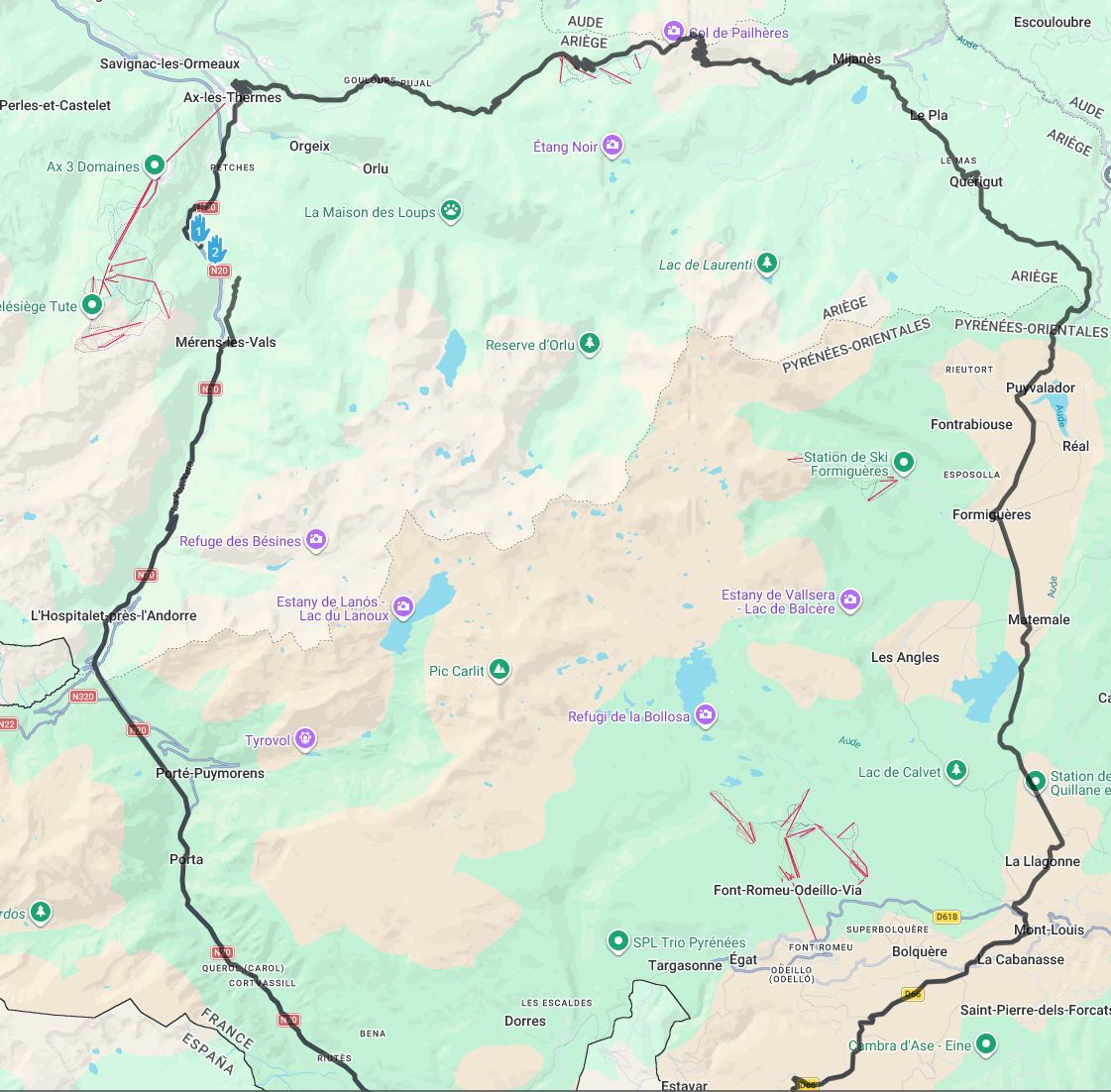
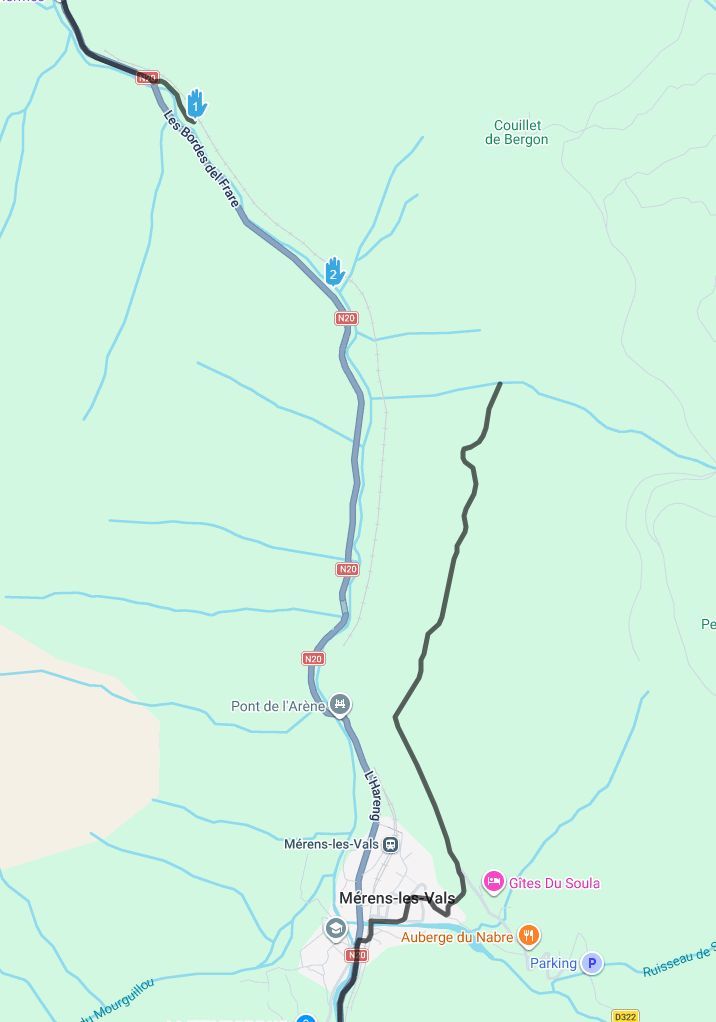
    Hi folks - trying to plan a route from France to Andorra and MRA keeps wanting to send me on a 77 mile detour between 2 points on the N20 road - screenshots show what is happening - can't seem to find any road closures or other issues to prevent such a journey - Google Maps runs down this road fine, but MRA seems to have some issue with its map, showing the road deviating away from themra-1.jpg mra-2.jpg N20 and stopping in the middle of the landscape 🙂

    Does anyone know how to fix this ? i've tried adjusting the waypoint and adding in more but it simply won't ride down this road. Just bought a lifetime sub for Gold and the Nav package and this is my first route i'm trying to plan out. Hope its not a sign of things to come where i need to revert to Google maps.

    1 Reply Last reply
    1
    • richard 3v Offline
      richard 3v Offline
      richard 3v
      wrote last edited by richard 3v
      #2

      On my screen via points 1 & 2 do not appear to be on the road but in the river ??

      May or may not be the issue!

      Steve Kelly 0 1 Reply Last reply
      0
      • richard 3v Offline
        richard 3v Offline
        richard 3v
        wrote last edited by
        #3

        Just put the same points into my system and it works fine, so I hope the above is your issue.

        1 Reply Last reply
        0
        • richard 3v richard 3v

          On my screen via points 1 & 2 do not appear to be on the road but in the river ??

          May or may not be the issue!

          Steve Kelly 0 Offline
          Steve Kelly 0 Offline
          Steve Kelly 0
          wrote last edited by
          #4

          @richard-3v Thanks Richard - its the same if you adjust the waypoints to be bang on the road - sorry i quickly recreated Waypoints 1 & 2 as a demo, my route was more complex until this point so was trying to simplify the question/screenshot. (sorry for late reply - had to wait 3600 seconds before it would let me post! (new user rules)).

          Brian McG 1 Reply Last reply
          2
          • Stevedo 6 0 Online
            Stevedo 6 0 Online
            Stevedo 6 0
            wrote last edited by
            #5

            I had exactly the same issue a couple of months ago heading in the opposite direction on that exact same point. I ended up planning a different route. I did however determine that there seemed to be no reason why MRA would not route that way i.e. no road closures etc.

            1 Reply Last reply
            0
            • richard 3v Offline
              richard 3v Offline
              richard 3v
              wrote last edited by
              #6

              Hi Steve, maybe try making your route public so it can be opened by others.
              Someone (most people) will have more idea than me 🙂

              Stevedo 6 0 1 Reply Last reply
              0
              • Steve Kelly 0 Steve Kelly 0

                @richard-3v Thanks Richard - its the same if you adjust the waypoints to be bang on the road - sorry i quickly recreated Waypoints 1 & 2 as a demo, my route was more complex until this point so was trying to simplify the question/screenshot. (sorry for late reply - had to wait 3600 seconds before it would let me post! (new user rules)).

                Brian McG Away
                Brian McG Away
                Brian McG
                wrote last edited by Brian McG
                #7

                @Steve-Kelly-0 I can only get the issue you show in the first post if I use OpenStreetMap as the route calculate option
                If I use Here or TomTom for the route calculation it is fine as you say it is with Google
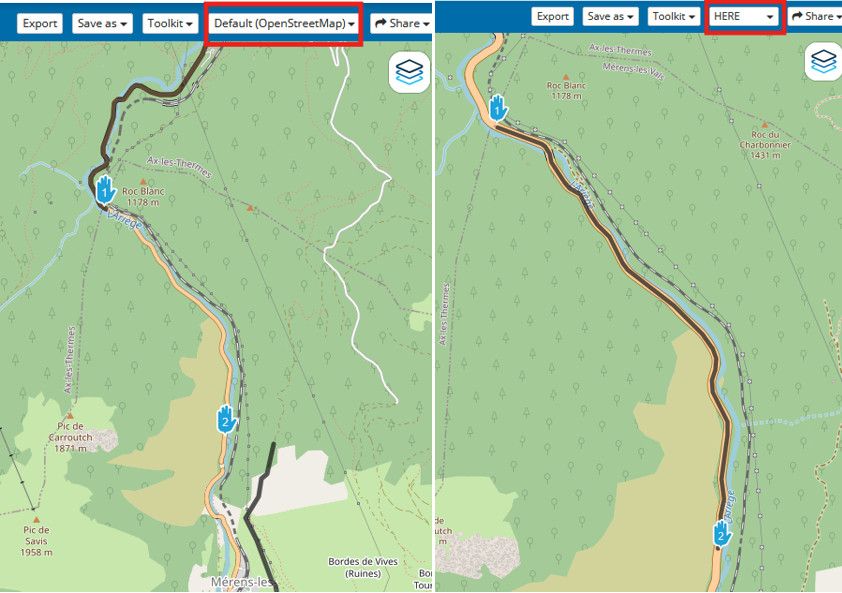
                3df2c25b-5e5d-4e76-93d6-ff44132d5100-image.jpeg

                When you have 1 routing calculator giving you a bad route it is more than likely that routing calculator is working with bad/old data
                If you actually go to the OpenStreetMap site your will see the it routes down the N20 with no problem as well
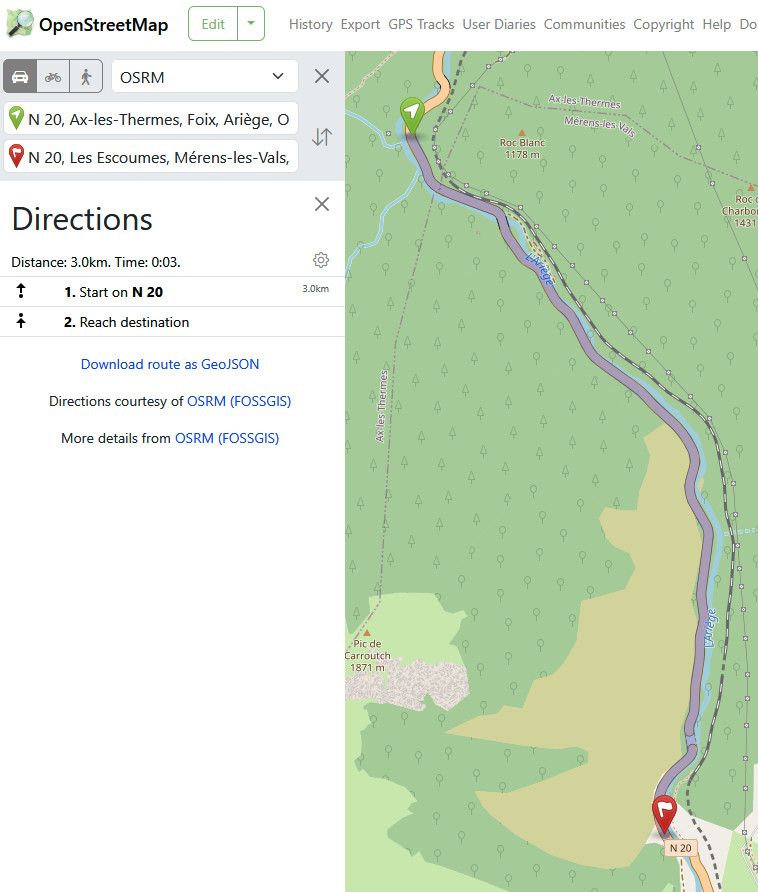
                6131672e-1ae9-4063-b8ad-9390b984a05e-image.jpeg

                This tells you that the issue is with the OpenStreetMap data used by MRA,
                it is known that MRA do not regularly update their OSM data, they can be very slow to update so you will come across issues like this when using the OSM route calculator in MRA
                The trick is to check & see if you also get the bad routing calculation on the OSM site

                BlackView BV7100, Android 12
                Navigate "Routes as Tracks" in Offline mode with Offline Maps
                No Wifi, no internet, no interruptions, works well

                Steve Kelly 0 1 Reply Last reply
                0
                • richard 3v richard 3v

                  Hi Steve, maybe try making your route public so it can be opened by others.
                  Someone (most people) will have more idea than me 🙂

                  Stevedo 6 0 Online
                  Stevedo 6 0 Online
                  Stevedo 6 0
                  wrote last edited by
                  #8

                  @richard-3v

                  Hi Richard, as indicated, I ended up planning a different route that avoided that section of road due to the issue I was having. Therefore, I don't have a route with the offending section of road in it. Sorry.

                  1 Reply Last reply
                  0
                  • maurizio 0 Offline
                    maurizio 0 Offline
                    maurizio 0
                    wrote last edited by
                    #9

                    It is the same for me. The routing is wrong only in openstreetmaps. I normally calculate using HERE because I often transfer the route to a Garmin. I drove that road last year, navigation ok.

                    1 Reply Last reply
                    0
                    • Brian McG Brian McG

                      @Steve-Kelly-0 I can only get the issue you show in the first post if I use OpenStreetMap as the route calculate option
                      If I use Here or TomTom for the route calculation it is fine as you say it is with Google
                      3df2c25b-5e5d-4e76-93d6-ff44132d5100-image.jpeg

                      When you have 1 routing calculator giving you a bad route it is more than likely that routing calculator is working with bad/old data
                      If you actually go to the OpenStreetMap site your will see the it routes down the N20 with no problem as well

                      6131672e-1ae9-4063-b8ad-9390b984a05e-image.jpeg

                      This tells you that the issue is with the OpenStreetMap data used by MRA,
                      it is known that MRA do not regularly update their OSM data, they can be very slow to update so you will come across issues like this when using the OSM route calculator in MRA
                      The trick is to check & see if you also get the bad routing calculation on the OSM site

                      Steve Kelly 0 Offline
                      Steve Kelly 0 Offline
                      Steve Kelly 0
                      wrote last edited by
                      #10

                      @Brian-McG Thank you Brian !!! - this works perfectly - will keep on planning my jaunt round Europe with a little more confidence in MRA 🙂

                      1 Reply Last reply
                      0

                      Hello! It looks like you're interested in this conversation, but you don't have an account yet.

                      Getting fed up of having to scroll through the same posts each visit? When you register for an account, you'll always come back to exactly where you were before, and choose to be notified of new replies (either via email, or push notification). You'll also be able to save bookmarks and upvote posts to show your appreciation to other community members.

                      With your input, this post could be even better 💗

                      Register Login
                      Reply
                      • Reply as topic
                      Log in to reply
                      • Oldest to Newest
                      • Newest to Oldest
                      • Most Votes


                      ACTIVE USERS
                      Stevedo 6 0
                      Stevedo 6 0
                      Brian McG
                      Brian McG
                      richard 3v
                      richard 3v
                      Steve Kelly 0
                      Steve Kelly 0
                      maurizio 0
                      maurizio 0
                      POPULAR TOPICS
                      • GPX Versions 1.1 vs 1.2 for Garmin Visually Explained
                        Steve Jarrell
                        Steve Jarrell
                        7
                        160
                        10.0k

                      • Audio cuttet via Bluetooth
                        Corjan Meijerink
                        Corjan Meijerink
                        1
                        67
                        22.1k

                      • Linker in MRA kleurt blauw (alles geselecteerd)
                        white.mouse
                        white.mouse
                        0
                        7
                        71

                      • Map definition/ clarity
                        Guzzist
                        Guzzist
                        0
                        7
                        89

                      • The compas direction on the elevation circle is wrong
                        CD130
                        CD130
                        0
                        21
                        383

                      • Lost all route points after repeatedly hitting Ctrl+Z (Undo)
                        white.mouse
                        white.mouse
                        0
                        4
                        22

                      • Auto skip many waypoints by itself while I was on route. [5.2.0 - 474]
                        paul69
                        paul69
                        0
                        31
                        1.1k

                      • Offline Track Navigation - Path Errors with Large Distance Between Points
                        paul69
                        paul69
                        0
                        5
                        234

                      MY GROUPS
                      • Login

                      • Login or register to search.
                      • First post
                        Last post
                      0
                      • Categories
                      • Recent
                      • Popular
                      • Support
                      • MyRoute-app