Skip to content
  • Categories
  • Recent
  • Popular
  • Support
  • MyRoute-app
Collapse
Brand Logo

MRA Community Forum

  1. Home
  2. The MyRoute-app
  3. [App] Android Auto & CarPlay
  4. Carpe Iter Adventure Control and Carpuride

Carpe Iter Adventure Control and Carpuride

Scheduled Pinned Locked Moved [App] Android Auto & CarPlay
10 Posts 2 Posters 317 Views 2 Watching
  • Oldest to Newest
  • Newest to Oldest
  • Most Votes
Reply
  • Reply as topic
Log in to reply
This topic has been deleted. Only users with topic management privileges can see it.
  • Massimo Cardoneundefined Offline
    Massimo Cardoneundefined Offline
    Massimo Cardone
    wrote last edited by
    #1

    Hi everyone,

    I bought the Carpe Itel Adventure Control, which arrived yesterday, and I’m installing it today.

    I downloaded the Carp Iter app and successfully established a Bluetooth connection. I also switched the profile to MyRouteapp, and it actually works—but only on the app on my phone, not on my Carpuride.

    I can use the controller to zoom, move left, move right, etc., but it has no effect on Carpuride. Why not? While navigating, I keep my phone in the tank bag and navigate exclusively with Carpuride.

    How can I get the Carpe Itel Adventure Control to work with Carpuride as well?

    Best regards,
    Massimo

    1 Reply Last reply
    0
    • Hubert Thoringundefined Offline
      Hubert Thoringundefined Offline
      Hubert Thoring
      Valued contributor
      wrote last edited by
      #2

      @massimo-cardone
      You have to connect the Carpe Itel Adventure Control to the Carpuride on Android, and then start the MRA app sep. on the Carpuride on Android, select the controller under input settings, this has nothing to do with your mobile phone.
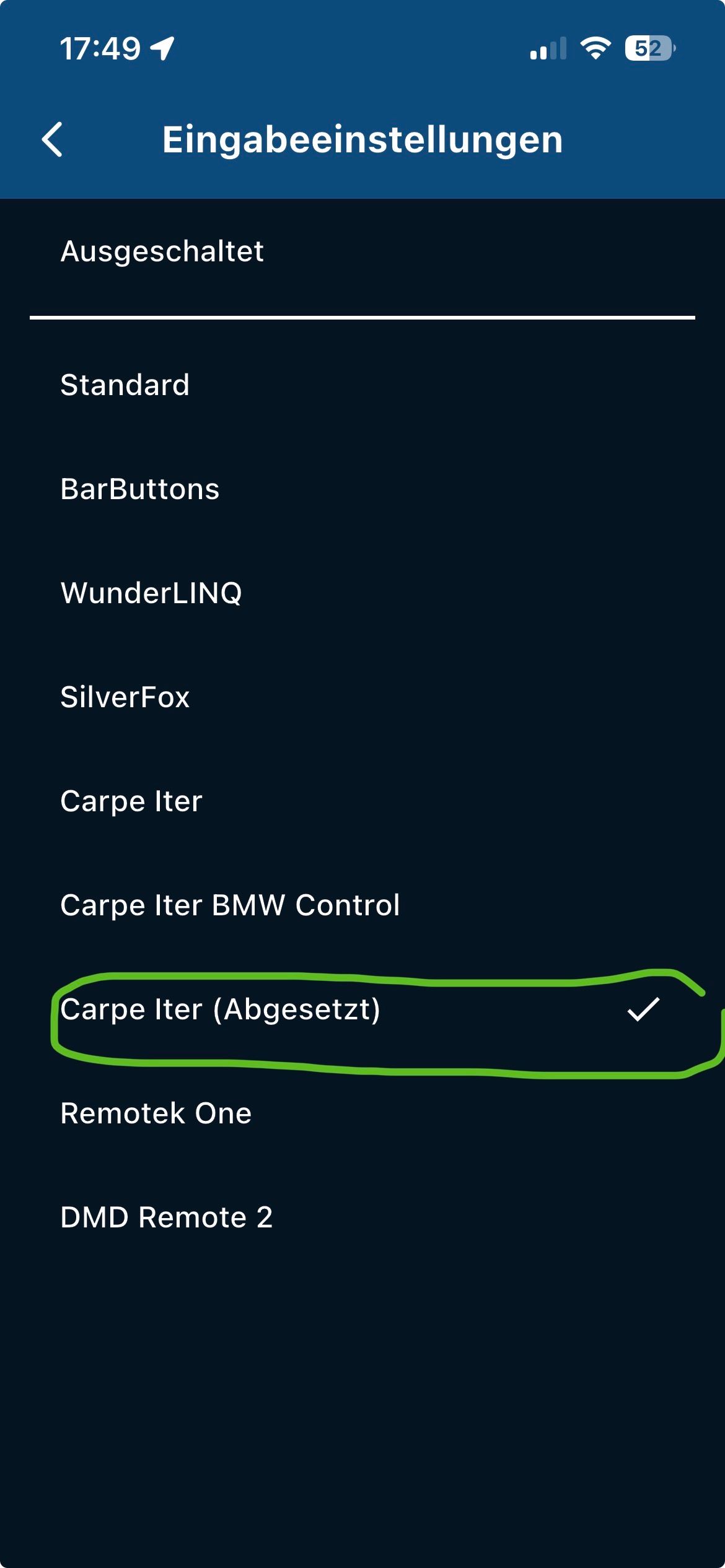
      IMG_9851.jpeg

      VG Hubert
      Beta Test "Next App" dazu die Hardware .
      iPad 9. Gen iOS 26.5.2/ iPhone 16e iOS 26.5/ Navi iPhone Xr iOS 18.7.9 / PC mit MS Win11 /❗️MyRoute-App im Cradel und Remotek-One❗️ Info zu MRA & Remotek One

      1 Reply Last reply
      0
      • Massimo Cardoneundefined Offline
        Massimo Cardoneundefined Offline
        Massimo Cardone
        wrote last edited by
        #3

        Hello Hubert

        Thank you very much for the input. I immediately went to the garage after your post, disconnected the Bluetooth connection to my mobile phone and tried to establish a Bluetooth connection with the Carpuride, but that doesn't work.

        1 Reply Last reply
        0
        • Hubert Thoringundefined Offline
          Hubert Thoringundefined Offline
          Hubert Thoring
          Valued contributor
          wrote last edited by Hubert Thoring
          #4

          @massimo-cardone
          Now I just noticed it... the devices come from different companies !!

          • Carpuride is a CarPlay / Android display depending on the model you can operate it with the WW.

          • Carpe-iter has is a tablet on Android

          • The Carpe-Itel Adventure Control is only for the tablet, so you can then control the apps on the tablet

          Do you have something that probably doesn't fit together or how do I see it?

          Which Carpuride display did you even buy?

          Do you happen to drive a BMW with navigation system mount in which you put the Carpuride, as for example with an R1250GS with WW?

          Then read the manual of the two parts.

          VG 👋

          VG Hubert
          Beta Test "Next App" dazu die Hardware .
          iPad 9. Gen iOS 26.5.2/ iPhone 16e iOS 26.5/ Navi iPhone Xr iOS 18.7.9 / PC mit MS Win11 /❗️MyRoute-App im Cradel und Remotek-One❗️ Info zu MRA & Remotek One

          1 Reply Last reply
          0
          • Hubert Thoringundefined Offline
            Hubert Thoringundefined Offline
            Hubert Thoring
            Valued contributor
            wrote last edited by
            #5

            @massimo-cardone
            So, according to your description, I now suspect that you run an Android phone with MRA and have now running Android Auto on the Carpuride to see MRA navigation on the display.

            Now you want to control the app with the Carpe Itel Adventure Control,...

            That's actually not possible !!!

            • not under CarPlay (CP)

            • not under Android Auto (AA)

            An unreleased solution:

            I use Remotek One as a BT keyboard, so I can zoom +/- and skip waypoints when a mobile phone screen is switched on.

            This is also transferred to a CP display..!

            I don't know if that's possible with the Carpe Itel Adventure Control.

            So pair with the mobile phone and leave the display of the mobile phone on, then +/- zoom and AA pairing and see if it works ...

            For Carpuride Display there are as I said solutions for the BMW navi bracket the WW e.g. B. the W702BS

            VG Hubert
            Beta Test "Next App" dazu die Hardware .
            iPad 9. Gen iOS 26.5.2/ iPhone 16e iOS 26.5/ Navi iPhone Xr iOS 18.7.9 / PC mit MS Win11 /❗️MyRoute-App im Cradel und Remotek-One❗️ Info zu MRA & Remotek One

            1 Reply Last reply
            0
            • Massimo Cardoneundefined Offline
              Massimo Cardoneundefined Offline
              Massimo Cardone
              wrote last edited by
              #6

              I have a Carpuride W702S Pro and ride a Ducati Multistrada, not a BMW. Okay, so I bought something that doesn’t work the way I expected and isn’t compatible. Great. As a result, the fault lies with me.

              But why doesn’t Carpe Iter state this clearly somewhere on their website? It’s very likely that it’s mentioned somewhere. After all, they support various navigation apps like Calimoto, Kurviger, and MyRoute-app, etc. They should know that these days, many motorcyclists use such displays via Apple CarPlay or Android Auto.

              So they really should have posted this prominently somewhere. As I said, I’m not looking for someone to blame, and I don’t want to shift the blame away from myself, but a note like that would have been helpful.

              Now I’ve thrown EUR 175 out the window. Great!

              1 Reply Last reply
              0
              • Hubert Thoringundefined Offline
                Hubert Thoringundefined Offline
                Hubert Thoring
                Valued contributor
                wrote last edited by Hubert Thoring
                #7

                Test it with the mobile phone display on, see the video. I have a Remotek One as a BT keyboard, but this application is not officially supported for CP / AA but works in this example.

                On the left a CP display and on the right iPhone Xr

                Link zum Video

                Aoocci BM6/BM7
                Motorradbildschirm für BMW

                Here, however, test with the Remotek One
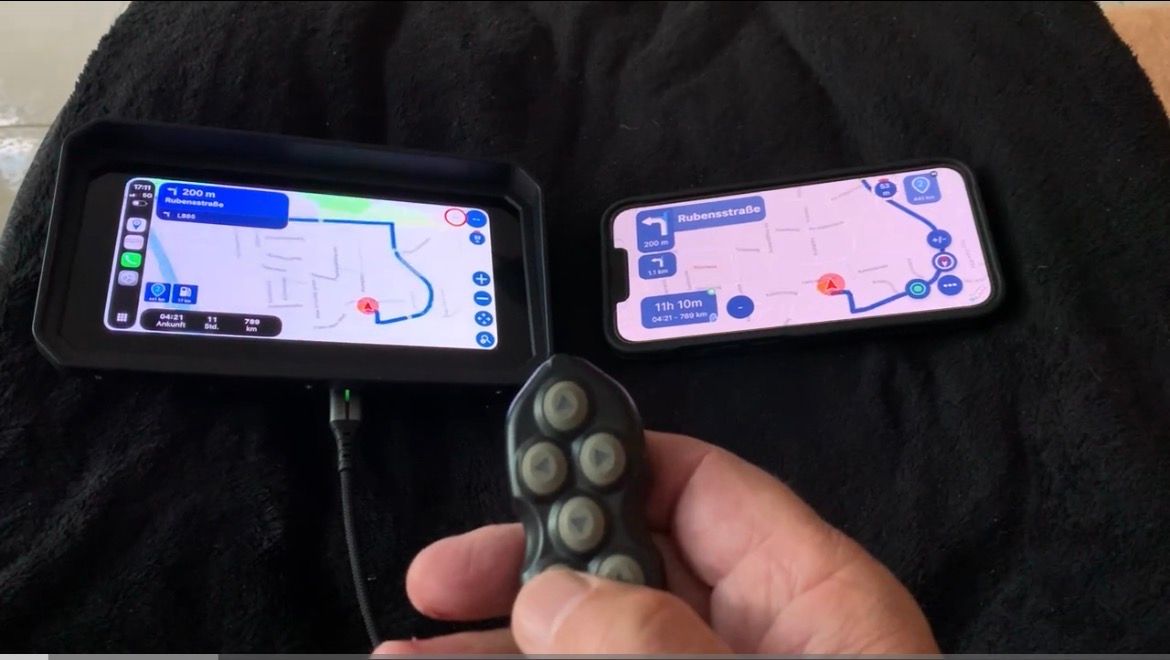
                IMG_9855.jpeg

                VG Hubert
                Beta Test "Next App" dazu die Hardware .
                iPad 9. Gen iOS 26.5.2/ iPhone 16e iOS 26.5/ Navi iPhone Xr iOS 18.7.9 / PC mit MS Win11 /❗️MyRoute-App im Cradel und Remotek-One❗️ Info zu MRA & Remotek One

                1 Reply Last reply
                0
                • Massimo Cardoneundefined Offline
                  Massimo Cardoneundefined Offline
                  Massimo Cardone
                  wrote last edited by
                  #8

                  When I installed everything yesterday, that’s exactly how it was. Both the mobile phone screen and the Carpuride display were switched on.
                  However, as I’ve already mentioned, only the mobile phone responded to commands from Carpe Iter; the Carpuride display did not.

                  1 Reply Last reply
                  0
                  • Massimo Cardoneundefined Offline
                    Massimo Cardoneundefined Offline
                    Massimo Cardone
                    wrote last edited by
                    #9

                    I have finally received a detailed response regarding my issue. The fact is that the Carpe Iter controller cannot be used with Android Auto or CarPlay. The commands work perfectly on the mobile phone, but due to a limitation, they are not forwarded to Android Auto or CarPlay.

                    Here is the detailed response from Carpe Iter:

                    Hi Massimo,

                    I completely understand why you wanted to add it to your setup, operating a touchscreen with thick motorcycle gloves is exactly why we created our controllers.

                    However, the behavior you are experiencing is due to a strict system limitation of Android Auto and Apple CarPlay.

                    Why is this happening?
                    The Carpuride W702S Pro is essentially a projection screen for Android Auto / Apple CarPlay. These platforms are completely locked down by Google and Apple. Our Carpe Iter controllers connect via Bluetooth to your phone and send commands to the phone's native operating system. Unfortunately, Google and Apple do not allow third-party Bluetooth controllers to pass screen interactions (like panning or zooming a map) from the phone through to the projected display on the Carpuride.

                    Because of this block in the Android Auto/CarPlay architecture, the inputs are registered on your phone's screen, but they are not mirrored to the Carpuride screen.

                    Sadly, there is no workaround, app, or setting that can bypass this restriction. It is a limitation baked into Android Auto and Apple CarPlay themselves.

                    To get the full functionality of the Adventure Control (panning, zooming, app switching), the controller needs to be paired with a device running a full, native Android operating system mounted on your handlebars, such as a Caretta or CiPad.
                    Best regards,

                    1 Reply Last reply
                    0
                    • Hubert Thoringundefined Offline
                      Hubert Thoringundefined Offline
                      Hubert Thoring
                      Valued contributor
                      wrote last edited by
                      #10

                      With the Aoocci BM6/BM7 display it seems to be different, or it is due to the combination MyRouteApp and the Remotek One, I can't contribute more.

                      VG 👋

                      VG Hubert
                      Beta Test "Next App" dazu die Hardware .
                      iPad 9. Gen iOS 26.5.2/ iPhone 16e iOS 26.5/ Navi iPhone Xr iOS 18.7.9 / PC mit MS Win11 /❗️MyRoute-App im Cradel und Remotek-One❗️ Info zu MRA & Remotek One

                      1 Reply Last reply
                      0

                      Hello! It looks like you're interested in this conversation, but you don't have an account yet.

                      Getting fed up of having to scroll through the same posts each visit? When you register for an account, you'll always come back to exactly where you were before, and choose to be notified of new replies (either via email, or push notification). You'll also be able to save bookmarks and upvote posts to show your appreciation to other community members.

                      With your input, this post could be even better 💗

                      Register Login
                      Reply
                      • Reply as topic
                      Log in to reply
                      • Oldest to Newest
                      • Newest to Oldest
                      • Most Votes


                      ACTIVE USERS
                      Hubert Thoringundefined
                      Hubert Thoring
                      Massimo Cardoneundefined
                      Massimo Cardone
                      POPULAR TOPICS
                      • GPX Versions 1.1 vs 1.2 for Garmin Visually Explained
                        Steve Jarrellundefined
                        Steve Jarrell
                        7
                        28
                        1.7k

                      • Hull to Rotterdam ferry not recognised
                        Brian McGundefined
                        Brian McG
                        0
                        8
                        116

                      • Hoe een kaart met bepaalde plaatsen als POI aanmaken.
                        nomkoundefined
                        nomko
                        0
                        6
                        98

                      • Another Erratic Routing Incident
                        John S Parryundefined
                        John S Parry
                        0
                        8
                        172

                      • BMW Wonderwheel Android Auto zoom
                        Chudyundefined
                        Chudy
                        0
                        3
                        80

                      • Herberekenen werkt niet.
                        Marinus van Deudekomundefined
                        Marinus van Deudekom
                        0
                        4
                        163

                      • Color of Via points issue
                        Nick Carthewundefined
                        Nick Carthew
                        0
                        2
                        19

                      • Modify a scenic route in the Navigation Naxt app
                        Brian McGundefined
                        Brian McG
                        3
                        6
                        204

                      MY GROUPS
                      • Login

                      • Login or register to search.
                      • First post
                        Last post
                      0
                      • Categories
                      • Recent
                      • Popular
                      • Support
                      • MyRoute-app