Help planning routes
-

I have been using myroute app for planning routes with a Garmin Zumo XT for the last few years but keep having an issue with coming off the route and then being redirected along a route I had not planned. Sometimes I realise and sometimes I don't until it's too late and also if I do divert off the route say for coffee, petrol, roadworks or something I am sometimes then taken on another route I have not planned. I am planning some routes for next year and looking for advice of how to stop this happening
-
I have been using myroute app for planning routes with a Garmin Zumo XT for the last few years but keep having an issue with coming off the route and then being redirected along a route I had not planned. Sometimes I realise and sometimes I don't until it's too late and also if I do divert off the route say for coffee, petrol, roadworks or something I am sometimes then taken on another route I have not planned. I am planning some routes for next year and looking for advice of how to stop this happening

@Paul-Phillips-2 I recognise this xt behavior. When I used to plan my route and didn't pay enough attention to the placing of the waypoints I used to have the same experience.
Zooming in to the max and make sure that your waypoints are EXACTLY on the route will make your life easier. Make shure that there are enough shaping points in your route. In that way your xt had lesser chance to mess up your route. Disable recalcurate and traffic info on your xt -

I use MRA and a Zumo XT for a successful outcome using the XT I always do the following.
-
In trip planner make all trips "Saved" rather than imported....you can do this in trip planner by starting the route and going back into trip planner and saving active route. This gives it a new name that you can change to something similar(but not the same as the original). Avoids routing issues Repeated U Turn behaviour if the route recalculates.
-
Switch off auto recalculation or to prompted....see above and try as much as possible to navigate yourself back to the line
-
Make track visible as well as route if you have to re-calculate you can see how different the new route might be. It shouldn't be if you put in enough shaping points. BUT
-
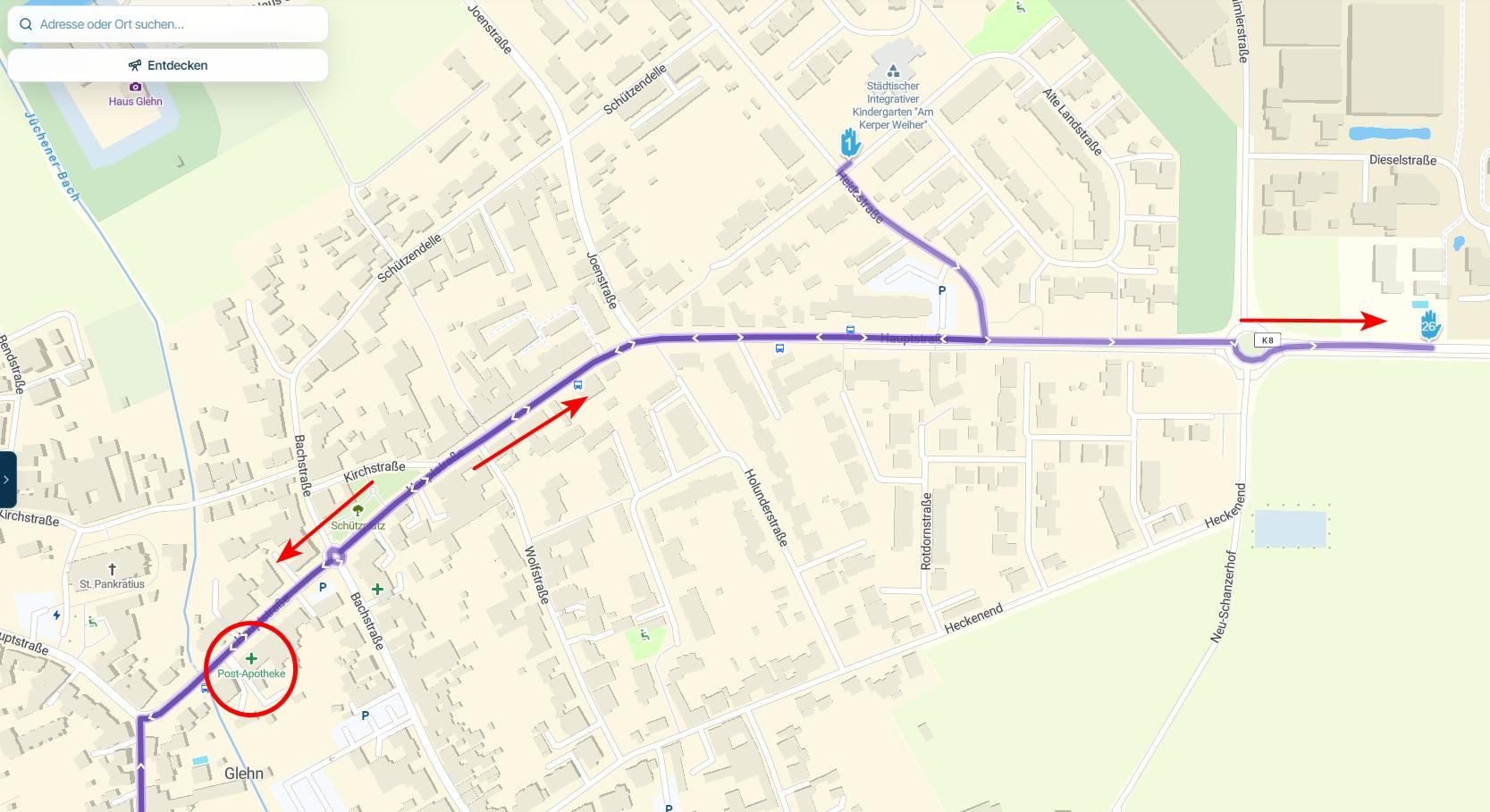
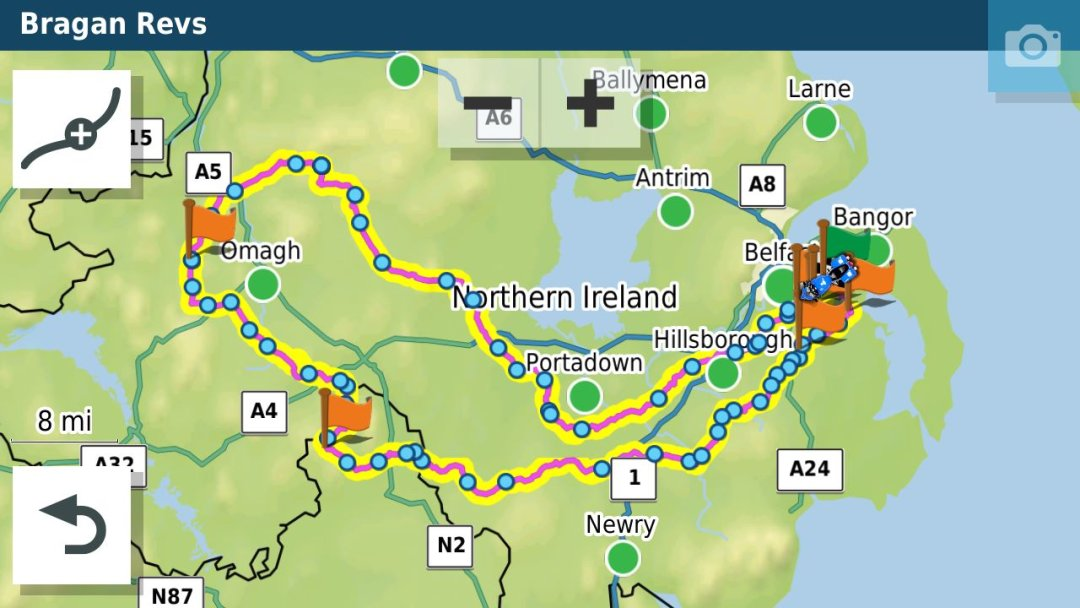
If you are doing a long out and back route with different but close together roads make sure that you have at least a Waypoint at the farthest end of the route. This will stop the unit short cutting the route if you have to recalculate. In the old units they tried to get you to the next shaping point in the direction of travel...if another shaping point is closer to the XT it will just cut off a big lump of the route if you recalculate. For example in this route if you recalculated Just before where the 1 is on the map it would cut off the rest of the route and take you to Hillsborough if it was all shaping points and no way points which have to be gone through.
This is an invaluable source if you are navigating with an XT.
https://zumouserforums.co.uk/viewtopic.php?t=1464
I predominantly use MRA for navigation now via my Africa Twin AA screen. The XT is for backup/ track and POI handling which it does better than MRA IMHO at the moment.
-
-
@Paul-Phillips-2 I recognise this xt behavior. When I used to plan my route and didn't pay enough attention to the placing of the waypoints I used to have the same experience.
Zooming in to the max and make sure that your waypoints are EXACTLY on the route will make your life easier. Make shure that there are enough shaping points in your route. In that way your xt had lesser chance to mess up your route. Disable recalcurate and traffic info on your xt
@Marinus-van-Deudekom Thank you
-
I use MRA and a Zumo XT for a successful outcome using the XT I always do the following.
-
In trip planner make all trips "Saved" rather than imported....you can do this in trip planner by starting the route and going back into trip planner and saving active route. This gives it a new name that you can change to something similar(but not the same as the original). Avoids routing issues Repeated U Turn behaviour if the route recalculates.
-
Switch off auto recalculation or to prompted....see above and try as much as possible to navigate yourself back to the line
-
Make track visible as well as route if you have to re-calculate you can see how different the new route might be. It shouldn't be if you put in enough shaping points. BUT
-
If you are doing a long out and back route with different but close together roads make sure that you have at least a Waypoint at the farthest end of the route. This will stop the unit short cutting the route if you have to recalculate. In the old units they tried to get you to the next shaping point in the direction of travel...if another shaping point is closer to the XT it will just cut off a big lump of the route if you recalculate. For example in this route if you recalculated Just before where the 1 is on the map it would cut off the rest of the route and take you to Hillsborough if it was all shaping points and no way points which have to be gone through.
This is an invaluable source if you are navigating with an XT.
https://zumouserforums.co.uk/viewtopic.php?t=1464
I predominantly use MRA for navigation now via my Africa Twin AA screen. The XT is for backup/ track and POI handling which it does better than MRA IMHO at the moment.
@Mzokk thank you exactly what I was looking for a detailed but not complicated explanation
-
-

Check if all your waypoints are on the route. I also have a XT, I use the 1.2 export. Set routecalculation "off" and your route is, as you planned it. If you are going off-route, simply ride back to the route.
Met andere apps maak je een route, met MRA componeer je een route!
Ducati Monster 1200 met Garmin Zümo XT
Fiat 124 Spider/Camper Dethleffs met Navigation-App op Samsung Tab Active4 Pro
MRA Lifetime Gold -
Check if all your waypoints are on the route. I also have a XT, I use the 1.2 export. Set routecalculation "off" and your route is, as you planned it. If you are going off-route, simply ride back to the route.
@Lex.Kloet.RX Thanks, I probably didn't have recalculation off
-

As already mentioned by Mzokk, make track and route visible. You can load custom views on the XT. they will change the track line to be wider than the calculated route line so you can see both at once. This makes it easier to see when you move off the track when the two lines split apart. See this on my friends page for details. https://www.wiltshire.net/2021/12/21/garmin-zumo-xt-theme-file-showing-route-and-tracks-overlaid/?fbclid=IwY2xjawO9Rc5leHRuA2FlbQIxMABicmlkETFEYXlHT212bFlBNFZBdVlSc3J0YwZhcHBfaWQQMjIyMDM5MTc4ODIwMDg5MgABHhqWFL4QuoR_3fjsSrN6G1QkyN9tbNba95EhlfNH9ki5SC_iof3TDGIWLvZh_aem_24alApHQwJVYjpVeinFnMg
R1200RS, Nav VI, Zumo XT2, iPhone. — Plot the Track, Go the Distance
-
As already mentioned by Mzokk, make track and route visible. You can load custom views on the XT. they will change the track line to be wider than the calculated route line so you can see both at once. This makes it easier to see when you move off the track when the two lines split apart. See this on my friends page for details. https://www.wiltshire.net/2021/12/21/garmin-zumo-xt-theme-file-showing-route-and-tracks-overlaid/?fbclid=IwY2xjawO9Rc5leHRuA2FlbQIxMABicmlkETFEYXlHT212bFlBNFZBdVlSc3J0YwZhcHBfaWQQMjIyMDM5MTc4ODIwMDg5MgABHhqWFL4QuoR_3fjsSrN6G1QkyN9tbNba95EhlfNH9ki5SC_iof3TDGIWLvZh_aem_24alApHQwJVYjpVeinFnMg
@Neil-Bartlett Thanks for the advice. After a crash of my ZUMO XT and a replacement by Garmin this possibility had gone. Now it's back again. Lucky me!
Hello! It looks like you're interested in this conversation, but you don't have an account yet.
Getting fed up of having to scroll through the same posts each visit? When you register for an account, you'll always come back to exactly where you were before, and choose to be notified of new replies (either via email, or push notification). You'll also be able to save bookmarks and upvote posts to show your appreciation to other community members.
With your input, this post could be even better 💗
Register Login-
 1430621
-
 0837
0837
-
0631
-
 0598
0598
-
0598
-
 049
049
-
 116301
-
 08506
08506