Ignore road closures.
-

I had a case today where in the Here map a road was marked as closed but it wasn't (the road is a mountain road which can be closed temporarily because of bad weather). Is there any way to ignore such a closure when I start to navigate, without adding offroad points? My setting for seasonal closures if off.
I am navigating as a track. I have seen cases where the app warns me for route violations and I had expected this to see again but it didnt this time. The app found a detour without warning me. Not sure how but I think that it would be useful to have some sort of control over when a track is updated.
-

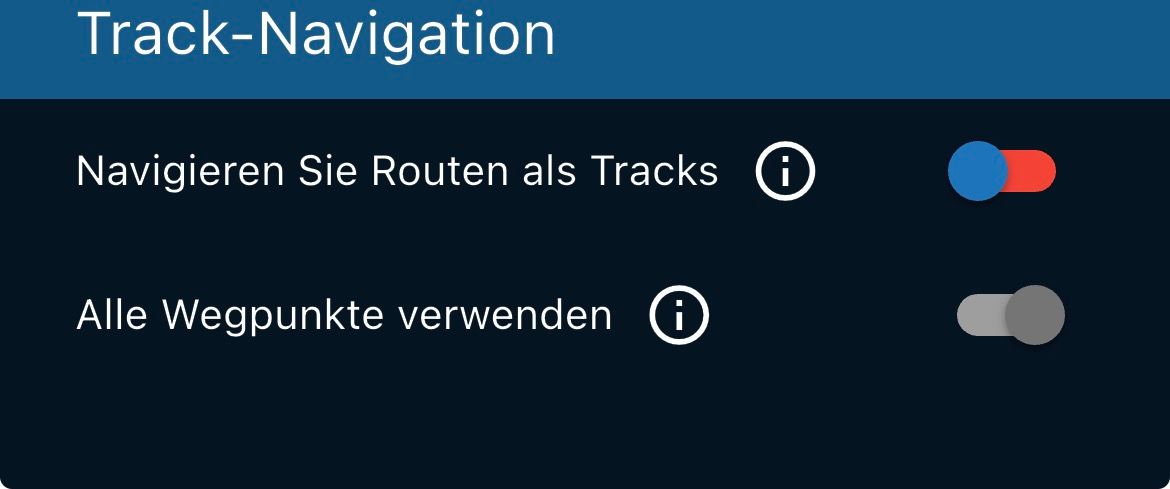
It helps to navigate the route as a track; this can be set under Settings in your own account, then under Navigation settings / Functions at the very bottom.
VG Hubert
Beta Test "Next App" dazu die Hardware .
iPad 9. Gen iOS 26.7.1/ iPhone 16e iOS 26.7.1/ Navi iPhone Xr iOS 18.7.10 / PC mit MS Win11 /❗️MyRoute-App im Cradel und Remotek-One❗️ Info zu MRA & Remotek One -
It helps to navigate the route as a track; this can be set under Settings in your own account, then under Navigation settings / Functions at the very bottom.
@Hubert-Thoring I do!
-

Hi, try also "traffic-aware route calculation" to switch off.
Hardware
iPhone 12 pro (iOS 26.2.1)
iPad (7.Gen.) 18.7.3
Oukitel RT3 Pro (Andr. 14)
Wireless CarPlay mit (Elebest C650)
Wired CarPlay (SEAT Arona - 2021)
MRA Workshops in Deutsch sind hier zu finden -
Hi, try also "traffic-aware route calculation" to switch off.
@Jörgen Also this setting was off.
-
Another option is, before starting the App and the route, go offline. Then the closure and traffic information will not be available when starting the route.
This is not a nice way for just a little issue and gave you limitation the rest off the route.Hardware
iPhone 12 pro (iOS 26.2.1)
iPad (7.Gen.) 18.7.3
Oukitel RT3 Pro (Andr. 14)
Wireless CarPlay mit (Elebest C650)
Wired CarPlay (SEAT Arona - 2021)
MRA Workshops in Deutsch sind hier zu finden -
Another option is, before starting the App and the route, go offline. Then the closure and traffic information will not be available when starting the route.
This is not a nice way for just a little issue and gave you limitation the rest off the route.
@Jörgen i can see that this would work but indeed not a nice solution.
I might be wrong but I think that it currently is not defined when the track is created and updated.
I have no proof yet but I think that I have seen the app come with an updated track during(!) navigation (even with automatic recalculation off). -
Would locking the route prevent the track to be changed?
-
Am I missing something here ?.
I have always had the understanding that a "track" did not recalculate. -
This route and video shows the reverse scenario.
I planned a route where a road between 2 waypoints is closed. Obviously the planner finds a way around it. However when I open or navigate the route the closed road is ignored. This might give a hint.https://www.myrouteapp.com/route/open/12534786
https://drive.google.com/file/d/1btcAp3SntE8T_76_aDMsHpB7tGdLaugL/view?usp=drivesdk
Hello! It looks like you're interested in this conversation, but you don't have an account yet.
Getting fed up of having to scroll through the same posts each visit? When you register for an account, you'll always come back to exactly where you were before, and choose to be notified of new replies (either via email, or push notification). You'll also be able to save bookmarks and upvote posts to show your appreciation to other community members.
With your input, this post could be even better 💗
Register Login-
 1511
1511
-
0613
-
 0524
0524
-
 0417
0417
-
 2489
2489
-
 0522
0522
-
0313
-
025