Skip to content
  • Categories
  • Recent
  • Popular
  • Support
  • MyRoute-app
Collapse
Brand Logo

MRA Community Forum

  1. Home
  2. MyRoute-app Routeplanner
  3. [Web] Problems, Bugs and other Issues
  4. Straight lines on MRA

Straight lines on MRA

Scheduled Pinned Locked Moved [Web] Problems, Bugs and other Issues
4 Posts 3 Posters 892 Views 3 Watching
  • Oldest to Newest
  • Newest to Oldest
  • Most Votes
Reply
  • Reply as topic
Log in to reply
This topic has been deleted. Only users with topic management privileges can see it.
  • Karl Foleyundefined Offline
    Karl Foleyundefined Offline
    Karl Foley
    wrote on last edited by
    #1

    Hi,
    another small issue.
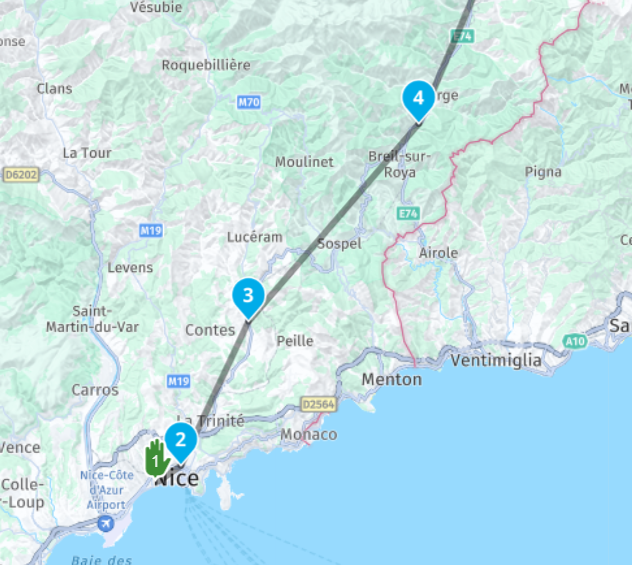
    Went into MRA to check on a route, and all of a sudden it's showing as straight lines between waypoints, instead of on the road.
    I've exported it to my XT and all is fine but just wondering why this happens.

    Best ask now instead of the middle of France 🙂
    Pic attached,
    K
    Nice Lines.png

    Corjan Meijerinkundefined 1 Reply Last reply
    0
    • Hans van de Ven MR.MRAundefined Offline
      Hans van de Ven MR.MRAundefined Offline
      Hans van de Ven MR.MRA
      Valued contributor
      wrote on last edited by
      #2

      Did you use "Skip waypoints" Or "Offroad"?

      Garmin Zumo XT3/XT2/XT/BMW Connected Ride Navigator/Tourstart/ MyRouteapp (The App)/...
      Een dag niet gelachen is een dag niet geleefd / Een route is net zo goed als deze uitgezet is.

      1 Reply Last reply
      0
      • Karl Foleyundefined Karl Foley

        Hi,
        another small issue.
        Went into MRA to check on a route, and all of a sudden it's showing as straight lines between waypoints, instead of on the road.
        I've exported it to my XT and all is fine but just wondering why this happens.

        Best ask now instead of the middle of France 🙂
        Pic attached,
        K
        Nice Lines.png

        Corjan Meijerinkundefined Offline
        Corjan Meijerinkundefined Offline
        Corjan Meijerink
        Developer
        wrote on last edited by
        #3

        @Karl-Foley open the toolkit and uncheck “offroad”

        1 Reply Last reply
        0
        • Karl Foleyundefined Offline
          Karl Foleyundefined Offline
          Karl Foley
          wrote on last edited by
          #4

          Thanks - that worked. I think I had that checked because of the route not going through a tunnel (not set to avoid in the toolkit.) and offroad fixed that - but obviously changed the route.

          As another member said - if I just go through the tunnel the next waypoint will be picked up.
          Thanks.

          1 Reply Last reply
          0

          Hello! It looks like you're interested in this conversation, but you don't have an account yet.

          Getting fed up of having to scroll through the same posts each visit? When you register for an account, you'll always come back to exactly where you were before, and choose to be notified of new replies (either via email, or push notification). You'll also be able to save bookmarks and upvote posts to show your appreciation to other community members.

          With your input, this post could be even better 💗

          Register Login
          Reply
          • Reply as topic
          Log in to reply
          • Oldest to Newest
          • Newest to Oldest
          • Most Votes


          ACTIVE USERS
          Corjan Meijerinkundefined
          Corjan Meijerink
          Hans van de Ven MR.MRAundefined
          Hans van de Ven MR.MRA
          Karl Foleyundefined
          Karl Foley
          POPULAR TOPICS
          • GPX Versions 1.1 vs 1.2 for Garmin Visually Explained
            Steve Jarrellundefined
            Steve Jarrell
            7
            122
            7.0k

          • Karte dreht im Stand bei der Navigation dauernd
            haweboundefined
            hawebo
            1
            9
            251

          • Auto skip many waypoints by itself while I was on route. [5.2.0 - 474]
            stuart marrittundefined
            stuart marritt
            0
            21
            573

          • Track vs Route
            Roger Needham 0undefined
            Roger Needham 0
            0
            10
            351

          • New update 5.2.1
            M. Schrijverundefined
            M. Schrijver
            13
            15
            358

          • esiste un manuale in italiano ?
            Rob Verhoeffundefined
            Rob Verhoeff
            0
            2
            56

          • MyRoute-App does not work on Caretta
            M. Schrijverundefined
            M. Schrijver
            0
            9
            1.3k

          • MRA App und Caretta von Carpe Iter arbeiten nicht zusammen
            Fran Sundefined
            Fran S
            0
            3
            72

          MY GROUPS
          • Login

          • Login or register to search.
          • First post
            Last post
          0
          • Categories
          • Recent
          • Popular
          • Support
          • MyRoute-app