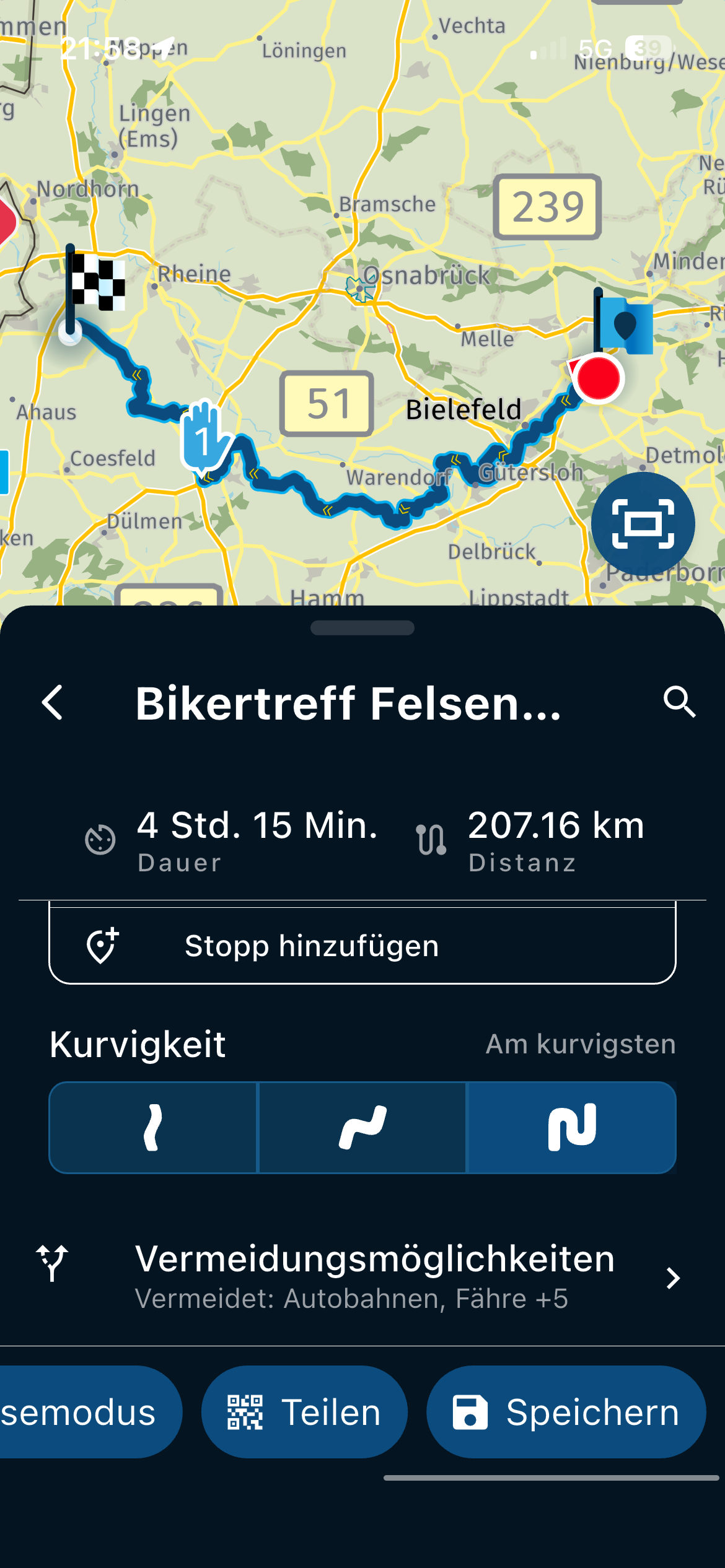
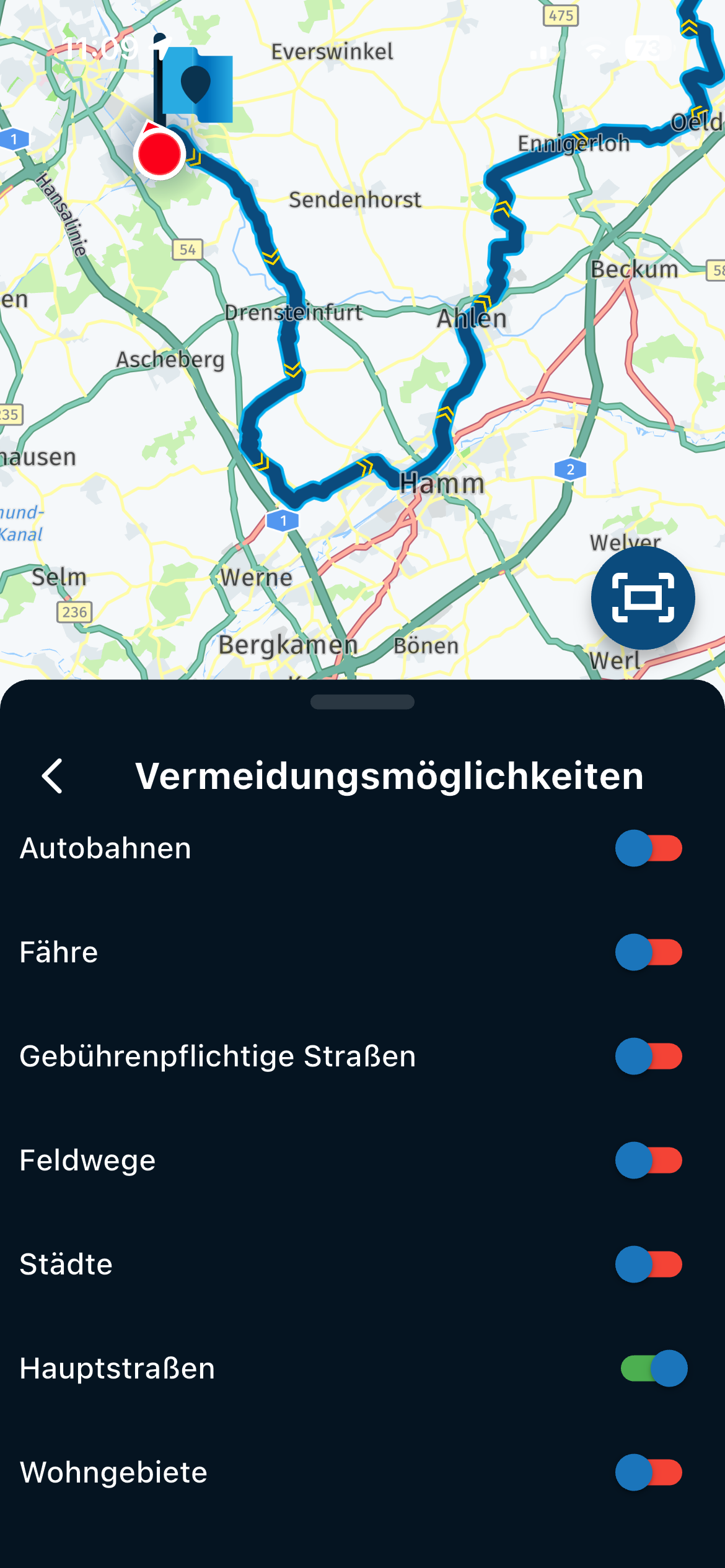
Navigate as Track > Use all waypoints?
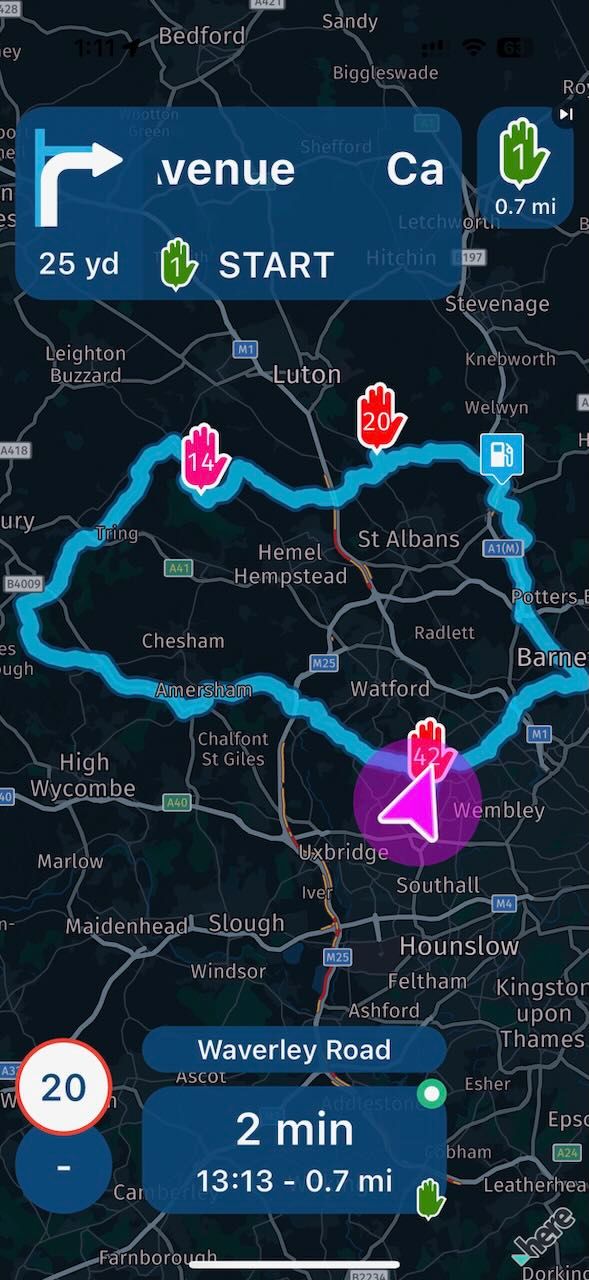
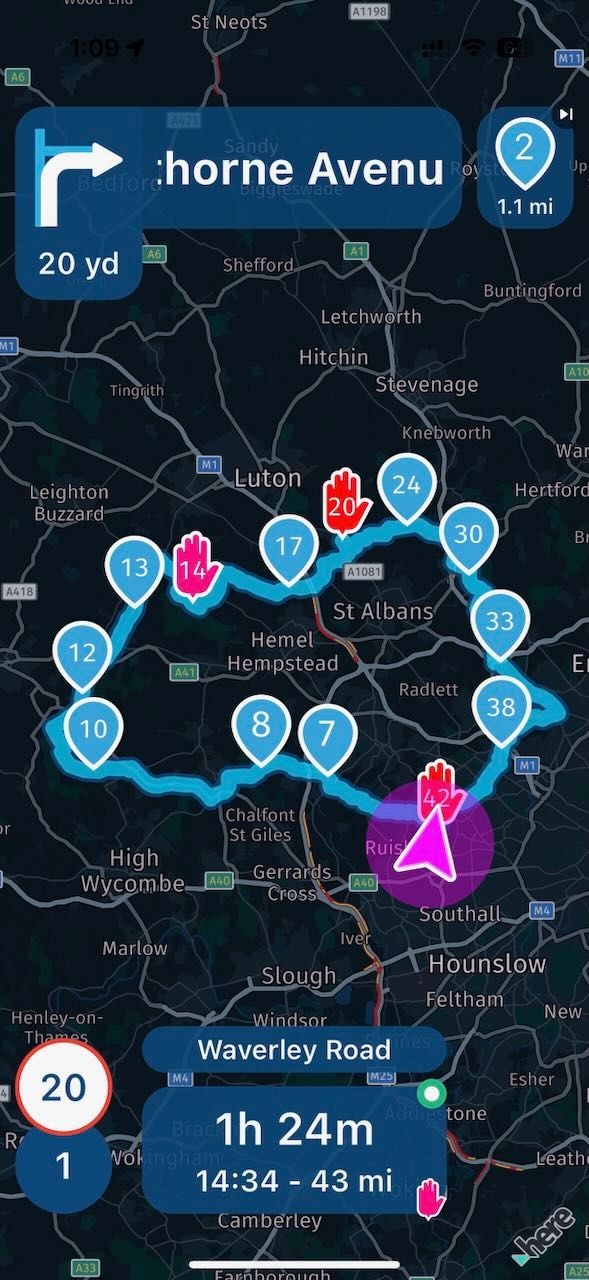
-
@Rajp, to me it is not a surprise that shaping points are ignored if you disable them. To be honest I cannot see why that would be different. Shaping points are not really relevant for navigating tracks, because the track is already shaped by the breadcrumbs of the track. Skipping to shaping points you cannot see on the map would be very counter-productive. Some people (myself amongst them) asked for shaping points to be visible, because sometimes they have a meaning. A color to indicate view points for example, or even notes to be spoken. If you want to re-enter the track at some random point, just long-press on that point. Re-entering a track is not limited to the shapingpoints, you know. You can re-enter on any point you like.

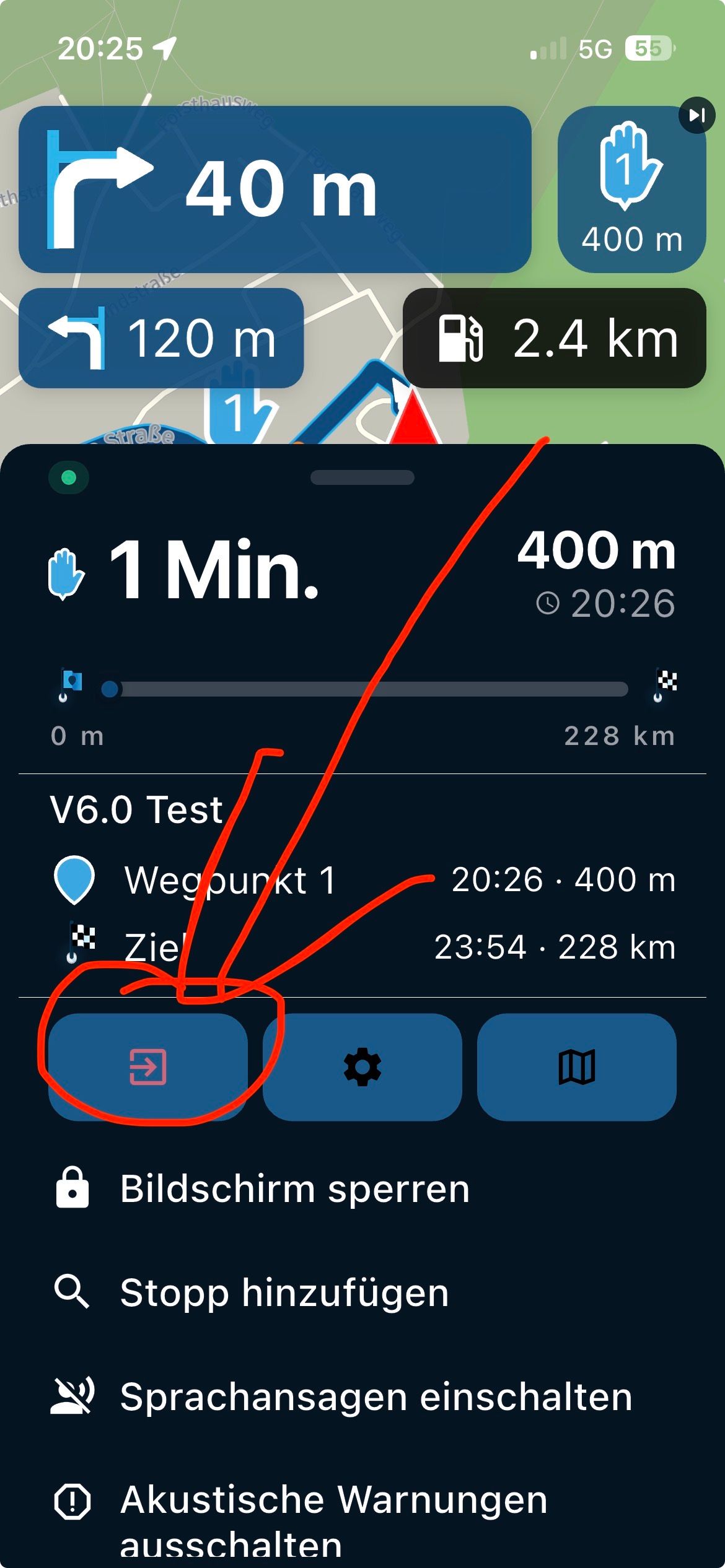
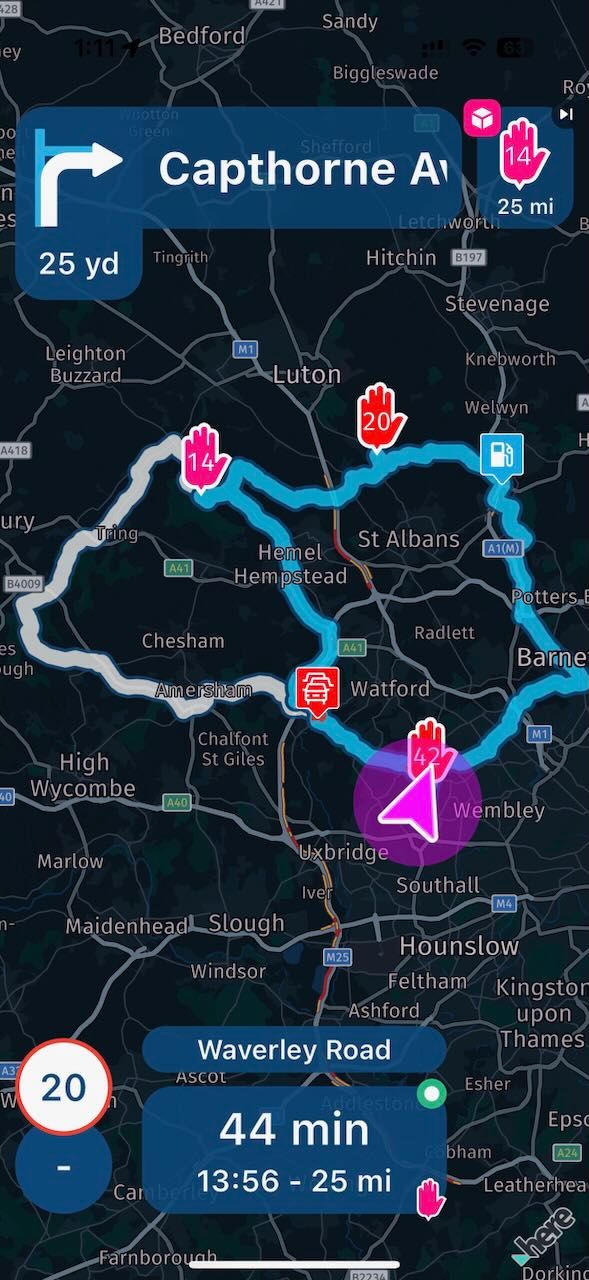
@Con-Hennekens You're missing the point, if use all waypoints is disabled, the track is recalculated if you go of course to get you back on, that's fine, but in doing so, it recalculates to the fastest path to the next via point, instead of sticking to the original track --> see screenshot 2.
-
@Con-Hennekens You're missing the point, if use all waypoints is disabled, the track is recalculated if you go of course to get you back on, that's fine, but in doing so, it recalculates to the fastest path to the next via point, instead of sticking to the original track --> see screenshot 2.

@Rajp I think that I misunderstood you. When you wrote "4. skipped the first viapoint (starting point)" I assumed that you skipped the viapoint by pressing on it at the top right corner. Now I think that you meant that you deviated from the track and didn't visit the first viapoint (shouldn't the app by design navigate you to that very first point ?).
I can understand Con's reasoning. But I see a slight difference in a) skipping a point by clicking on it at the top right and b) by clicking on just any point on the track. In the first case (a) I would expect the app to still honour the (hidden) points in the sequence. In the latter case (b) a new direct route is more what I would expect. -
@Rajp I think that I misunderstood you. When you wrote "4. skipped the first viapoint (starting point)" I assumed that you skipped the viapoint by pressing on it at the top right corner. Now I think that you meant that you deviated from the track and didn't visit the first viapoint (shouldn't the app by design navigate you to that very first point ?).
I can understand Con's reasoning. But I see a slight difference in a) skipping a point by clicking on it at the top right and b) by clicking on just any point on the track. In the first case (a) I would expect the app to still honour the (hidden) points in the sequence. In the latter case (b) a new direct route is more what I would expect.
@Herman-Veldhuizen I tested both.
First time, I skipped viapoint 1 (start), instead of the track remaining as the original it recalculated directly to viapoint 2 ignoring the original track line.
Second time, I passed viapoint 1, and then went off course, again it recalculated directly to viapoint 2 ignoring the original track line.
-
@Herman-Veldhuizen I tested both.
First time, I skipped viapoint 1 (start), instead of the track remaining as the original it recalculated directly to viapoint 2 ignoring the original track line.
Second time, I passed viapoint 1, and then went off course, again it recalculated directly to viapoint 2 ignoring the original track line.
@Rajp By skipping I assume that you mean that you drive off before arriving at the first viapoint. By current design the app should navigate you to that point as long as you haven't visited it.
If you visited point 1 and then drove off the app should in my opinion do what you expected : take you back to the track. I might be wrong but by design it takes you to the next via point if you are not using all points. That's why I use all points and have the automatic recalculation disabled. -
@Rajp By skipping I assume that you mean that you drive off before arriving at the first viapoint. By current design the app should navigate you to that point as long as you haven't visited it.
If you visited point 1 and then drove off the app should in my opinion do what you expected : take you back to the track. I might be wrong but by design it takes you to the next via point if you are not using all points. That's why I use all points and have the automatic recalculation disabled.
@Herman-Veldhuizen no, by skipping I meant I hit the skip button
-
@Rajp By skipping I assume that you mean that you drive off before arriving at the first viapoint. By current design the app should navigate you to that point as long as you haven't visited it.
If you visited point 1 and then drove off the app should in my opinion do what you expected : take you back to the track. I might be wrong but by design it takes you to the next via point if you are not using all points. That's why I use all points and have the automatic recalculation disabled.
“ I might be wrong but by design it takes you to the next via point if you are not using all points. That's why I use all points ”
And that’s my point, if this is by design, the in-app popup explanation should make it clearer and online support should have this behaviour described. As right now it simply implies shaping points are visible on the skip button. Where in fact this option is relied upon for track navigation recalculations as well.
-
@Herman-Veldhuizen no, by skipping I meant I hit the skip button

@Rajp said in Navigate as Track > Use all waypoints?:
by skipping I meant I hit the skip button
Again, if you skip to the first available waypoint, being VIA 14 (because you disabled the shaping points in between) all is logical and by design. You just have to remember to long-press anywhere on the track if you want to re-join there. It would not be logical to have to press the skip button 14 times to skip to the first visible waypoint, would it?
Second time, I passed viapoint 1, and then went off course, again it recalculated directly to viapoint 2 ignoring the original track line.
This I could not read from your earlier posts. If this is for real, you have a valid point. Deviating from the track should lead you back to the track in a sensible way. It should not skip to any VIA point unless it is the first sensible point of re-entry to the track. Maybe @Corjan-Meijerink can say something about this?
@Herman-Veldhuizen said in Navigate as Track > Use all waypoints?:
I would expect the app to still honour the (hidden) points in the sequence.
If you disable "use all waypoints", it is not like your disabled shaping points turn into some hidden waypoints.
I am just an enthusiastic MRA user, and hope you will be one too!
Most motorcycle problems are caused by the nut that connects the handlebar to the saddle.
Check out RideSleepRepeat.eu, a biker community for sharing stays across Europe
-
@Rajp said in Navigate as Track > Use all waypoints?:
by skipping I meant I hit the skip button
Again, if you skip to the first available waypoint, being VIA 14 (because you disabled the shaping points in between) all is logical and by design. You just have to remember to long-press anywhere on the track if you want to re-join there. It would not be logical to have to press the skip button 14 times to skip to the first visible waypoint, would it?
Second time, I passed viapoint 1, and then went off course, again it recalculated directly to viapoint 2 ignoring the original track line.
This I could not read from your earlier posts. If this is for real, you have a valid point. Deviating from the track should lead you back to the track in a sensible way. It should not skip to any VIA point unless it is the first sensible point of re-entry to the track. Maybe @Corjan-Meijerink can say something about this?
@Herman-Veldhuizen said in Navigate as Track > Use all waypoints?:
I would expect the app to still honour the (hidden) points in the sequence.
If you disable "use all waypoints", it is not like your disabled shaping points turn into some hidden waypoints.
@Con-Hennekens said in Navigate as Track > Use all waypoints?:
Again, if you skip to the first available waypoint, being VIA 14 (because you disabled the shaping points in between) all is logical and by design. You just have to remember to long-press anywhere on the track if you want to re-join there. It would not be logical to have to press the skip button 14 times to skip to the first visible waypoint, would it?
I'm not saying you the need to skip 13 other waypoints. what I'm saying is, the skip button shows skip viapoint 1. I hit skip, the skip button should now show skip viapoint 14 - which it does. My concern is, when I skipped viapoint 1, why does it recalculate to the shortest path to viapoint 14, why not stick to the original track??
And if this is by design, can we get some better explanation in the UI/support pages. To me "Enable it to show all waypoints (rather than only viapoints)" reads that when
use all waypointsisdisabled, the skip button will only show viapoints (which it does), but the track will still be honoured if you skip a viapoint/deviate off track (which is does not) -
@Con-Hennekens said in Navigate as Track > Use all waypoints?:
Again, if you skip to the first available waypoint, being VIA 14 (because you disabled the shaping points in between) all is logical and by design. You just have to remember to long-press anywhere on the track if you want to re-join there. It would not be logical to have to press the skip button 14 times to skip to the first visible waypoint, would it?
I'm not saying you the need to skip 13 other waypoints. what I'm saying is, the skip button shows skip viapoint 1. I hit skip, the skip button should now show skip viapoint 14 - which it does. My concern is, when I skipped viapoint 1, why does it recalculate to the shortest path to viapoint 14, why not stick to the original track??
And if this is by design, can we get some better explanation in the UI/support pages. To me "Enable it to show all waypoints (rather than only viapoints)" reads that when
use all waypointsisdisabled, the skip button will only show viapoints (which it does), but the track will still be honoured if you skip a viapoint/deviate off track (which is does not)
@Rajp I tend to agree here. Most people I think want to drive the track as planned. Hidden shaping points are (should be) used implicitly in the form of the track.
Calculating a whole new route after pressing the skip can be a big change which you might want to check on a map first before committing to it. But I can live with both designs.
In my work I never skip a point by hand. I skip points by deliberately deviating. The apps behaviour on my phone has recently changed related to this. Different issue but might be related. -
@Con-Hennekens said in Navigate as Track > Use all waypoints?:
Again, if you skip to the first available waypoint, being VIA 14 (because you disabled the shaping points in between) all is logical and by design. You just have to remember to long-press anywhere on the track if you want to re-join there. It would not be logical to have to press the skip button 14 times to skip to the first visible waypoint, would it?
I'm not saying you the need to skip 13 other waypoints. what I'm saying is, the skip button shows skip viapoint 1. I hit skip, the skip button should now show skip viapoint 14 - which it does. My concern is, when I skipped viapoint 1, why does it recalculate to the shortest path to viapoint 14, why not stick to the original track??
And if this is by design, can we get some better explanation in the UI/support pages. To me "Enable it to show all waypoints (rather than only viapoints)" reads that when
use all waypointsisdisabled, the skip button will only show viapoints (which it does), but the track will still be honoured if you skip a viapoint/deviate off track (which is does not)
@Rajp said in Navigate as Track > Use all waypoints?:
My concern is, when I skipped viapoint 1, why does it recalculate to the shortest path to viapoint 14, why not stick to the original track??
Because you explicitly skip to Via point 14. That's what that option does. If you want to honor the track, long-press at your own point of re-entry. It will guide you fastest way there. This is simply how it works.
Maybe it helps if you look at it this way: skipping by pressing the skip WP button does not skip the previous WP, but it skips TO THE NEXT waypoint.
but the track will still be honoured if you skip a viapoint/deviate off track (which is does not)
Like I said earlier, if this is true you have a valid point. I have been asking questions about this in our test group, but are not able to test this myself currently. It does not align with my earlier experience of the "route as track" feature though.
Hello! It looks like you're interested in this conversation, but you don't have an account yet.
Getting fed up of having to scroll through the same posts each visit? When you register for an account, you'll always come back to exactly where you were before, and choose to be notified of new replies (either via email, or push notification). You'll also be able to save bookmarks and upvote posts to show your appreciation to other community members.
With your input, this post could be even better 💗
Register Login-
 1123166
-
 0621
0621
-
 0578
0578
-
 0531
0531
-
18161.6k
-
 0420
0420
-
0880
-
0577