How to avoid closed roads?
-

Hello forum, when planning a route (A to B), MRA does not recognize closed roads. Google Maps, on the other hand, guides you around these closures when planning your route.
How can one avoid roads that are known to be closed (e.g. roadworks) when planning a route in MRA?
Best, Axel
-
Hello forum, when planning a route (A to B), MRA does not recognize closed roads. Google Maps, on the other hand, guides you around these closures when planning your route.
How can one avoid roads that are known to be closed (e.g. roadworks) when planning a route in MRA?
Best, Axel

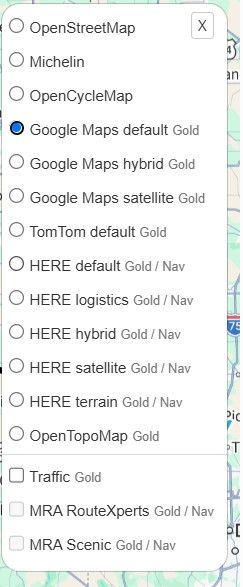
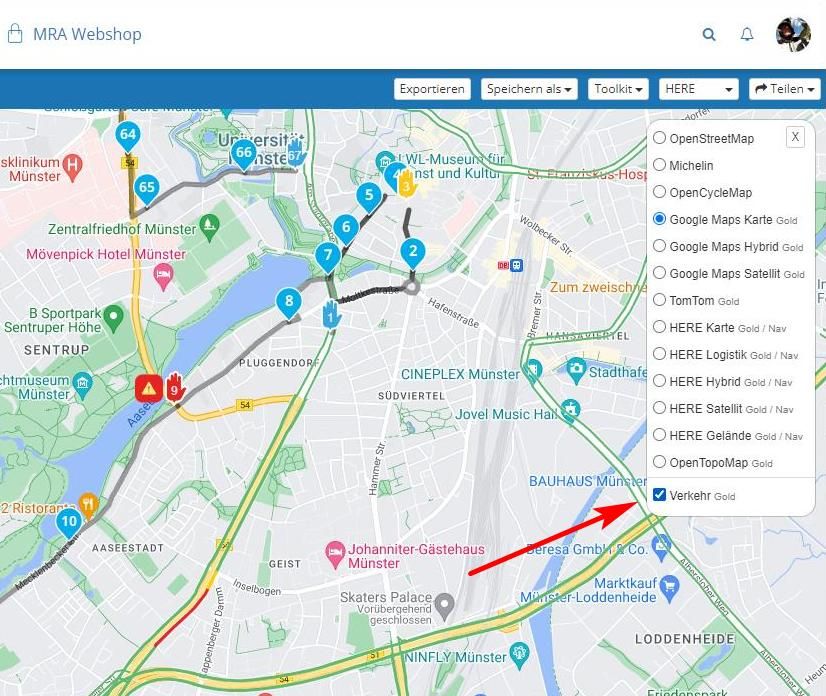
@Axel-Härtl turn on the traffic layer in the toolbox. Dit the Netherlands and Germany there are poi lists to heel you
-

@Axel-Härtl See here:
-
Hello forum, when planning a route (A to B), MRA does not recognize closed roads. Google Maps, on the other hand, guides you around these closures when planning your route.
How can one avoid roads that are known to be closed (e.g. roadworks) when planning a route in MRA?
Best, Axel

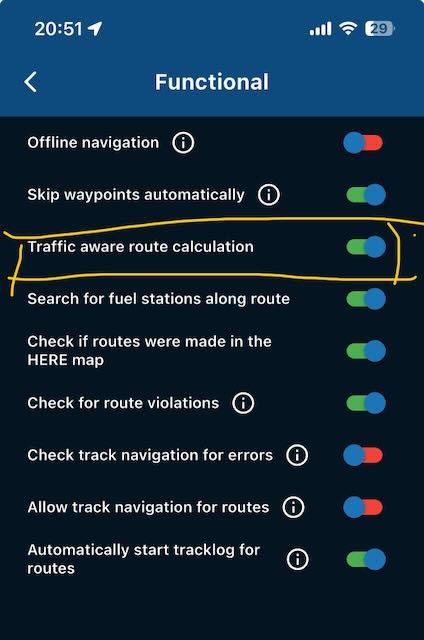
@Axel-Härtl Besides the option mentioned above, the app also has 'Traffic aware route calculation' during navigation. So if you're planning an A-to-B route directly in the app, it's also recommended to turn this switch on.
-
Hi youall,
thanks for your answers. I now know how to navigate with traffic information.
Best, Axel
Hello! It looks like you're interested in this conversation, but you don't have an account yet.
Getting fed up of having to scroll through the same posts each visit? When you register for an account, you'll always come back to exactly where you were before, and choose to be notified of new replies (either via email, or push notification). You'll also be able to save bookmarks and upvote posts to show your appreciation to other community members.
With your input, this post could be even better 💗
Register Login-
 850615
-
 443524
-
67510
-
 0425
0425
-
08719
-
 1227250
-
05148
-
 13115
13115