Export route from i-phone to Nav 6
-

Hi everyone,
I was hoping someone could please help a newbie out with some advice.
I'm trying to understand the procedure for exporting (or Save As..?) a route using the MRA app on my i-phone to my Nav 6. I've successfully managed to export a route connecting my Nav 6 to my laptop via USB cable, but unfortunately haven't been able to replicate the process using the MRA app on my i-phone and then exporting the route to my Nav 6 via bluetooth (using Smartlink..?).
I've watched all the videos available (including the one explaining how to use Smartlink for mobile export), but unfortunately the app seems to have changed since then (2018) and those processes seem to be outdated. I have also contacted SUPPORT to see if they could perhaps help, but no luck yet, unfortunately.
Is there anyone out there that has perhaps had any success exporting a route from an i-phone, using the MRA app, to a Nav 6 - please help
Andre
-
Hi everyone,
I was hoping someone could please help a newbie out with some advice.
I'm trying to understand the procedure for exporting (or Save As..?) a route using the MRA app on my i-phone to my Nav 6. I've successfully managed to export a route connecting my Nav 6 to my laptop via USB cable, but unfortunately haven't been able to replicate the process using the MRA app on my i-phone and then exporting the route to my Nav 6 via bluetooth (using Smartlink..?).
I've watched all the videos available (including the one explaining how to use Smartlink for mobile export), but unfortunately the app seems to have changed since then (2018) and those processes seem to be outdated. I have also contacted SUPPORT to see if they could perhaps help, but no luck yet, unfortunately.
Is there anyone out there that has perhaps had any success exporting a route from an i-phone, using the MRA app, to a Nav 6 - please help
Andre

@Andre-van-der-Merwe said in Export route from i-phone to Nav 6:
Nav 6
There are several different GPS devices called NAv 6. Which Nav 6 do you mean?
-
Hi everyone,
I was hoping someone could please help a newbie out with some advice.
I'm trying to understand the procedure for exporting (or Save As..?) a route using the MRA app on my i-phone to my Nav 6. I've successfully managed to export a route connecting my Nav 6 to my laptop via USB cable, but unfortunately haven't been able to replicate the process using the MRA app on my i-phone and then exporting the route to my Nav 6 via bluetooth (using Smartlink..?).
I've watched all the videos available (including the one explaining how to use Smartlink for mobile export), but unfortunately the app seems to have changed since then (2018) and those processes seem to be outdated. I have also contacted SUPPORT to see if they could perhaps help, but no luck yet, unfortunately.
Is there anyone out there that has perhaps had any success exporting a route from an i-phone, using the MRA app, to a Nav 6 - please help
Andre

@Andre-van-der-Merwe
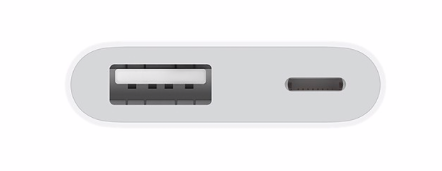
It is possible to export a route with an iPhone to the BMW NAV 6.
You do need an adapter to which you can also connect power. If you use it, the iPhone sees the BMW NAV 6 as an external medium and you can export the route to the desired location.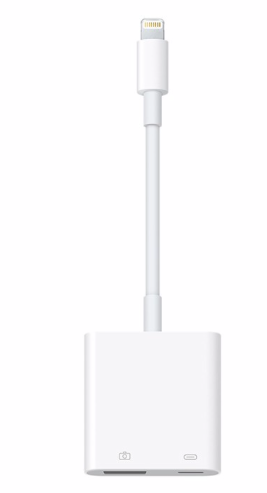
-
@Andre-van-der-Merwe said in Export route from i-phone to Nav 6:
Nav 6
There are several different GPS devices called NAv 6. Which Nav 6 do you mean?
@Drabslab it's a BMW navigator 6

-
@Andre-van-der-Merwe
It is possible to export a route with an iPhone to the BMW NAV 6.
You do need an adapter to which you can also connect power. If you use it, the iPhone sees the BMW NAV 6 as an external medium and you can export the route to the desired location.
Hey @Jack-van-Tilburg - thanks for your note and I will definitely try this when I get the adapter.
But what I'm actually trying to do is to export the file from my phone to the nav6 not using any adapters, plugs, cables or any devices other than my phone and the MRA app on my phone. Previously (in the 2018 version off the app), there was definitely a way to do this using SMARTLINK, but I can't seem to figure out how to do this using the latest version of the app.
I'll keep trying - wish me luck

A.
-
Hey @Jack-van-Tilburg - thanks for your note and I will definitely try this when I get the adapter.
But what I'm actually trying to do is to export the file from my phone to the nav6 not using any adapters, plugs, cables or any devices other than my phone and the MRA app on my phone. Previously (in the 2018 version off the app), there was definitely a way to do this using SMARTLINK, but I can't seem to figure out how to do this using the latest version of the app.
I'll keep trying - wish me luck
A.
@Andre-van-der-Merwe said in Export route from i-phone to Nav 6:
There is no way to transfer the files from the iPhone to your NAV6 without an adapter, plug or cable.
Not even with SMARTLINK. -
@Andre-van-der-Merwe said in Export route from i-phone to Nav 6:
There is no way to transfer the files from the iPhone to your NAV6 without an adapter, plug or cable.
Not even with SMARTLINK.
Hello! It looks like you're interested in this conversation, but you don't have an account yet.
Getting fed up of having to scroll through the same posts each visit? When you register for an account, you'll always come back to exactly where you were before, and choose to be notified of new replies (either via email, or push notification). You'll also be able to save bookmarks and upvote posts to show your appreciation to other community members.
With your input, this post could be even better 💗
Register Login-
 034212
-
 2241362
-
 01153
01153
-
0850
-
 1866
1866
-
 015208
-
2640
-
 722288