Skip to content
  • Categories
  • Recent
  • Popular
  • Support
  • MyRoute-app
Collapse
Brand Logo

MRA Community Forum

  1. Home
  2. MyRoute-app Routeplanner
  3. [Web] Problems, Bugs and other Issues
  4. Export to Motorrad VI

Export to Motorrad VI

Scheduled Pinned Locked Moved [Web] Problems, Bugs and other Issues
5 Posts 3 Posters 1.4k Views 2 Watching
  • Oldest to Newest
  • Newest to Oldest
  • Most Votes
Reply
  • Reply as topic
Log in to reply
This topic has been deleted. Only users with topic management privileges can see it.
  • PIT 3
    PIT 3
    PIT 3
    wrote on last edited by
    #1

    Hello, what is the best way to export routes to a Motorrad VI ?
    Thanks

    John S Parry 1 Reply Last reply
    0
    • PIT 3 PIT 3

      Hello, what is the best way to export routes to a Motorrad VI ?
      Thanks

      John S Parry
      John S Parry
      John S Parry
      wrote on last edited by John S Parry
      #2

      @PIT-3 There are a few methods. MRA has its own Connector tool, but I haven't used it yet. But I have a friend who does, and he confirms to me that it works.

      The method I'm currently using is to copy the saved MRA 1.1 GPX file directly to the GPX folder on my Zumo XT. Plug your Nav into your computer. And then, from File Explorer (PC) or Android File Transfer (Mac), drag the GPX file to the GPX folder on the Nav. Unplug the Nav, turn it on, go into Trip Planner, you'll get a message telling you there is a new route ready for import. Click the check box, and you're done.

      PIT 3 1 Reply Last reply
      0
      • John S Parry John S Parry

        @PIT-3 There are a few methods. MRA has its own Connector tool, but I haven't used it yet. But I have a friend who does, and he confirms to me that it works.

        The method I'm currently using is to copy the saved MRA 1.1 GPX file directly to the GPX folder on my Zumo XT. Plug your Nav into your computer. And then, from File Explorer (PC) or Android File Transfer (Mac), drag the GPX file to the GPX folder on the Nav. Unplug the Nav, turn it on, go into Trip Planner, you'll get a message telling you there is a new route ready for import. Click the check box, and you're done.

        PIT 3
        PIT 3
        PIT 3
        wrote on last edited by
        #3

        @John-S-Parry thanks a lot 🙂

        Hubert Thoring 1 Reply Last reply
        0
        • PIT 3 PIT 3

          @John-S-Parry thanks a lot 🙂

          Hubert Thoring
          Hubert Thoring
          Hubert Thoring
          Valued contributor
          wrote on last edited by Hubert Thoring
          #4

          @PIT-3 : das geht auch vom Handy oder iPad wenn man unterwegs ist, da hat man ja eigentlich keinen Laptop oder PC mehr dabei …

          Einfach aus der MyRoute-App (Next) direkt herunterladen damit Exportieren als GPX 1.1 und unter Dateien in das / Garmin / GPX Verzeichnis kopieren

          Das geht als Basis User (kostenlose) mit der MyRoute-App, denn du hast Zugriff auf deine in Web geplanten Routen 👍

          hier mit einem iPhone Xr sollte mit einem Android Handy auch gehen.
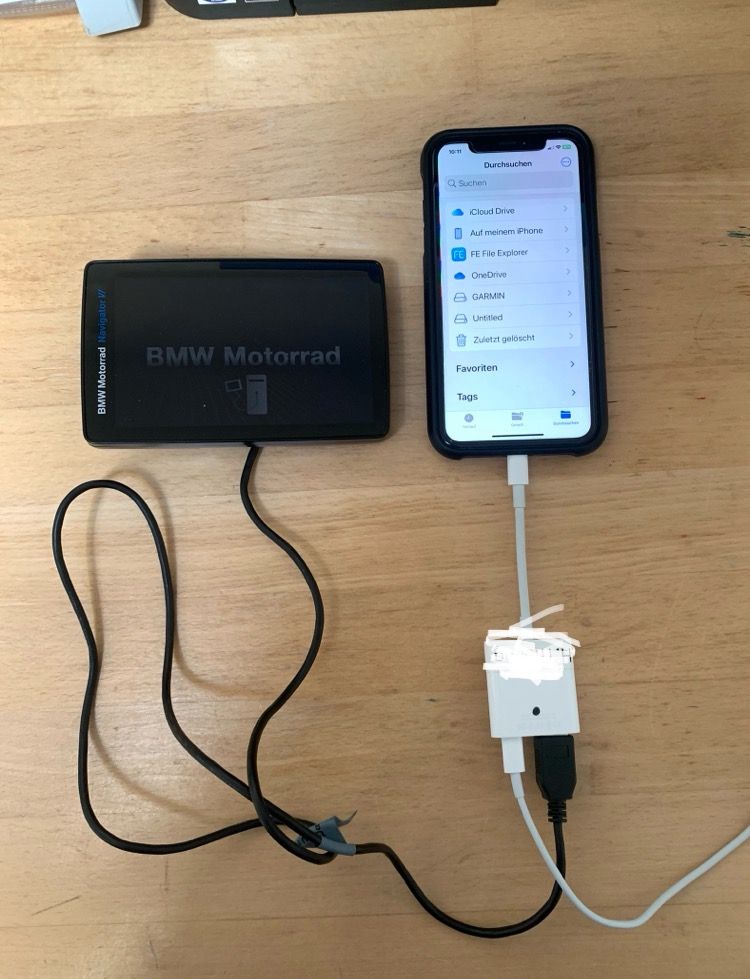
          IMG_3433.jpg

          VG Hubert
          Beta Test "Next App" dazu die Hardware .
          iPad 9. Gen iOS 26.7/ iPhone 16e iOS 26.7/ Navi iPhone Xr iOS 18.7.10 / PC mit MS Win11 /❗️MyRoute-App im Cradel und Remotek-One❗️ Info zu MRA & Remotek One

          John S Parry 1 Reply Last reply
          1
          • Hubert Thoring Hubert Thoring

            @PIT-3 : das geht auch vom Handy oder iPad wenn man unterwegs ist, da hat man ja eigentlich keinen Laptop oder PC mehr dabei …

            Einfach aus der MyRoute-App (Next) direkt herunterladen damit Exportieren als GPX 1.1 und unter Dateien in das / Garmin / GPX Verzeichnis kopieren

            Das geht als Basis User (kostenlose) mit der MyRoute-App, denn du hast Zugriff auf deine in Web geplanten Routen 👍

            hier mit einem iPhone Xr sollte mit einem Android Handy auch gehen.

            IMG_3433.jpg

            John S Parry
            John S Parry
            John S Parry
            wrote on last edited by
            #5

            @Hubert-Thoring Very Nice! I generally have my laptop with me on longer trips for creating/transferring new routes, but I see situations where your approach can be useful.

            I'm going to order a Lightning to USB adapter and have this as an option. Thanks!

            1 Reply Last reply
            0

            Hello! It looks like you're interested in this conversation, but you don't have an account yet.

            Getting fed up of having to scroll through the same posts each visit? When you register for an account, you'll always come back to exactly where you were before, and choose to be notified of new replies (either via email, or push notification). You'll also be able to save bookmarks and upvote posts to show your appreciation to other community members.

            With your input, this post could be even better 💗

            Register Login
            Reply
            • Reply as topic
            Log in to reply
            • Oldest to Newest
            • Newest to Oldest
            • Most Votes


            ACTIVE USERS
            John S Parry
            John S Parry
            Hubert Thoring
            Hubert Thoring
            PIT 3
            PIT 3
            POPULAR TOPICS
            • [NL] MyRoute-app Routeplanner Next (Beta)
              Hubert Thoring
              Hubert Thoring
              5
              103
              4.3k

            • Forum Discussions - Filter Languages
              John S Parry
              John S Parry
              1
              5
              113

            • Points of interest
              Lluís Casals
              Lluís Casals
              0
              5
              123

            • [EN] MyRoute-app Routeplanner Next (Beta)
              Hubert Thoring
              Hubert Thoring
              9
              98
              4.2k

            • Altitude numbers size
              Aiello antonino
              Aiello antonino
              0
              9
              282

            • The "Route as Track" function is no longer working.
              Con Hennekens
              Con Hennekens
              0
              3
              114

            • Elektrisch voertuig
              Marinus van Deudekom
              Marinus van Deudekom
              0
              26
              966

            • Suggestion: Live location sharing for friends on the map
              JP d
              JP d
              0
              3
              95

            MY GROUPS
            • Login

            • Login or register to search.
            • First post
              Last post
            0
            • Categories
            • Recent
            • Popular
            • Support
            • MyRoute-app