How can I make poi's visible on routes.
-

Als ik een route importeer met poi's kan ik deze zichbaar maken in route lab. Maar als ik de route gebruik op de navigatie app dan kan ik ze niet zien. Doe ik iets fout met opslaan of exporteren?
When I import a route with POIs, I can make it visible in route lab. But when I use the route on the navigation app, I cannot see them. Am I doing something wrong with saving or exporting?
-
Als ik een route importeer met poi's kan ik deze zichbaar maken in route lab. Maar als ik de route gebruik op de navigatie app dan kan ik ze niet zien. Doe ik iets fout met opslaan of exporteren?
When I import a route with POIs, I can make it visible in route lab. But when I use the route on the navigation app, I cannot see them. Am I doing something wrong with saving or exporting?

Hi @Leike-Lodiers!##I am not totally sure if I understood you correct, but if you want to have POI‘s in MRA Navigation Next, you need to make them to waypoints within your routes. I normally do this as VIA-points as I normally wants to have a stop there. At least for a quick photo.
At the moment I don‘t see any way to get your POI‘s in your amp on MRA Navigation Next.Thomas
-

From what I understand:
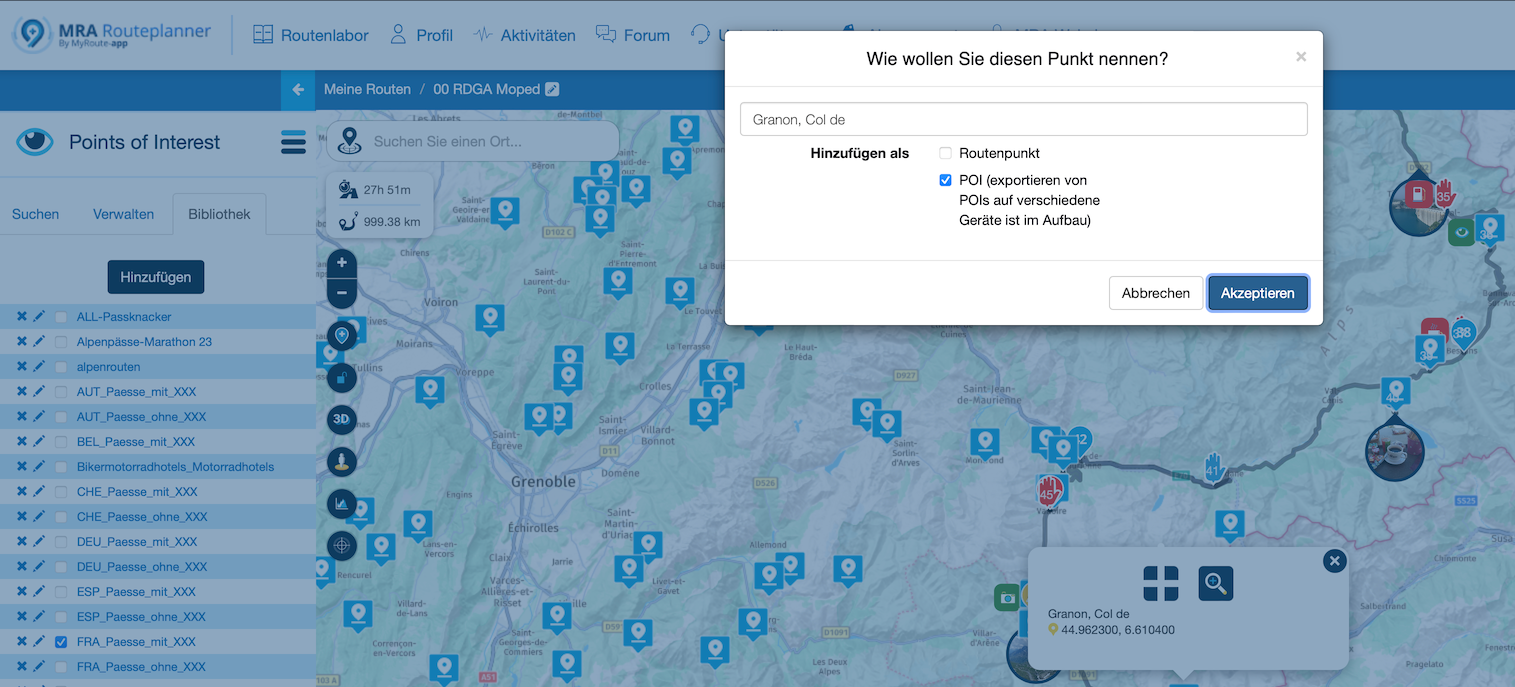
You have to klick and add the POIs as favorites. Whether you add them into your route, or just by importing them all as GPX.Then go to your route, dial POI in the list, activate them and click the POI. Click "Add POI" and now you will have it on MRA Next.
See my example.
-
Als ik een route importeer met poi's kan ik deze zichbaar maken in route lab. Maar als ik de route gebruik op de navigatie app dan kan ik ze niet zien. Doe ik iets fout met opslaan of exporteren?
When I import a route with POIs, I can make it visible in route lab. But when I use the route on the navigation app, I cannot see them. Am I doing something wrong with saving or exporting?

@Leike-Lodiers in welk formaat Importeer je zo'n route.
Kun je die met ons delen zodat we je kunnen helpen -
From what I understand:
You have to klick and add the POIs as favorites. Whether you add them into your route, or just by importing them all as GPX.Then go to your route, dial POI in the list, activate them and click the POI. Click "Add POI" and now you will have it on MRA Next.
See my example.

@No6671 you don't actually have to save the POIs as favourites. Once the the POI is displayed on you planning map, you can tap on a POI and then tap the plus sign and choose to add to your route as a POI. They will then be displayed on your route while navigating.
-
I receive this route from the organization of cycling rounds. I import them as route/track and then as POIs. I then convert the route to Here map via routelab. The first route is the one I receive. Create the second route that I see in route lab. I need all POIs to check on the route whether there is a traffic controller and who that should be. (I have a list of names on paper) So if I have to enter all the points manually, it is quite a job every time. I then make them visible on the route and see them all. I then click on the poi and on the cross and add as poi then go to poi in the menu and click on add. And it is now visible on the route, but I have to do them all manually one by one. Is that also possible in one go?
Ik krijg deze route aangeleverd door de organisatie van wieler rondes. Ik importeer ze als route/track en daarna als POI's. De route doe ik dan via routelab omzetten naar Here kaart. De eerste route is die wat ik aangeleverd krijg. De tweede route maak die ik in routelab zie. Ik heb alle poi's nodig om op de route te controleren of er een verkeersregelaar staat en wie dat zou moeten zijn. (heb zelf een lijst met namen op papier) Dus als ik alle punten handmatig moet invoeren is wel een flinke klus iedere keer. Ik maak ze dan zichbaar op de route en zie ze allemaal. ik klik dan op de poi en op het kruis en voeg toe als poi ga dan naar poi in het menu en klik op add. En hij is nu zichtbaar op de route maar deze moet ik allemaal een voor een handmatig doen kan dat ook in een keer?
Origenel route:https://www.myrouteapp.com/en/social/route/9351786?mode=share
Made with MRA route:
https://www.myrouteapp.com/en/social/route/9351826?mode=share
-
@No6671 you don't actually have to save the POIs as favourites. Once the the POI is displayed on you planning map, you can tap on a POI and then tap the plus sign and choose to add to your route as a POI. They will then be displayed on your route while navigating.
@RetiredWingMan
Yes, but then they are part of navigation.
As I understood, the TE wanted them visible, without direct routing.At least I do so, as I tried to describe. Sometimes I plan (like in my example) a route, but decide on the go, to visit a POI.
--
Goran
Get up. Travel. Make friends. Sleep. Repeat. -
@RetiredWingMan
Yes, but then they are part of navigation.
As I understood, the TE wanted them visible, without direct routing.At least I do so, as I tried to describe. Sometimes I plan (like in my example) a route, but decide on the go, to visit a POI.
@No6671 Yes you're right but i like to now if I can set them all in one go. There are a lot of poi's we have to check on a route.
-
I receive this route from the organization of cycling rounds. I import them as route/track and then as POIs. I then convert the route to Here map via routelab. The first route is the one I receive. Create the second route that I see in route lab. I need all POIs to check on the route whether there is a traffic controller and who that should be. (I have a list of names on paper) So if I have to enter all the points manually, it is quite a job every time. I then make them visible on the route and see them all. I then click on the poi and on the cross and add as poi then go to poi in the menu and click on add. And it is now visible on the route, but I have to do them all manually one by one. Is that also possible in one go?
Ik krijg deze route aangeleverd door de organisatie van wieler rondes. Ik importeer ze als route/track en daarna als POI's. De route doe ik dan via routelab omzetten naar Here kaart. De eerste route is die wat ik aangeleverd krijg. De tweede route maak die ik in routelab zie. Ik heb alle poi's nodig om op de route te controleren of er een verkeersregelaar staat en wie dat zou moeten zijn. (heb zelf een lijst met namen op papier) Dus als ik alle punten handmatig moet invoeren is wel een flinke klus iedere keer. Ik maak ze dan zichbaar op de route en zie ze allemaal. ik klik dan op de poi en op het kruis en voeg toe als poi ga dan naar poi in het menu en klik op add. En hij is nu zichtbaar op de route maar deze moet ik allemaal een voor een handmatig doen kan dat ook in een keer?
Origenel route:https://www.myrouteapp.com/en/social/route/9351786?mode=share
Made with MRA route:
https://www.myrouteapp.com/en/social/route/9351826?mode=share

@Leike-Lodiers said in How can I make poi's visible on routes.:
Dus als ik alle punten handmatig moet invoeren is wel een flinke klus iedere keer. ..... kan dat ook in een keer?
Ik heb nog geen manier gevonden om dat in één keer te doen! Best een klusje dus.
Aangezien de website (de planningtool) toch nog aangepakt moet worden dit jaar is dit wellicht een wens die op de lijst kan worden gezet. Ik zou dit niet snel gebruiken denk ik, maar anderen (zoals jij) wel.🏍️ BMW K1600GT-P (2013) | Nolan N100-5 with Sena 30K
📱 iOS on iPhone 13 & 16 (mounted on Quadlock or AliExpress extention on BMW-cradle)
🚙 Apple CarPlay in VW T-Roc
💻 Routelab on MacBook Air & iMac (Golden Gate & Ventura) -
@Leike-Lodiers said in How can I make poi's visible on routes.:
Dus als ik alle punten handmatig moet invoeren is wel een flinke klus iedere keer. ..... kan dat ook in een keer?
Ik heb nog geen manier gevonden om dat in één keer te doen! Best een klusje dus.
Aangezien de website (de planningtool) toch nog aangepakt moet worden dit jaar is dit wellicht een wens die op de lijst kan worden gezet. Ik zou dit niet snel gebruiken denk ik, maar anderen (zoals jij) wel.
@Rob-Verhoeff zou idd makkelijk zijn als er een knop alle poi's toevoegen als poi zou komen.
R1250GS. Started with a Zumo 550, BMW nav IV, Carpe-iter and now Chigee met MRA app.
-
@Rob-Verhoeff zou idd makkelijk zijn als er een knop alle poi's toevoegen als poi zou komen.
@Leike-Lodiers als je die POI’s in een lijst krijgt, kun je die mogelijk als geheel als POI’s importeren. Zeker als het een excel sheet is
Honda Goldwing GL1500,
Honda Silverwing GL 650
DMD2 T865X 8 inch Android tablet using MRA next for navigation
Garmin XT sold
Samsung S24FE mounted on a Quadlock and using Android Auto in my car -
@Leike-Lodiers als je die POI’s in een lijst krijgt, kun je die mogelijk als geheel als POI’s importeren. Zeker als het een excel sheet is
@Marinus-van-Deudekom ik kan ze met de gpx importeren maar moet ze dan nog altijd handmatig zichtbaar te maken voor gebruik in de app tijdens navigeren.
R1250GS. Started with a Zumo 550, BMW nav IV, Carpe-iter and now Chigee met MRA app.
-
@Marinus-van-Deudekom ik kan ze met de gpx importeren maar moet ze dan nog altijd handmatig zichtbaar te maken voor gebruik in de app tijdens navigeren.
@Leike-Lodiers als je die hebt geïmporteerd kun je die ineens zichtbaar maken.
Honda Goldwing GL1500,
Honda Silverwing GL 650
DMD2 T865X 8 inch Android tablet using MRA next for navigation
Garmin XT sold
Samsung S24FE mounted on a Quadlock and using Android Auto in my car -
@Leike-Lodiers als je die hebt geïmporteerd kun je die ineens zichtbaar maken.
@Marinus-van-Deudekom ja dat klopt dan worden ze geïmporteerd naar de libary
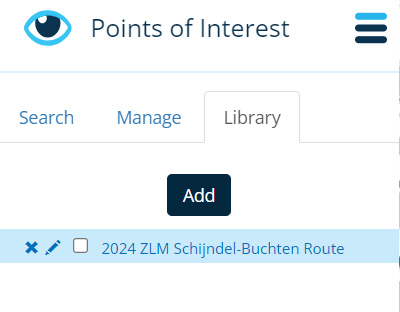
daar vink je ze aan en worden ze zichtbaar op de route. dan moet je ze op de route selecteren en toevoegen als poi.
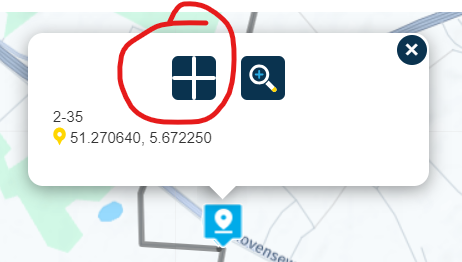
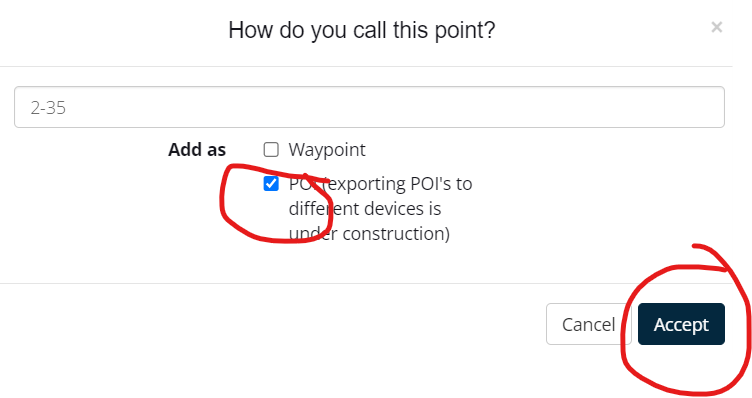
dan worden ze toegevoegd aan manage in het poi menu en hier moet ik ze met add toevoegen om ze zichtbaar te krijgen op mijn route in de next app
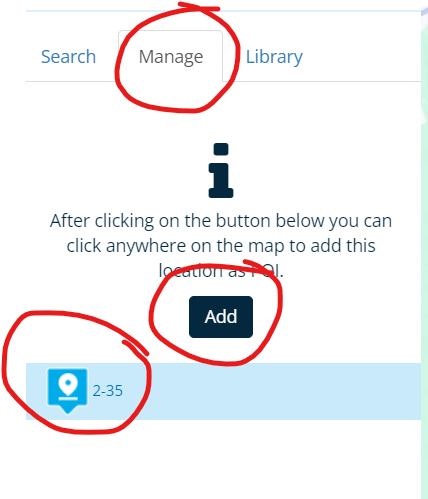
nu is hij zichtbaar als ik de route open om te navigeren in de app.
-
@Marinus-van-Deudekom said in How can I make poi's visible on routes.:
@Leike-Lodiers als je die hebt geïmporteerd kun je die ineens zichtbaar maken.
Maar niet in een route! Ze staan wel allemaal in je bieb maar moet ze wel handmatig één voor één toevoegen aan de route die je wilt navigeren. Dat zou wellicht handiger kunnen.
Hello! It looks like you're interested in this conversation, but you don't have an account yet.
Getting fed up of having to scroll through the same posts each visit? When you register for an account, you'll always come back to exactly where you were before, and choose to be notified of new replies (either via email, or push notification). You'll also be able to save bookmarks and upvote posts to show your appreciation to other community members.
With your input, this post could be even better 💗
Register Login-
 08204
08204
-
 0521
0521
-
0746
-
 0314
0314
-
0311
-
0311
-
0211
-
026