Skip to content
  • Categories
  • Recent
  • Popular
  • Support
  • MyRoute-app
Collapse
Brand Logo

MRA Community Forum

  1. Home
  2. General Discussion
  3. loading a map onto a Garmin XT

loading a map onto a Garmin XT

Scheduled Pinned Locked Moved General Discussion
7 Posts 4 Posters 1.9k Views 2 Watching
  • Oldest to Newest
  • Newest to Oldest
  • Most Votes
Reply
  • Reply as topic
Log in to reply
This topic has been deleted. Only users with topic management privileges can see it.
  • Mike 4bundefined Offline
    Mike 4bundefined Offline
    Mike 4b
    wrote on last edited by
    #1

    Hi. I am using an Apple Mac and have downloaded the MRA connector which says is connected. When i try to export the map to a Garmin XT its says it is not connected to the Garmin . Any suggestions please. I am a new user so a little unfamiliar with all techniques on the App. cheers
    Reinhard-32undefined Hans van de Ven MR.MRAundefined K1W1undefined 3 Replies Last reply
    0
    • Mike 4bundefined Mike 4b

      Hi. I am using an Apple Mac and have downloaded the MRA connector which says is connected. When i try to export the map to a Garmin XT its says it is not connected to the Garmin . Any suggestions please. I am a new user so a little unfamiliar with all techniques on the App. cheers

      Reinhard-32undefined Offline
      Reinhard-32undefined Offline
      Reinhard-32
      wrote on last edited by
      #2

      @Mike-4b The connector doesn’t work with a Mac and a ZumoXT. Please save the route as GPX file on your mac and copy this file in the GPX folder on your ZumoXT.

      Kindly regards
      Reinhard

      Montana 700i and Mac

      Mike 4bundefined 1 Reply Last reply
      0
      • Mike 4bundefined Mike 4b

        Hi. I am using an Apple Mac and have downloaded the MRA connector which says is connected. When i try to export the map to a Garmin XT its says it is not connected to the Garmin . Any suggestions please. I am a new user so a little unfamiliar with all techniques on the App. cheers

        Hans van de Ven MR.MRAundefined Offline
        Hans van de Ven MR.MRAundefined Offline
        Hans van de Ven MR.MRA
        Valued contributor
        wrote on last edited by
        #3

        @Mike-4b

        See this: https://forum.myrouteapp.com/topic/1396/garmin-zumo-xt-mac?_=1681190736024

        As @Reinhard-32 suggested, save the route and copy paste it in the gpx folder.

        Garmin Zumo XT3/XT2/XT/BMW Connected Ride Navigator/MyRouteapp (The App)/...
        Een dag niet gelachen is een dag niet geleefd / Een route is net zo goed als deze uitgezet is.

        1 Reply Last reply
        0
        • Reinhard-32undefined Reinhard-32

          @Mike-4b The connector doesn’t work with a Mac and a ZumoXT. Please save the route as GPX file on your mac and copy this file in the GPX folder on your ZumoXT.

          Mike 4bundefined Offline
          Mike 4bundefined Offline
          Mike 4b
          wrote on last edited by
          #4

          @Reinhard-32

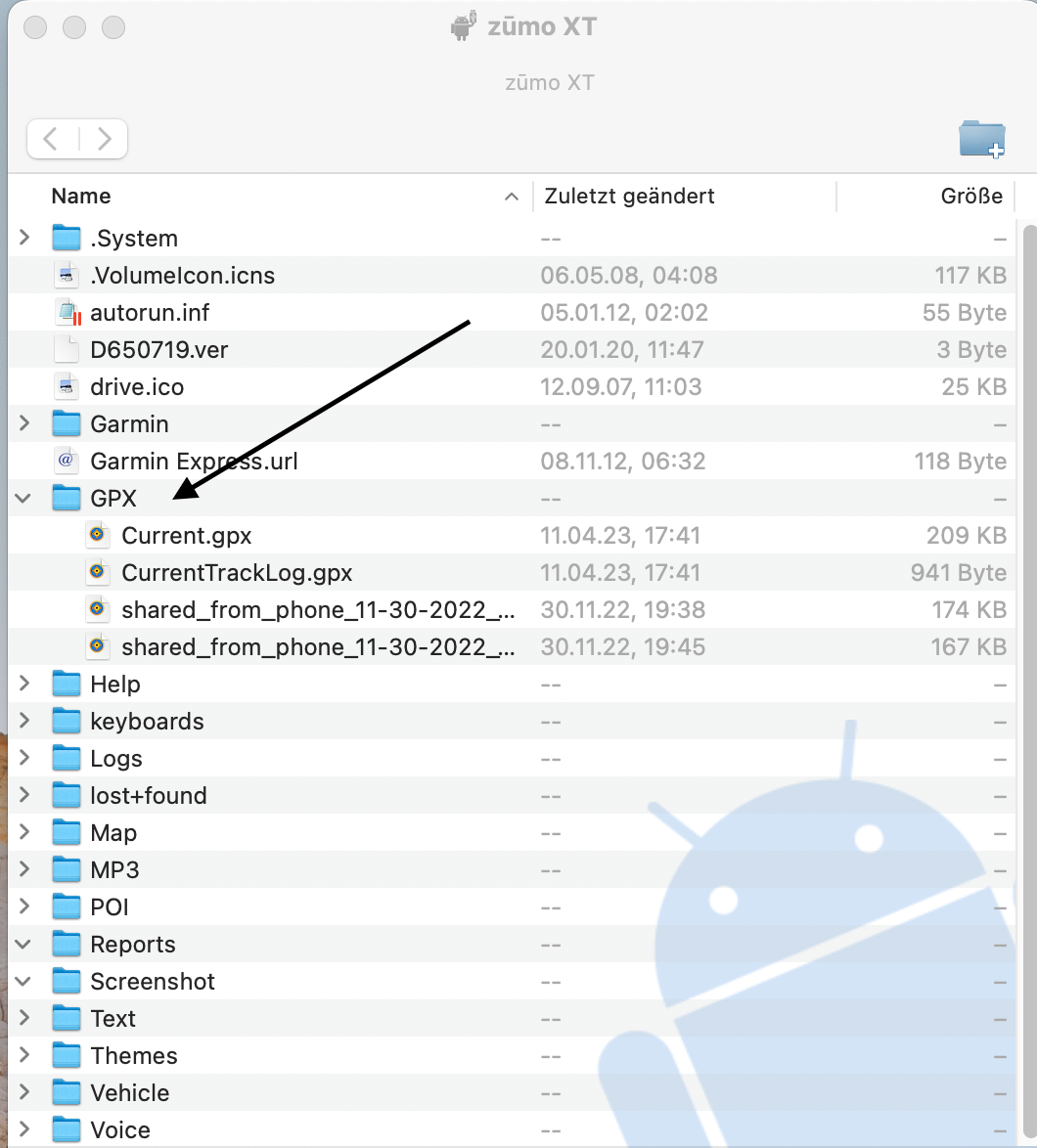
          Thanks Reinhard , where is GPS folder on the Garmin XT ?

          Reinhard-32undefined 2 Replies Last reply
          0
          • Mike 4bundefined Mike 4b

            @Reinhard-32

            Thanks Reinhard , where is GPS folder on the Garmin XT ?

            Reinhard-32undefined Offline
            Reinhard-32undefined Offline
            Reinhard-32
            wrote on last edited by Reinhard-32
            #5

            @Mike-4b !
            klick:
            Bildschirmfoto 2023-04-11 um 17.43.48.png

            Kindly regards
            Reinhard

            Montana 700i and Mac

            1 Reply Last reply
            0
            • Mike 4bundefined Mike 4b

              @Reinhard-32

              Thanks Reinhard , where is GPS folder on the Garmin XT ?

              Reinhard-32undefined Offline
              Reinhard-32undefined Offline
              Reinhard-32
              wrote on last edited by Reinhard-32
              #6

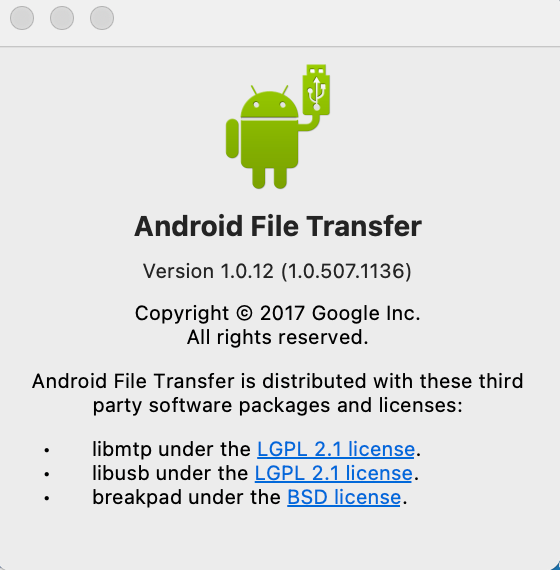
              @Mike-4b For access from a Mac to the ZumoXT you need the app Android File transfer. This can obtained form this website:
              https://www.android.com/filetransfer/
              Bildschirmfoto 2023-04-11 um 18.00.14.png

              Kindly regards
              Reinhard

              Montana 700i and Mac

              1 Reply Last reply
              0
              • Mike 4bundefined Mike 4b

                Hi. I am using an Apple Mac and have downloaded the MRA connector which says is connected. When i try to export the map to a Garmin XT its says it is not connected to the Garmin . Any suggestions please. I am a new user so a little unfamiliar with all techniques on the App. cheers

                K1W1undefined Offline
                K1W1undefined Offline
                K1W1
                wrote on last edited by
                #7

                @Mike-4b I use Android File Transfer (As above) from my Mac to my XT and it works seamlessly. I just export the route from My Route App to my Mac hard drive then used Android File Transfer to copy it from the hard drive to the XT. Android File Transfer can take some time to recognise that the XT is plugged in but once it does the transfer is seamless and virtually instant.

                1 Reply Last reply
                0
                • Reinhard-32undefined Reinhard-32 referenced this topic on

                Hello! It looks like you're interested in this conversation, but you don't have an account yet.

                Getting fed up of having to scroll through the same posts each visit? When you register for an account, you'll always come back to exactly where you were before, and choose to be notified of new replies (either via email, or push notification). You'll also be able to save bookmarks and upvote posts to show your appreciation to other community members.

                With your input, this post could be even better 💗

                Register Login
                Reply
                • Reply as topic
                Log in to reply
                • Oldest to Newest
                • Newest to Oldest
                • Most Votes


                ACTIVE USERS
                Hans van de Ven MR.MRAundefined
                Hans van de Ven MR.MRA
                Reinhard-32undefined
                Reinhard-32
                Mike 4bundefined
                Mike 4b
                K1W1undefined
                K1W1
                POPULAR TOPICS
                • Android 9: no tracklogs
                  Gijs Jonkerundefined
                  Gijs Jonker
                  0
                  4
                  87

                • Radar
                  Marko 3undefined
                  Marko 3
                  0
                  7
                  271

                • Export waypoints to Google Maps on mobile
                  Con Hennekensundefined
                  Con Hennekens
                  0
                  3
                  42

                • Rondreis Schotland en VK
                  Alida Veenstraundefined
                  Alida Veenstra
                  0
                  9
                  377

                • MRA 5.1.0 (462) Turn the card to stop and continue driving after a break
                  Con Hennekensundefined
                  Con Hennekens
                  0
                  3
                  19

                • Zoom Out in north Up view
                  Lluis Arasanzundefined
                  Lluis Arasanz
                  0
                  3
                  23

                • unable to dismiss "Resume Navigation?" overlay with remote
                  Con Hennekensundefined
                  Con Hennekens
                  0
                  2
                  29

                • Anyone tried Ridernav R7M with MRA via AA yet?
                  PieterGundefined
                  PieterG
                  0
                  31
                  3.2k

                MY GROUPS
                • Login

                • Login or register to search.
                • First post
                  Last post
                0
                • Categories
                • Recent
                • Popular
                • Support
                • MyRoute-app