App crashes when starting a direct route
-

The app often crashes when I start a simple A to B route. However, it doesn't always happen. At first it seemed that it only happened if Flitsmeister was also active, but the crashes also occur without Flitsmeister being active. I've cleared the cache several times, but after doing this and creating a route the app immediately crashes (but not always).
Steps:
- Optional: Open Flitsmeister
- Clear the cache and open MRA Mobile
- Use the search button and look for a city or address
- Generate the route
- Click on Start
- Click again on Start, it now shows the route, distance and time
- Click again on Start, the app crashes (but not always)
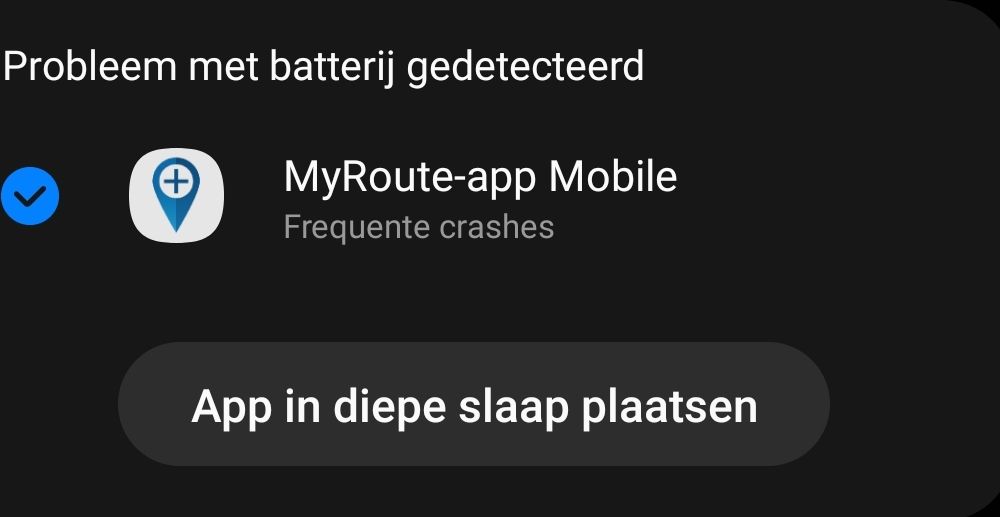
After several crashes I got this popup:
-
The app often crashes when I start a simple A to B route. However, it doesn't always happen. At first it seemed that it only happened if Flitsmeister was also active, but the crashes also occur without Flitsmeister being active. I've cleared the cache several times, but after doing this and creating a route the app immediately crashes (but not always).
Steps:
- Optional: Open Flitsmeister
- Clear the cache and open MRA Mobile
- Use the search button and look for a city or address
- Generate the route
- Click on Start
- Click again on Start, it now shows the route, distance and time
- Click again on Start, the app crashes (but not always)
After several crashes I got this popup:

@Jaap-van-Maanen Thanks for sharing! This indeed currently can be an issue with Android devices and we are working on a fix

Hello! It looks like you're interested in this conversation, but you don't have an account yet.
Getting fed up of having to scroll through the same posts each visit? When you register for an account, you'll always come back to exactly where you were before, and choose to be notified of new replies (either via email, or push notification). You'll also be able to save bookmarks and upvote posts to show your appreciation to other community members.
With your input, this post could be even better 💗
Register Login-
 01431
01431
-
0923
-
 911210.5k
-
 0712
0712
-
 0726
0726
-
1519
-
1423
-
0413