Move, Save, Delete window
-
Hi,
today I noticed that the (move, save and delete) window covers information needed.
I wanted to select only Route-Track File for moving, but the window covers the information.
Is it possible to make this window moveable?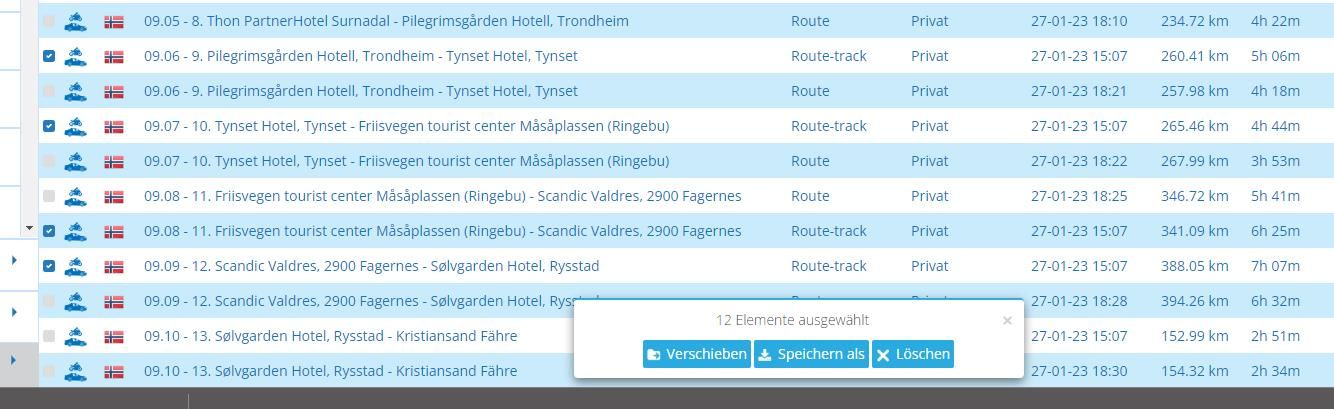
Hardware
iPhone 12 pro (iOS 26.2.1)
iPad (7.Gen.) 18.7.3
Oukitel RT3 Pro (Andr. 14)
Wireless CarPlay mit (Elebest C650)
Wired CarPlay (SEAT Arona - 2021)
MRA Workshops in Deutsch sind hier zu finden -
Hi,
today I noticed that the (move, save and delete) window covers information needed.
I wanted to select only Route-Track File for moving, but the window covers the information.
Is it possible to make this window moveable?@Jörgen
Hi Jörgen, gute Idee.Auf meinem Samsung Laptop und Samsung Smartphone kann ich zum Glück die Seite mit den Touren im Hintergrund hochscrollen, sodass Ich die gewünschten Informationen sehen kann.
Luckily on my Samsung Tablet and Samsung Smartphone
i can scroll up the tours page behind the Infobox, so that I can see the information I want.Greetings
Ronni -
Hi,
today I noticed that the (move, save and delete) window covers information needed.
I wanted to select only Route-Track File for moving, but the window covers the information.
Is it possible to make this window moveable? -
Ok, could be an option.
But if you miss one or two, the problem still exists.Hardware
iPhone 12 pro (iOS 26.2.1)
iPad (7.Gen.) 18.7.3
Oukitel RT3 Pro (Andr. 14)
Wireless CarPlay mit (Elebest C650)
Wired CarPlay (SEAT Arona - 2021)
MRA Workshops in Deutsch sind hier zu finden -
Ok, could be an option.
But if you miss one or two, the problem still exists.That is true, but you can alwys click on the "X' on the end of the line



Hello! It looks like you're interested in this conversation, but you don't have an account yet.
Getting fed up of having to scroll through the same posts each visit? When you register for an account, you'll always come back to exactly where you were before, and choose to be notified of new replies (either via email, or push notification). You'll also be able to save bookmarks and upvote posts to show your appreciation to other community members.
With your input, this post could be even better 💗
Register Login-
 0576
0576
-
618852
-
116655
-
2341
-
 08258
08258
-
 312380
-
 05127
05127