Circular Routes
-
Hi, I’m new to MyRouteApp to be gentle

Yesterday I created what I call a circular route. From home in the West Midlands to mid Wales and back home, about 150miles. The route I created had lots of waypoints and took a different route home than the one going.
I then used MyRouteNavigation to navigate the route. As soon as I left home, the app started to protest and kept trying to take me back home. I tried several times but even after 20 miles it was still trying to take me directly back home.
I assume this is because the start and end points of the route were my home address.
Is there a way of creating a “circular” route and forcing the navigation app to navigate each waypoint in the correct order?
I guess I could split the route into one outbound and one return but it would be better if I didn’t need to.
Thx in anticipation.

@mick-k
I think you didn't drive through the first point at the start of the route.
I would prevent that by editing the route a bit by moving that point a little further from the start. -
Hi, I’m new to MyRouteApp to be gentle
Yesterday I created what I call a circular route. From home in the West Midlands to mid Wales and back home, about 150miles. The route I created had lots of waypoints and took a different route home than the one going.
I then used MyRouteNavigation to navigate the route. As soon as I left home, the app started to protest and kept trying to take me back home. I tried several times but even after 20 miles it was still trying to take me directly back home.
I assume this is because the start and end points of the route were my home address.
Is there a way of creating a “circular” route and forcing the navigation app to navigate each waypoint in the correct order?
I guess I could split the route into one outbound and one return but it would be better if I didn’t need to.
Thx in anticipation.

@mick-k said in Circular Routes:
I assume this is because the start and end points of the route were my home address.
This most likely is your issue. The start and end waypoints are via points automatically, and shall be driven through for the navigation to work correctly. Based on your comment I assume these waypoints are placed at the exact location of your house, and not even on the road. (You can confirm this by showing us a screenshot of that part of the route, or sharing your route with us[in that case make sure to set the privacy setting to public]...)
As @Jack-van-Tilburg states, put the first waypoint about 50m upwards from the start location on the road, and similarly for the final waypoint but then backwards from the end location.
-
@mick-k
I think you didn't drive through the first point at the start of the route.
I would prevent that by editing the route a bit by moving that point a little further from the start. -
@mick-k said in Circular Routes:
I assume this is because the start and end points of the route were my home address.
This most likely is your issue. The start and end waypoints are via points automatically, and shall be driven through for the navigation to work correctly. Based on your comment I assume these waypoints are placed at the exact location of your house, and not even on the road. (You can confirm this by showing us a screenshot of that part of the route, or sharing your route with us[in that case make sure to set the privacy setting to public]...)
As @Jack-van-Tilburg states, put the first waypoint about 50m upwards from the start location on the road, and similarly for the final waypoint but then backwards from the end location.

@stefanhummelink said in Circular Routes:
@mick-k said in Circular Routes:
I assume this is because the start and end points of the route were my home address.
This most likely is your issue. The start and end waypoints are via points automatically, and shall be driven through for the navigation to work correctly. Based on your comment I assume these waypoints are placed at the exact location of your house, and not even on the road. (You can confirm this by showing us a screenshot of that part of the route, or sharing your route with us[in that case make sure to set the privacy setting to public]...)
As @Jack-van-Tilburg states, put the first waypoint about 50m upwards from the start location on the road, and similarly for the final waypoint but then backwards from the end location.
I think that the start point was actually at a point I did not drive through. So perhaps that was my problem. Though I though the app was meant to skip waypoints that were missed.
-
@stefanhummelink said in Circular Routes:
@mick-k said in Circular Routes:
I assume this is because the start and end points of the route were my home address.
This most likely is your issue. The start and end waypoints are via points automatically, and shall be driven through for the navigation to work correctly. Based on your comment I assume these waypoints are placed at the exact location of your house, and not even on the road. (You can confirm this by showing us a screenshot of that part of the route, or sharing your route with us[in that case make sure to set the privacy setting to public]...)
As @Jack-van-Tilburg states, put the first waypoint about 50m upwards from the start location on the road, and similarly for the final waypoint but then backwards from the end location.
I think that the start point was actually at a point I did not drive through. So perhaps that was my problem. Though I though the app was meant to skip waypoints that were missed.
Thx for the reply guys, unfortunately I deleted the home bound section of the route to eventually get it to work, so I can’t post a picture of it or share it.
However, from your comments it looks like “circular” routes are possible, I just need to make sure I pass through the first waypoint.
I will do some experiments on a short route to see.
-
@jack-van-tilburg That is quite possible though there is a setting in the Navigation App to skip waypoints automatically (though it does say “Beta”) Which I had set to ON.
@mick-k said in Circular Routes:
@jack-van-tilburg That is quite possible though there is a setting in the Navigation App to skip waypoints automatically (though it does say “Beta”) Which I had set to ON.
You can not skip the first and last waypoints.
-
A lot of navigation devices have a lot of known/unknown/published/not published quirks (and workarounds). The big ones are Garmin, TomTom, already extensively reviewed by MrGPS.
So also MRA must have them. But then again, I don't think MrGPS has ever reviewed any navigation app. A blind spot in GPS-land's knowledge...
-
@jack-van-tilburg That is quite possible though there is a setting in the Navigation App to skip waypoints automatically (though it does say “Beta”) Which I had set to ON.
@mick-k said in Circular Routes:
@jack-van-tilburg That is quite possible though there is a setting in the Navigation App to skip waypoints automatically (though it does say “Beta”) Which I had set to ON.
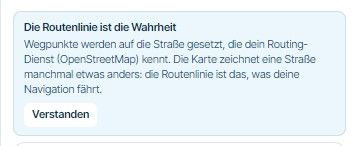
The Navigation app only skips waypoints automatically but no viapoints(these shall be skipped manually). Regular waypoints are the identified with the balloon symbol, while viapoints are identified with a hand symbol:

Note how the first and last waypoints are always viapoints no matter what you do and therefore these will not be skipped by the app automatically.
-
@mick-k said in Circular Routes:
@jack-van-tilburg That is quite possible though there is a setting in the Navigation App to skip waypoints automatically (though it does say “Beta”) Which I had set to ON.
You can not skip the first and last waypoints.
-
@mick-k said in Circular Routes:
@jack-van-tilburg That is quite possible though there is a setting in the Navigation App to skip waypoints automatically (though it does say “Beta”) Which I had set to ON.
The Navigation app only skips waypoints automatically but no viapoints(these shall be skipped manually). Regular waypoints are the identified with the balloon symbol, while viapoints are identified with a hand symbol:
Note how the first and last waypoints are always viapoints no matter what you do and therefore these will not be skipped by the app automatically.
@stefanhummelink
Waypoint, viapoints, shapingpoitns.....I often get those names mixed up.

-
@jack-van-tilburg That’s a good tip, thanks. I’m planning a 2500 mile tour in June so have just adjusted all the start points to 50 yards from the actual start point so I will definitely drive through them.
@mick-k said in Circular Routes:
@jack-van-tilburg That’s a good tip, thanks. I’m planning a 2500 mile tour in June so have just adjusted all the start points to 50 yards from the actual start point so I will definitely drive through them.
You might be wrong. On holidays, it regularly (in my case anyway) occurs that your bike is inside an undergound garage where there's not any satellite coverage at all. If you know your route, and depart in the right direction, you may very well have passed your route's first point already, just to find out, 500 meters down your route, that your GPS knows where it is : 450 meters behind you...
-
@mick-k said in Circular Routes:
@jack-van-tilburg That’s a good tip, thanks. I’m planning a 2500 mile tour in June so have just adjusted all the start points to 50 yards from the actual start point so I will definitely drive through them.
You might be wrong. On holidays, it regularly (in my case anyway) occurs that your bike is inside an undergound garage where there's not any satellite coverage at all. If you know your route, and depart in the right direction, you may very well have passed your route's first point already, just to find out, 500 meters down your route, that your GPS knows where it is : 450 meters behind you...
@sudolea said in Circular Routes:
You might be wrong. On holidays, it regularly (in my case anyway) occurs that your bike is inside an undergound garage where there's not any satellite coverage at all.
One of those rare occasions where special care for the first waypoint is applicable
-
@mick-k said in Circular Routes:
@jack-van-tilburg That’s a good tip, thanks. I’m planning a 2500 mile tour in June so have just adjusted all the start points to 50 yards from the actual start point so I will definitely drive through them.
You might be wrong. On holidays, it regularly (in my case anyway) occurs that your bike is inside an undergound garage where there's not any satellite coverage at all. If you know your route, and depart in the right direction, you may very well have passed your route's first point already, just to find out, 500 meters down your route, that your GPS knows where it is : 450 meters behind you...
@sudolea
Wow helpfull
Hello! It looks like you're interested in this conversation, but you don't have an account yet.
Getting fed up of having to scroll through the same posts each visit? When you register for an account, you'll always come back to exactly where you were before, and choose to be notified of new replies (either via email, or push notification). You'll also be able to save bookmarks and upvote posts to show your appreciation to other community members.
With your input, this post could be even better 💗
Register Login-
 0518
0518
-
 0521
0521
-
 039
039
-
0312
-
 0746
0746
-
0311
-
034
-
1260