AI planner: The trip is missing
-

Hi,
Thanks
-

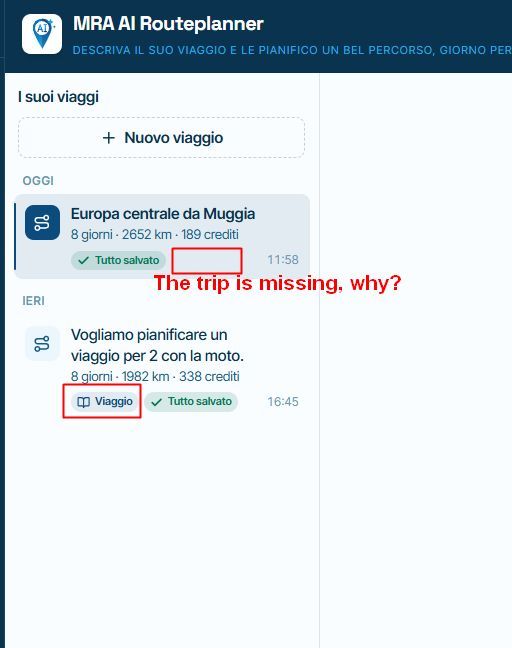
The planner doesn't make a trip on its own: saving the days puts the routes in your library, and the trip only comes once you ask for it. Open the chat "Europa centrale da Muggia" and look at the panel on the right with the days. Near the top there is a button "Crea il viaggio". Press it and the trip is made with every day and the nights in between, and the "Viaggio" label appears in the list beside "Tutto salvato". Days you save in that chat later join the trip by themselves.
In your other chat you (or the planner page) already pressed that button, which is why it shows there.
If you had already made a trip from this chat and later deleted it, the label goes away too. Pressing "Crea il viaggio" again makes a new one.
-
Ok, thanks a lot
-
Corjan Meijerink locked this topic
Hello! It looks like you're interested in this conversation, but you don't have an account yet.
Getting fed up of having to scroll through the same posts each visit? When you register for an account, you'll always come back to exactly where you were before, and choose to be notified of new replies (either via email, or push notification). You'll also be able to save bookmarks and upvote posts to show your appreciation to other community members.
With your input, this post could be even better 💗
Register Login-
 08148
-
 0614
-
0418
-
 1329
-
039
-
 0314
-
 0326
-
 026