Best format to save my route in---Here?
-

Hello, I'm leaving on a big trip and saved all my routes in the google maps default. Is that the best option or should I be using HERE default Gold/Nav? So far I have not been able to push my routes over to my Garmin Zumo XT like I used to be able to. I used to do it wirelessly, and the routes get there but they don't show up in trip planner. So I used the usb cable to my computer and dropped the files in the gpx folder on the garmin but they never will import. Sometimes they get to 100% when importing, but never finish. No routes imported. Really want to use the garmin as we are looking at riding in some rain and don't want to have my phone out. Please help.
Mike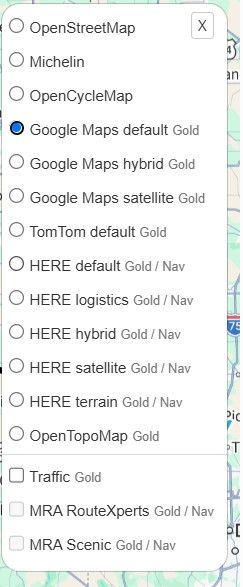
-

Hi Mike,
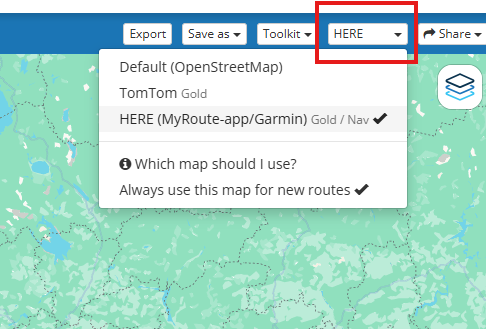
What you’re seeing there is just the layout map, which you can change without affecting the base map, depending on visual preferences.
You need to select one of the 3 available maps a little higher up in the menu. Since you mentioned you’re using Garmin, you’ll need to select the Here map!
After routes are created, export ast GPX 1.2, and it should work just fine !
Best regards,
Adrian📱Samsung S24 Ultra with MyRoute-APP (GOLD Lifetime)
🏍️Honda NC750X (2021) with AA/CarPlay by CHIGEE Aio-5
🚙Renault Duster with onboard AA/CarPlay Unit -
Hi Mike,
What you’re seeing there is just the layout map, which you can change without affecting the base map, depending on visual preferences.
You need to select one of the 3 available maps a little higher up in the menu. Since you mentioned you’re using Garmin, you’ll need to select the Here map!
After routes are created, export ast GPX 1.2, and it should work just fine !
@Adrian-Avram So I could not get 1.2 to work. They would not import into my Zumo XT. Someone on the Garmin Forum said I need to use 1.1 and it worked great. I love the connector option of tying the zumo to the computer and exporting. Thanks for your help.
Mike W
2013 Honda Goldwing
Bushtec Trailer
Garmin Zumo XT
Nebraska
youTube channel https://www.youtube.com/@mrjawmaster5854 -
@Adrian-Avram So I could not get 1.2 to work. They would not import into my Zumo XT. Someone on the Garmin Forum said I need to use 1.1 and it worked great. I love the connector option of tying the zumo to the computer and exporting. Thanks for your help.

@Mike-wiruth bullsh** I have a XT and I only use version 1.2. Try with the connector or else just export the 1.2 edition, drag it to the folder /GPX of the XT, restart your XT and it will directly save it as a trip and a track will be saved. For using the gpx1.2 set recalculating on the XT off.
When you go off-route, don't panic, just ride to the route and it will pick you up again.Met andere apps maak je een route, met MRA componeer je een route!
Ducati Monster 1200 met Garmin Zümo XT
Fiat 124 Spider/Camper Dethleffs met Navigation-App op Samsung Tab Active4 Pro
MRA Lifetime Gold -
@Mike-wiruth bullsh** I have a XT and I only use version 1.2. Try with the connector or else just export the 1.2 edition, drag it to the folder /GPX of the XT, restart your XT and it will directly save it as a trip and a track will be saved. For using the gpx1.2 set recalculating on the XT off.
When you go off-route, don't panic, just ride to the route and it will pick you up again.
bullsh** I have a XT and I only use version 1.2. Try with the connector or else just export the 1.2 edition, drag it to the folder /GPX of the XT, restart your XT and it will directly save it as a trip and a track will be saved.
That's been my experience too. Both on my XT and my XT3.
The drag-and-drop method works. Always. And it's simple. Using intermediary apps (Drive/Tread) and Connectors can break for various reasons. And usually at the worst possible times.
-

I loved the Garmin Drive wireless route transfer to the XT before I dropped it in favor of the MRA Nav.
-
I loved the Garmin Drive wireless route transfer to the XT before I dropped it in favor of the MRA Nav.
@LennyO me too (or better #metoo
 ), when I am on a trip and I have to change a route, yes it is a bless that you can send your routes by wifi. However, when I am at home behind my computer composing my routes for a multi-day trip, my XT always hangs on an usb-port. Draging your routes to the XT is 2 clicks away
But it depends also on your home configuration. Is your pc in the attic, or in your basement and you are designing your routes on a tablet or phone, sure I am glad to be able to transfer the routes with wifi. -
I loved the Garmin Drive wireless route transfer to the XT before I dropped it in favor of the MRA Nav.
I loved the Garmin Drive wireless route transfer to the XT before I dropped it in favor of the MRA Nav.
The Drive app for the XT is convenient. I used it for a brief time before deciding on wired transfer as my preferred method. The problem is that Garmin can break the Drive app with updates. It happened a couple of years ago, where the app was unusable for about 6-weeks. And my understanding is that they broke it again in the last month or so. For me, that's too much risk to depend on.
Moving forward to the XT2/XT3, you have to use the Tread app for wireless route transfer. Much has been written about how that can mess things up. The bottom line it's to be avoided.
For a longer trip where I might be in a position to have to modify or even create new routes, I carry my small MacBook Pro laptop with me. MRA Routplanner works great on it. The Mac takes up little space, so no big deal. As always, to each is own.
-
The Drive app was broken for Android, and they fixed it within a day. There was no issue with Mac, have been using Drive ever since I bought my XT with no issues whatsoever
Hello! It looks like you're interested in this conversation, but you don't have an account yet.
Getting fed up of having to scroll through the same posts each visit? When you register for an account, you'll always come back to exactly where you were before, and choose to be notified of new replies (either via email, or push notification). You'll also be able to save bookmarks and upvote posts to show your appreciation to other community members.
With your input, this post could be even better 💗
Register Login-
 07172
07172
-
 07157
07157
-
 01848
01848
-
 01045
01045
-
1523
-
 1327357
-
0512
-
0522