Scenic route and planned route are not intuitively differentiated in library listing
-

I created a scenic route, saved to library
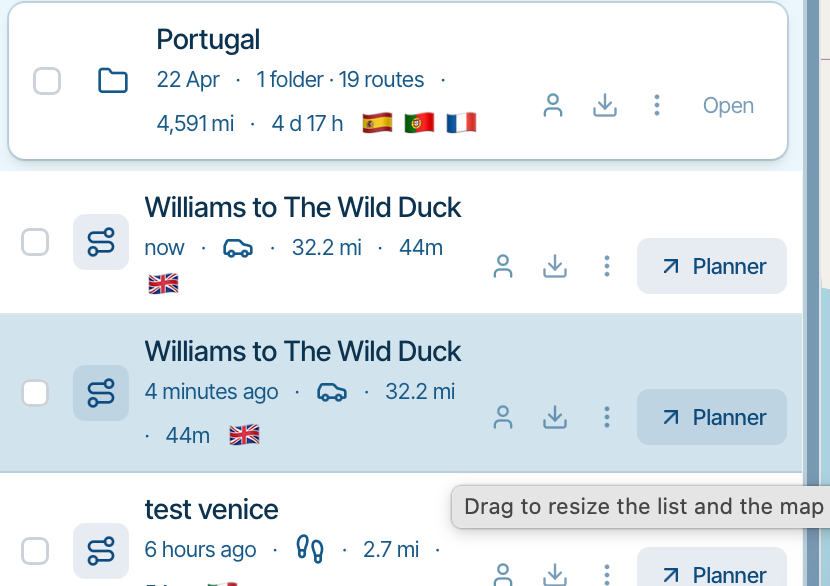
Then I used "convert to route" and saved that.Issue: The two are presented identically in the library catalogue except that (I have only just noticed!) one is shaded blue. It's not intuitively obvious which is which.
Expected result: Some sort of indication that one is a scenic route (eg "SCENIC" tag, or "(scenic)" appended to file name) and the other is a proper route.
This is exacerbated because each time I want to use a scenic route as base for a proper route, I end up with two files.
Example:
-

I’ll make some improvements

Hello! It looks like you're interested in this conversation, but you don't have an account yet.
Getting fed up of having to scroll through the same posts each visit? When you register for an account, you'll always come back to exactly where you were before, and choose to be notified of new replies (either via email, or push notification). You'll also be able to save bookmarks and upvote posts to show your appreciation to other community members.
With your input, this post could be even better 💗
Register Login-
 0858
-
 07163
-
0643
-
 0529
-
 517754
-
 0583
-
 0429
-
0418