Restore routes & tracks
-

Hi all!

We know the focus over the past year has been with Navigation Next.
However, we definitely have not forgotten about the website Due to being a small ("but mighty") team we need to allocate our resources efficiently.
Anyway! A long awaited improvement for the website has been released

Some users accidentally delete routes
 Unfortunately those were immediately deleted. As of today, you have 30 days to recover deleted routes & tracks from your library.
Whenever you have deleted items, the top folder of your routes / tracklogs page will show a "[MRA] Trash" folder. Opening it will allow you to delete items forever or recover them!
Note: After 30 days they will be deleted automatically.
We do however not allow folder restoration.
- Did you delete a folder? The routes will be placed in the trash individually.
- Recovering a route of which the original folder still exists? It will be placed back in that folder
- Recovering a route of which the original folder does not exist? It will be placed back in your root folder
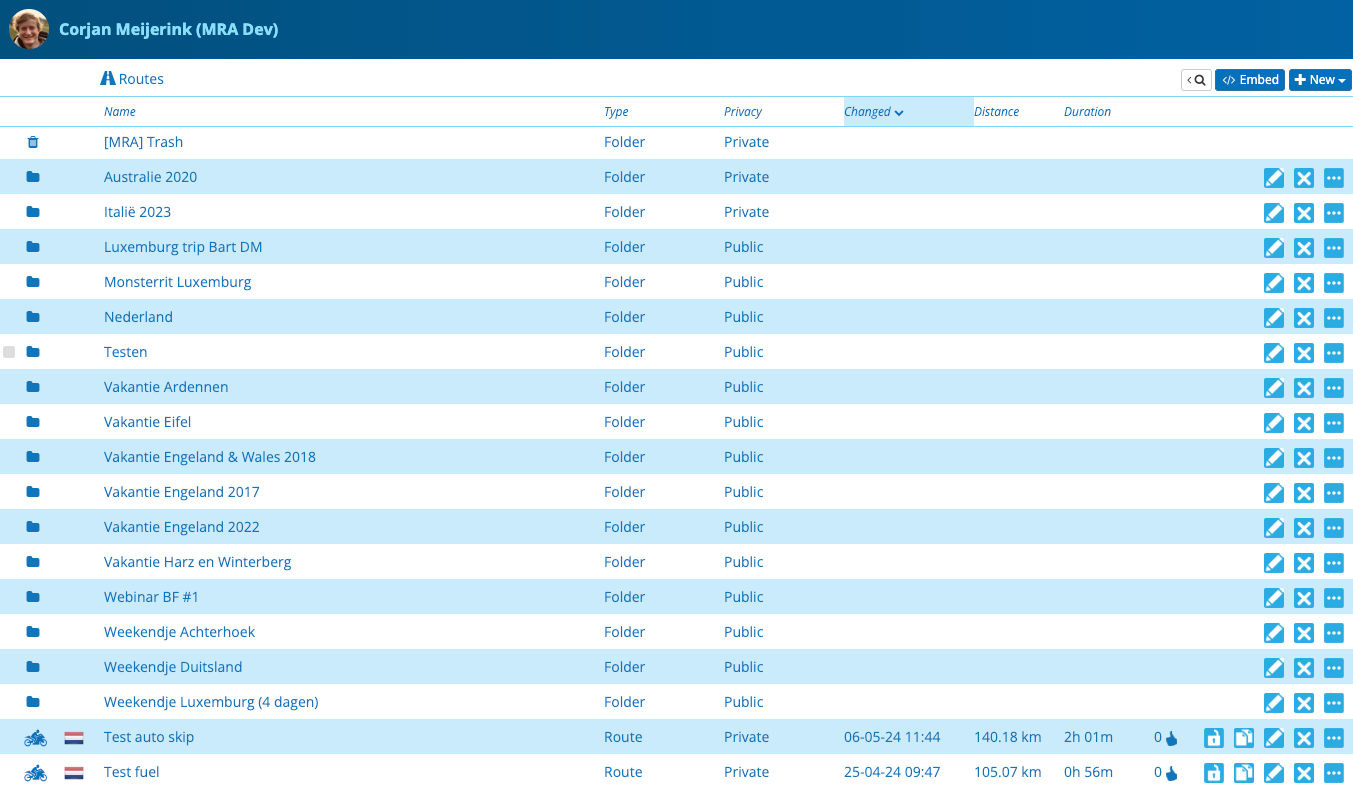
That's it!

Cheers,
Corjan -
Hi all!
We know the focus over the past year has been with Navigation Next.
However, we definitely have not forgotten about the website Due to being a small ("but mighty") team we need to allocate our resources efficiently.Anyway! A long awaited improvement for the website has been released
Some users accidentally delete routes
Unfortunately those were immediately deleted. As of today, you have 30 days to recover deleted routes & tracks from your library.Whenever you have deleted items, the top folder of your routes / tracklogs page will show a "[MRA] Trash" folder. Opening it will allow you to delete items forever or recover them!
Note: After 30 days they will be deleted automatically.
We do however not allow folder restoration.
- Did you delete a folder? The routes will be placed in the trash individually.
- Recovering a route of which the original folder still exists? It will be placed back in that folder
- Recovering a route of which the original folder does not exist? It will be placed back in your root folder
That's it!
Cheers,
Corjan
@Corjan-Meijerink Not that I had the need for this in the past it shows how versatile the dev team is haha! From app to website back to app.

-
Hi all!
We know the focus over the past year has been with Navigation Next.
However, we definitely have not forgotten about the website Due to being a small ("but mighty") team we need to allocate our resources efficiently.Anyway! A long awaited improvement for the website has been released
Some users accidentally delete routes
Unfortunately those were immediately deleted. As of today, you have 30 days to recover deleted routes & tracks from your library.Whenever you have deleted items, the top folder of your routes / tracklogs page will show a "[MRA] Trash" folder. Opening it will allow you to delete items forever or recover them!
Note: After 30 days they will be deleted automatically.
We do however not allow folder restoration.
- Did you delete a folder? The routes will be placed in the trash individually.
- Recovering a route of which the original folder still exists? It will be placed back in that folder
- Recovering a route of which the original folder does not exist? It will be placed back in your root folder
That's it!
Cheers,
Corjan
@Corjan-Meijerink, Thanks, that's a useful addition, and much requested.
-
Hi all!
We know the focus over the past year has been with Navigation Next.
However, we definitely have not forgotten about the website Due to being a small ("but mighty") team we need to allocate our resources efficiently.Anyway! A long awaited improvement for the website has been released
Some users accidentally delete routes
Unfortunately those were immediately deleted. As of today, you have 30 days to recover deleted routes & tracks from your library.Whenever you have deleted items, the top folder of your routes / tracklogs page will show a "[MRA] Trash" folder. Opening it will allow you to delete items forever or recover them!
Note: After 30 days they will be deleted automatically.
We do however not allow folder restoration.
- Did you delete a folder? The routes will be placed in the trash individually.
- Recovering a route of which the original folder still exists? It will be placed back in that folder
- Recovering a route of which the original folder does not exist? It will be placed back in your root folder
That's it!
Cheers,
Corjan
@Corjan-Meijerink Thankyou always good to have a fat fingers recovery option

-

Small but very useful improvement, thanks! Maybe an additional warning when someone is trying to delete non-empty folder would be good idea?
-
Hi all!
We know the focus over the past year has been with Navigation Next.
However, we definitely have not forgotten about the website Due to being a small ("but mighty") team we need to allocate our resources efficiently.Anyway! A long awaited improvement for the website has been released
Some users accidentally delete routes
Unfortunately those were immediately deleted. As of today, you have 30 days to recover deleted routes & tracks from your library.Whenever you have deleted items, the top folder of your routes / tracklogs page will show a "[MRA] Trash" folder. Opening it will allow you to delete items forever or recover them!
Note: After 30 days they will be deleted automatically.
We do however not allow folder restoration.
- Did you delete a folder? The routes will be placed in the trash individually.
- Recovering a route of which the original folder still exists? It will be placed back in that folder
- Recovering a route of which the original folder does not exist? It will be placed back in your root folder
That's it!
Cheers,
Corjan
@Corjan-Meijerink : Dankeschön dafür !!
-
Hi all!
We know the focus over the past year has been with Navigation Next.
However, we definitely have not forgotten about the website Due to being a small ("but mighty") team we need to allocate our resources efficiently.Anyway! A long awaited improvement for the website has been released
Some users accidentally delete routes
Unfortunately those were immediately deleted. As of today, you have 30 days to recover deleted routes & tracks from your library.Whenever you have deleted items, the top folder of your routes / tracklogs page will show a "[MRA] Trash" folder. Opening it will allow you to delete items forever or recover them!
Note: After 30 days they will be deleted automatically.
We do however not allow folder restoration.
- Did you delete a folder? The routes will be placed in the trash individually.
- Recovering a route of which the original folder still exists? It will be placed back in that folder
- Recovering a route of which the original folder does not exist? It will be placed back in your root folder
That's it!
Cheers,
Corjan
@Corjan-Meijerink Thank you very much for this quick and handy update
Good to know that we now have this feature, but I am still hoping, that I will never ned itTom

Hello! It looks like you're interested in this conversation, but you don't have an account yet.
Getting fed up of having to scroll through the same posts each visit? When you register for an account, you'll always come back to exactly where you were before, and choose to be notified of new replies (either via email, or push notification). You'll also be able to save bookmarks and upvote posts to show your appreciation to other community members.
With your input, this post could be even better 💗
Register Login-
 417175
-
 012640
-
0829
-
 1201.1k
-
06174
-
05132
-
0456
-
0341