Skip to content
  • Categories
  • Recent
  • Popular
  • Support
  • MyRoute-app
Collapse
Brand Logo

MRA Community Forum

  1. Home
  2. [Beta] The MyRoute-app
  3. [Beta] Suggestions and Discussions
  4. Current Speed/Limit not visible in Carplay

Current Speed/Limit not visible in Carplay
Scheduled Pinned Locked Moved [Beta] Suggestions and Discussions
9 Posts 5 Posters 68 Views 2 Watching
  • Oldest to Newest
  • Newest to Oldest
  • Most Votes
Reply
  • Reply as topic
Log in to reply
This topic has been deleted. Only users with topic management privileges can see it.
  • Stephen Rowland Offline
    Stephen Rowland Offline
    Stephen Rowland
    wrote on last edited by
    #1

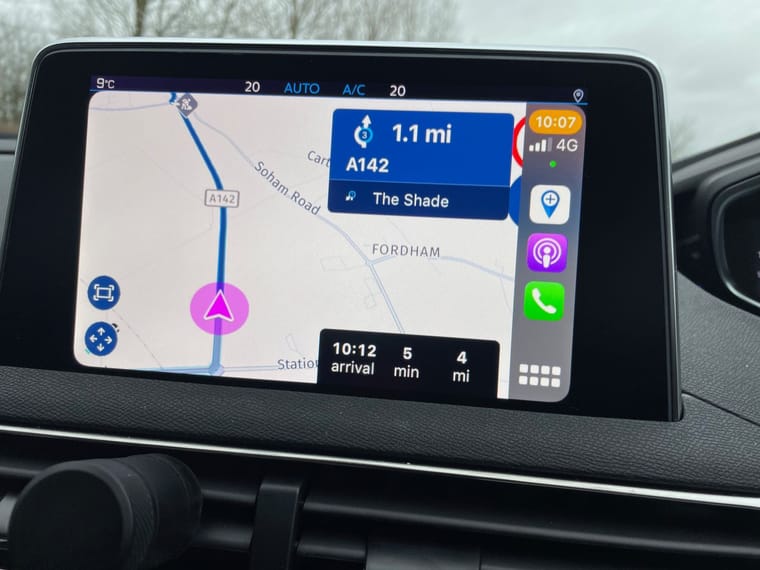
    In my Peugeot the Current Speed and Speed Limit is hidden under a sidebar menu that cannot be moved.
    IMG_3993.jpg

    I would imagine that if I asked for them to be moved to the Left Side, that would mess up someone elses screen. Any chance of a menu button to give an option?

    Jack van Tilburg Skellum Corjan Meijerink 3 Replies Last reply
    0
    • Stephen Rowland Stephen Rowland

      In my Peugeot the Current Speed and Speed Limit is hidden under a sidebar menu that cannot be moved.
      IMG_3993.jpg

      I would imagine that if I asked for them to be moved to the Left Side, that would mess up someone elses screen. Any chance of a menu button to give an option?

      Jack van Tilburg Offline
      Jack van Tilburg Offline
      Jack van Tilburg
      wrote on last edited by
      #2
      This post is deleted!
      Stephen Rowland 1 Reply Last reply
      0
      • Stephen Rowland Stephen Rowland

        In my Peugeot the Current Speed and Speed Limit is hidden under a sidebar menu that cannot be moved.
        IMG_3993.jpg

        I would imagine that if I asked for them to be moved to the Left Side, that would mess up someone elses screen. Any chance of a menu button to give an option?

        Skellum Offline
        Skellum Offline
        Skellum
        wrote on last edited by Skellum
        #3

        @Stephen-Rowland said in Current Speed/Limit not visible in Carplay:

        In my Peugeot the Current Speed and Speed Limit is hidden under a sidebar menu that cannot be moved.
        IMG_3993.jpg

        I would imagine that if I asked for them to be moved to the Left Side, that would mess up someone elses screen. Any chance of a menu button to give an option?

        I have exactly the same problem indeed, I can't even see any of the red/blue speed rings on the right hand side like the above pic., so a fix to resolve that would be great.
        Other than that and the battery/hot phone issue with my iPhone, CarPlay with the latest Beta update worked perfectly for two longish planned trips yesterday.
        So thanks to all for their work improving the app.
        PS., any chance of the computer directional voices being improved?

        1 Reply Last reply
        1
        • Jack van Tilburg Jack van Tilburg
          [[topic:post-is-deleted]]
          Stephen Rowland Offline
          Stephen Rowland Offline
          Stephen Rowland
          wrote on last edited by
          #4

          @Jack-van-Tilburg Sort of proves one of my points. If the speed speeds were moved to the LHS to suit my screen it would be the wrong side for yours as your CP menu is opposite to mine. Don't know why you can't see the speeds - perhaps you don't have the latest beta update?

          1 Reply Last reply
          0
          • Jack van Tilburg Offline
            Jack van Tilburg Offline
            Jack van Tilburg
            wrote on last edited by
            #5
            This post is deleted!
            Stephen Rowland 1 Reply Last reply
            0
            • Jack van Tilburg Jack van Tilburg
              [[topic:post-is-deleted]]
              Stephen Rowland Offline
              Stephen Rowland Offline
              Stephen Rowland
              wrote on last edited by
              #6

              @Jack-van-Tilburg That's perfect for you then - However, not for me. It's not a huge problem but if there were some options in locating the icons it would be better.

              Marinus van Deudekom Jack van Tilburg 2 Replies Last reply
              0
              • Stephen Rowland Stephen Rowland

                @Jack-van-Tilburg That's perfect for you then - However, not for me. It's not a huge problem but if there were some options in locating the icons it would be better.

                Marinus van Deudekom Offline
                Marinus van Deudekom Offline
                Marinus van Deudekom
                RouteXpert
                wrote on last edited by
                #7

                @Stephen-Rowland I’m afraad it’s an Apple thing. On Android no problems.

                Honda Goldwing GL1500,
                Honda Silverwing GL 650
                DMD2 T865X 8 inch Android tablet using MRA next for navigation
                Garmin XT sold
                Samsung S24FE mounted on a Quadlock and using Android Auto in my car

                1 Reply Last reply
                0
                • Stephen Rowland Stephen Rowland

                  @Jack-van-Tilburg That's perfect for you then - However, not for me. It's not a huge problem but if there were some options in locating the icons it would be better.

                  Jack van Tilburg Offline
                  Jack van Tilburg Offline
                  Jack van Tilburg
                  wrote on last edited by
                  #8
                  This post is deleted!
                  1 Reply Last reply
                  0
                  • Stephen Rowland Stephen Rowland

                    In my Peugeot the Current Speed and Speed Limit is hidden under a sidebar menu that cannot be moved.
                    IMG_3993.jpg

                    I would imagine that if I asked for them to be moved to the Left Side, that would mess up someone elses screen. Any chance of a menu button to give an option?

                    Corjan Meijerink Online
                    Corjan Meijerink Online
                    Corjan Meijerink
                    Developer
                    wrote on last edited by
                    #9

                    @Stephen-Rowland Thanks for reporting! 🙂
                    We'll make sure this gets fixed before the 4.1.0 release.

                    Guess we forgot about left hand driving vehicles somewhere along the road 😉

                    1 Reply Last reply
                    1

                    Hello! It looks like you're interested in this conversation, but you don't have an account yet.

                    Getting fed up of having to scroll through the same posts each visit? When you register for an account, you'll always come back to exactly where you were before, and choose to be notified of new replies (either via email, or push notification). You'll also be able to save bookmarks and upvote posts to show your appreciation to other community members.

                    With your input, this post could be even better 💗

                    Register Login
                    Reply
                    • Reply as topic
                    Log in to reply
                    • Oldest to Newest
                    • Newest to Oldest
                    • Most Votes


                    ACTIVE USERS
                    Corjan Meijerink
                    Corjan Meijerink
                    Marinus van Deudekom
                    Marinus van Deudekom
                    Skellum
                    Skellum
                    Stephen Rowland
                    Stephen Rowland
                    Jack van Tilburg
                    Jack van Tilburg
                    POPULAR TOPICS
                    • Paar onduidelijkheden.
                      Travellexxie
                      Travellexxie
                      1
                      16
                      158

                    • Er gaat hier iets mis melding
                      Travellexxie
                      Travellexxie
                      0
                      14
                      275

                    • Wegwerkzaamheden worden niet goed toegepast
                      Con Hennekens
                      Con Hennekens
                      0
                      7
                      109

                    • Giving folders its own color
                      Travellexxie
                      Travellexxie
                      0
                      8
                      189

                    • Route app reageert niet
                      Erik Schouten
                      Erik Schouten
                      0
                      4
                      42

                    • Vormingspunt, viapunt en Eindpunt op Carplay
                      Huibertus
                      Huibertus
                      0
                      3
                      25

                    • Blauwe routelijn lijft in Carplay wit
                      Corjan Meijerink
                      Corjan Meijerink
                      0
                      4
                      63

                    • New update 5.2 - Avoid roadblocks, persistent map items, POI management and share
                      M. Schrijver
                      M. Schrijver
                      28
                      61
                      7.0k

                    MY GROUPS
                    • Login

                    • Login or register to search.
                    • First post
                      Last post
                    0
                    • Categories
                    • Recent
                    • Popular
                    • Support
                    • MyRoute-app