Highlight blocked roads (e.g. in the way point list)
-

Hello everyone,
I have another feature request: if a planned route uses a road that is shown as blocked when you enable "traffic" in the maps menu, e.g. because of construction work, it would be great if the affected road block or connection between two waypoints would be highlighted so that I can change my route planning to avoid this road block.
Right now, I see this block not before I export to and load the route on my GPS (TomTom 550).
Thank you
Freddy -
Hello everyone,
I have another feature request: if a planned route uses a road that is shown as blocked when you enable "traffic" in the maps menu, e.g. because of construction work, it would be great if the affected road block or connection between two waypoints would be highlighted so that I can change my route planning to avoid this road block.
Right now, I see this block not before I export to and load the route on my GPS (TomTom 550).
Thank you
Freddy
@Freddy-Schenk
Hello Freddy,
Hi Freddy,
That depends on what the road authorities pass on to the map suppliers. I always use the combination of the traffic layer and TomTom Mydrive, because that also contains a lot of information.
And, as Stefan indicates, you can check this in Google My Maps. Click!BMW BMW Connected Ride Navigator/Garmin Zumo XT3/XT2/XT//Tourstart/ MyRouteapp (The App)/...
Een dag niet gelachen is een dag niet geleefd / Een route is net zo goed als deze uitgezet is. -
@Freddy-Schenk
Hello Freddy,
Hi Freddy,
That depends on what the road authorities pass on to the map suppliers. I always use the combination of the traffic layer and TomTom Mydrive, because that also contains a lot of information.
And, as Stefan indicates, you can check this in Google My Maps. Click!
@Hans-van-de-Ven-MRA-Master
Hi Hans,
if the road is displayed as blocked (with black lines on both sides of the road), then this is not a matter of IF this has been reported, because it obviously HAS been reported.
My point is that the routing should circumvent / avoid this section.Thank you
FreddyPS: By the way: in another comment I suggested that the black lines on both sides on the blocked road should be replaced by another, well visible pattern, e.g. bold red-white, so that I can see them immediately when I plan a route. Currently, the the black lines that indicate a road block are not visible since my planned route is also black. Usability matters

-
@Hans-van-de-Ven-MRA-Master
Hi Hans,
if the road is displayed as blocked (with black lines on both sides of the road), then this is not a matter of IF this has been reported, because it obviously HAS been reported.
My point is that the routing should circumvent / avoid this section.Thank you
FreddyPS: By the way: in another comment I suggested that the black lines on both sides on the blocked road should be replaced by another, well visible pattern, e.g. bold red-white, so that I can see them immediately when I plan a route. Currently, the the black lines that indicate a road block are not visible since my planned route is also black. Usability matters
@Freddy-Schenk
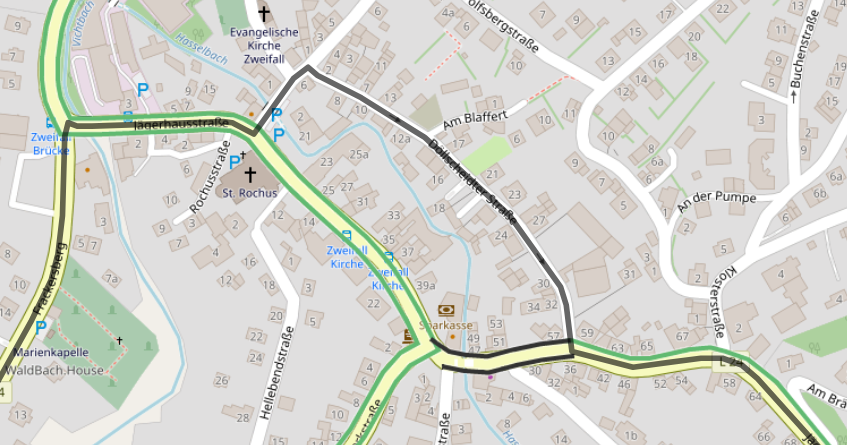
Example for both problems, coloring and routing:
Detailed view, see the black lines above, on and below the section:
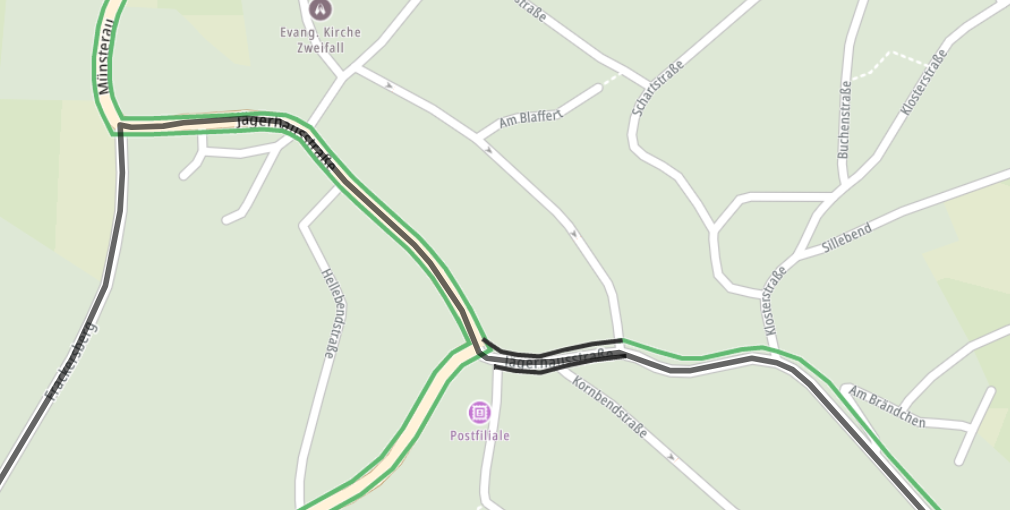
Normal planning view, which I normally use (no, I do not drive the complete route virtually before I drive it on the bike :-))
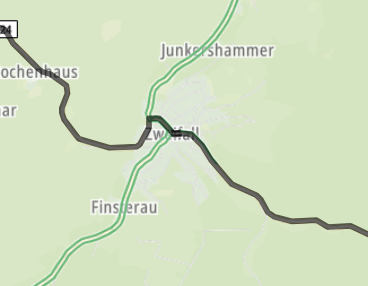
Regarding routing: if I change the map from TomTom to OpenStreetMap, the deviation works:
Hello! It looks like you're interested in this conversation, but you don't have an account yet.
Getting fed up of having to scroll through the same posts each visit? When you register for an account, you'll always come back to exactly where you were before, and choose to be notified of new replies (either via email, or push notification). You'll also be able to save bookmarks and upvote posts to show your appreciation to other community members.
With your input, this post could be even better 💗
Register Login-
 1414821
-
 1561
1561
-
 05151
05151
-
 06165
06165
-
 0441
0441
-
 0565
0565
-
0376
-
03134