Some wishes for the CarPlay functions
-
I use the Carpuride W602s Pro with my iPhone and the list below is what I'm really missing:
- To be able to see the number and color of the next waypoints in CarPlay just like on the phone. Currently you can only see in CarPlay the number of the next Waypoint if you push on skip when the question comes if to skip or not.
- To be able to change on the CarPlay screen between the end destination and the next waypoint information of remaining Km and time of arrival (currently you can do it only on the phone).
- To be able to see a list of the waypoints (including colors) in the CarPlay.
But especially the first 2 points are important to me
-
I use the Carpuride W602s Pro with my iPhone and the list below is what I'm really missing:
- To be able to see the number and color of the next waypoints in CarPlay just like on the phone. Currently you can only see in CarPlay the number of the next Waypoint if you push on skip when the question comes if to skip or not.
- To be able to change on the CarPlay screen between the end destination and the next waypoint information of remaining Km and time of arrival (currently you can do it only on the phone).
- To be able to see a list of the waypoints (including colors) in the CarPlay.
But especially the first 2 points are important to me
@Oron 1 and 3 will be added in update 5.1 expected release middle May!

2 is already possible but made easier / more clear in 5.1. Just tap settings while navigating and toggle the finish flag / shapingpoint / viapoint icon.
-
Great, thank you Corjan for the reply
-
I'd like to add one more wish to my colleague's wish list:
For example… he designed a 5-point MRA route…
Start Point 1 (palm of hand) is my house
Point 2 (water droplet) a known point near home
Point 3 (water droplet) I am now in an unknown area of the route and therefore decide to open and use my NEXT navigator
Point 4 (water droplet) unknown point on the route
Point 5 (palm of hand) end point of the route
Now let's look at the navigation in this example:
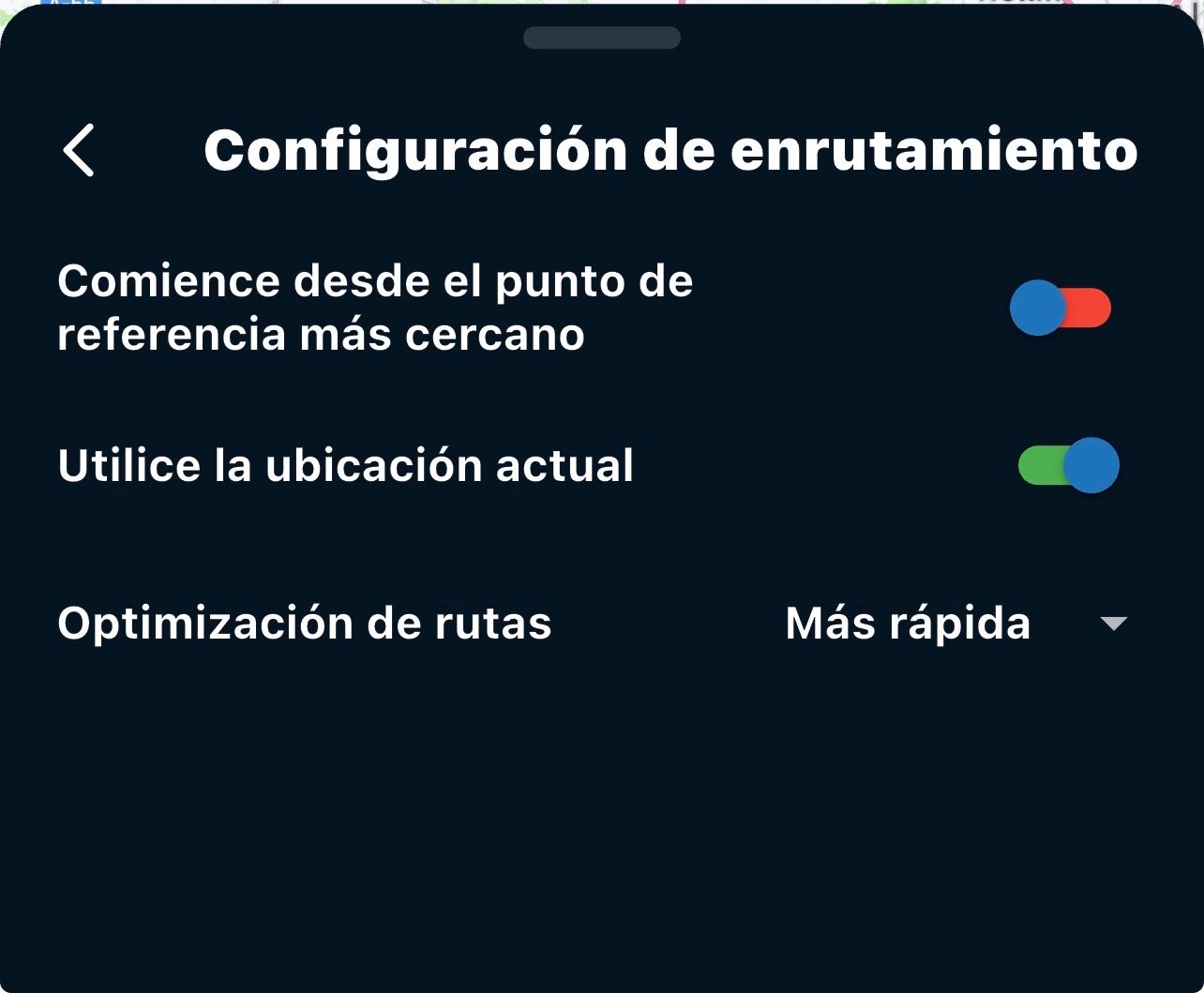
Since it's a route with a known start, point 1 is my house and point 2 is near my house… (therefore I'm out riding and not using NEXT)… when I pass point 3 (I'm now in an unknown area) and therefore I open my NEXT navigator to guide me… so far so good. In the NEXT routing settings menu, I can activate the green checkmark with two options:
1 / Start the route from the nearest reference point (this works without a problem)
2 / Use the position Currently... (near point 3, the water droplet shape, which is unknown to me) and this is where the problem arises, in my opinion... because at this point, there are two possibilities if you decide to activate the routing option (start the route from the current position)...
-
If you are near point 3, the navigation recalculates and takes you back along the route (which is an error in my opinion)... since it forces you to pass through point 3, which you have already passed (and clarifying that this point 3 was designed as a water droplet shape, NOT as a mandatory stop). Therefore, here is the error... (Why does it make me navigate backward if my GPS position is past point 3 and I have activated the routing option to start from the current position?)
-
What can happen that allows you to navigate correctly forward... Possibility (correct): being very close to point 4, and therefore far from point 3, the navigation system does start the route correctly from your location. where you are and navigate you forward correctly on your planned route.
Therefore, I would like this error corrected because, depending on how close or far you are from the previous point when you start using "next" (midway through a route already known at the beginning)... it will navigate you correctly to the next point or incorrectly to the previous point, and the only solution is to manually skip the previous point (let's say point 3 in my example).
-
-
I'd like to add one more wish to my colleague's wish list:
For example… he designed a 5-point MRA route…
Start Point 1 (palm of hand) is my house
Point 2 (water droplet) a known point near home
Point 3 (water droplet) I am now in an unknown area of the route and therefore decide to open and use my NEXT navigator
Point 4 (water droplet) unknown point on the route
Point 5 (palm of hand) end point of the route
Now let's look at the navigation in this example:
Since it's a route with a known start, point 1 is my house and point 2 is near my house… (therefore I'm out riding and not using NEXT)… when I pass point 3 (I'm now in an unknown area) and therefore I open my NEXT navigator to guide me… so far so good. In the NEXT routing settings menu, I can activate the green checkmark with two options:
1 / Start the route from the nearest reference point (this works without a problem)
2 / Use the position Currently... (near point 3, the water droplet shape, which is unknown to me) and this is where the problem arises, in my opinion... because at this point, there are two possibilities if you decide to activate the routing option (start the route from the current position)...
-
If you are near point 3, the navigation recalculates and takes you back along the route (which is an error in my opinion)... since it forces you to pass through point 3, which you have already passed (and clarifying that this point 3 was designed as a water droplet shape, NOT as a mandatory stop). Therefore, here is the error... (Why does it make me navigate backward if my GPS position is past point 3 and I have activated the routing option to start from the current position?)
-
What can happen that allows you to navigate correctly forward... Possibility (correct): being very close to point 4, and therefore far from point 3, the navigation system does start the route correctly from your location. where you are and navigate you forward correctly on your planned route.
Therefore, I would like this error corrected because, depending on how close or far you are from the previous point when you start using "next" (midway through a route already known at the beginning)... it will navigate you correctly to the next point or incorrectly to the previous point, and the only solution is to manually skip the previous point (let's say point 3 in my example).
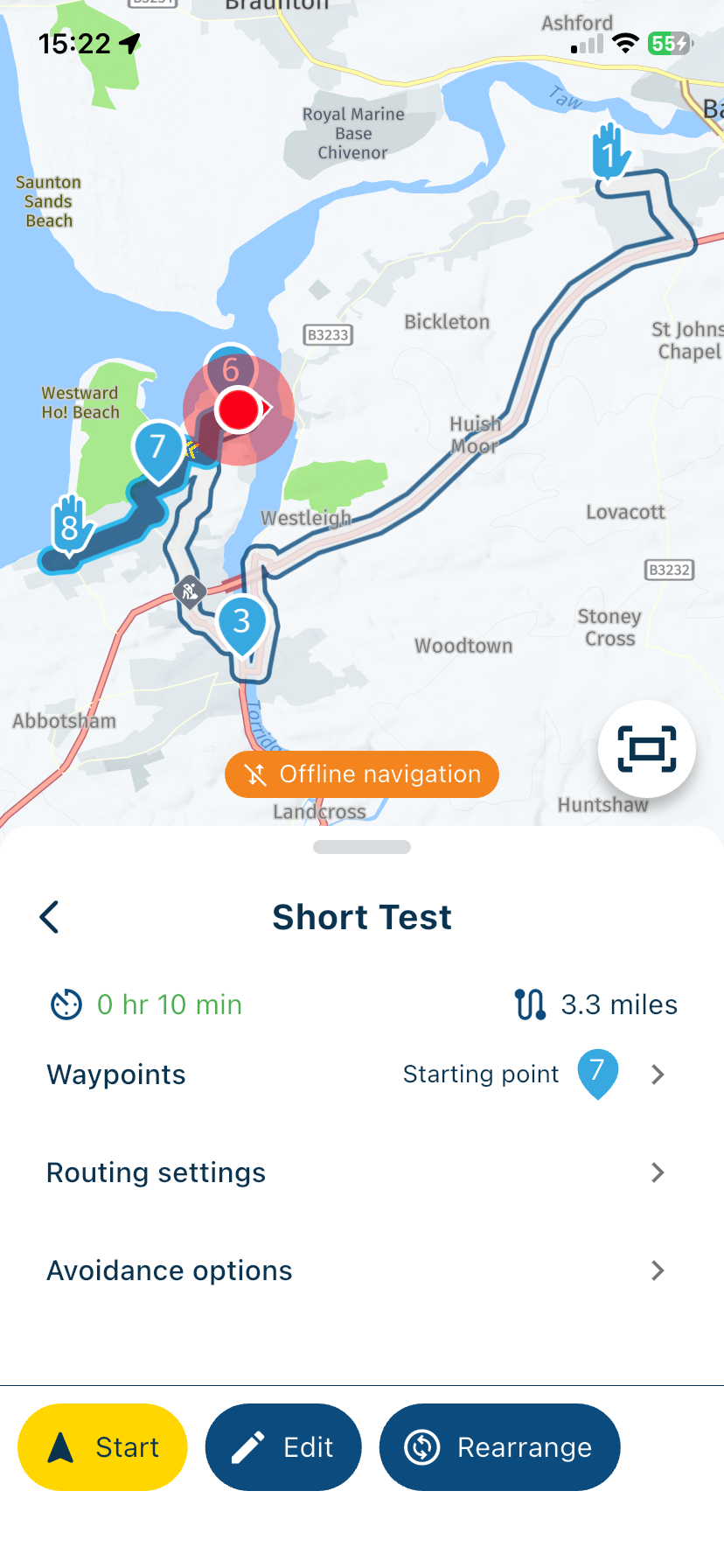
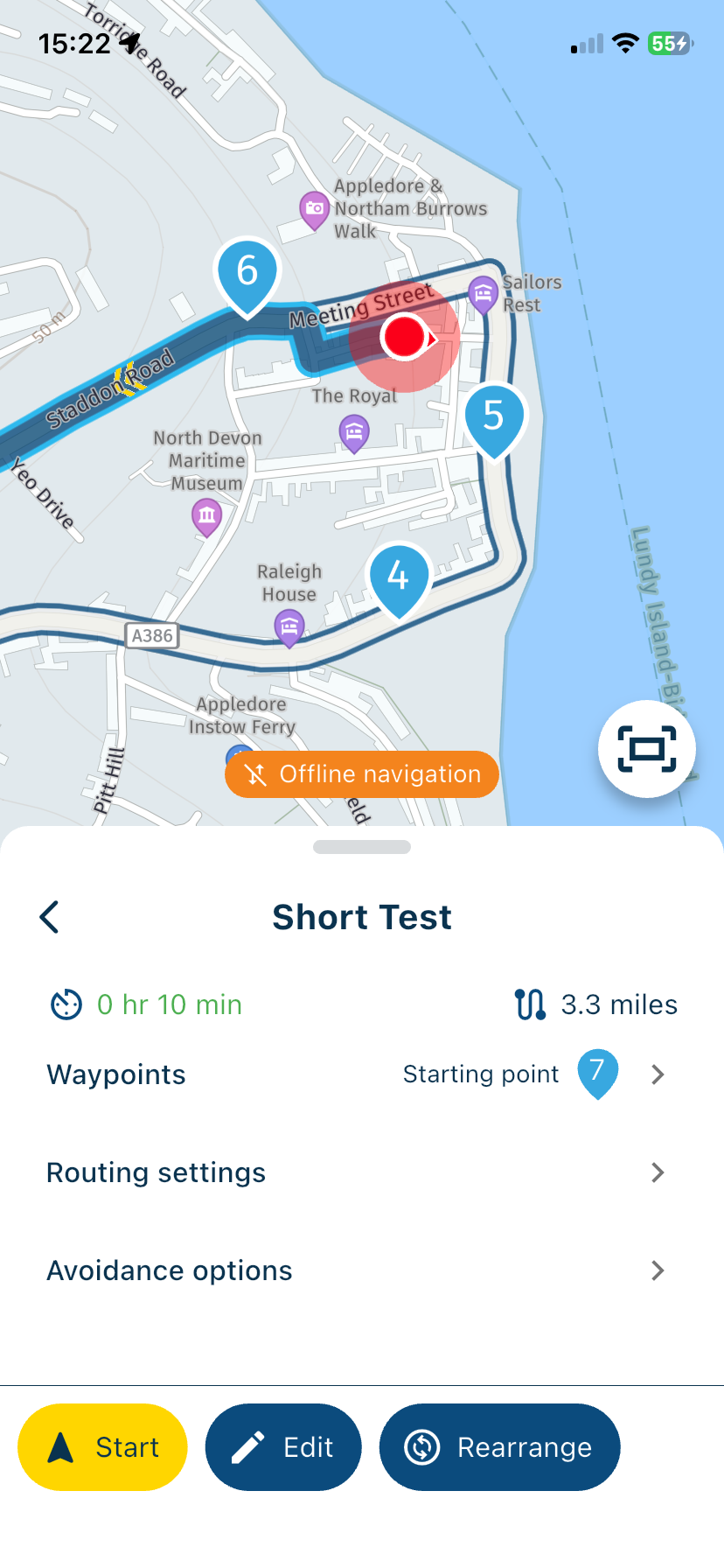
@Jose-antonio-marin-segura You’re not correct with your scenario. If you start a route and you are not at the beginning, the app knows your location and will therefore start from the nearest location that is in front of you not behind you. My two screenshots demonstrate this. The first screenshot is an overview of the whole route. The second screenshot shows my location, the white line and waypoints 4 and 5 are behind me, the app will start navigation from waypoint 6.
-